SIROE task boards
Task management with kanban and Gantt charts
A task board is a kanban board you place inside a page. Rearrange the same cards into columns, a timeline, a list, or a monthly calendar. You can see who holds which work without going around asking.
Open Samurai AppTry without signing upRequest materials
- Who is working on what
You ask someone every time you want a status#
There is a task list, but where things stand still takes asking around.
Where are we on that?
The list names an owner and a due date, but not how far along it is. Status check-ins eat into the actual work.
Updating the list and the schedule twice
The task list and the schedule are separate files, and only one gets updated. Only the person who made them knows which is right.
Your tasks are scattered
Each project has its own board, so seeing your own tasks means opening them one by one. Things due soon slip through.
Line up cards in columns and share where each task stands#
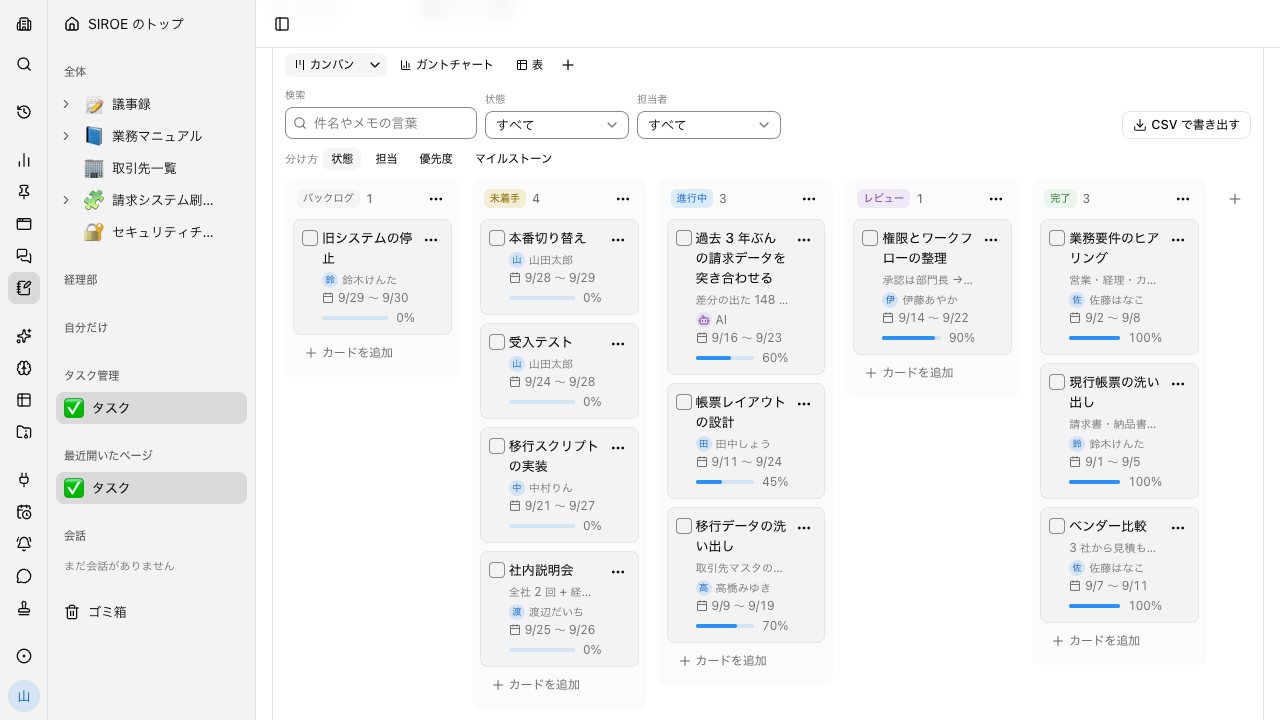
Choose Create kanban from the page's slash menu to place a board. Each card shows assignees, due date, and progress, so you can read the status without opening it.
- Put several assignees on one card, and move several cards to another column at once
- Filter by status, assignee, or label, and export to CSV that opens in Excel
- Each card can have its own page, so background and notes stay with the card
Put the same cards on a Gantt chart and a calendar#
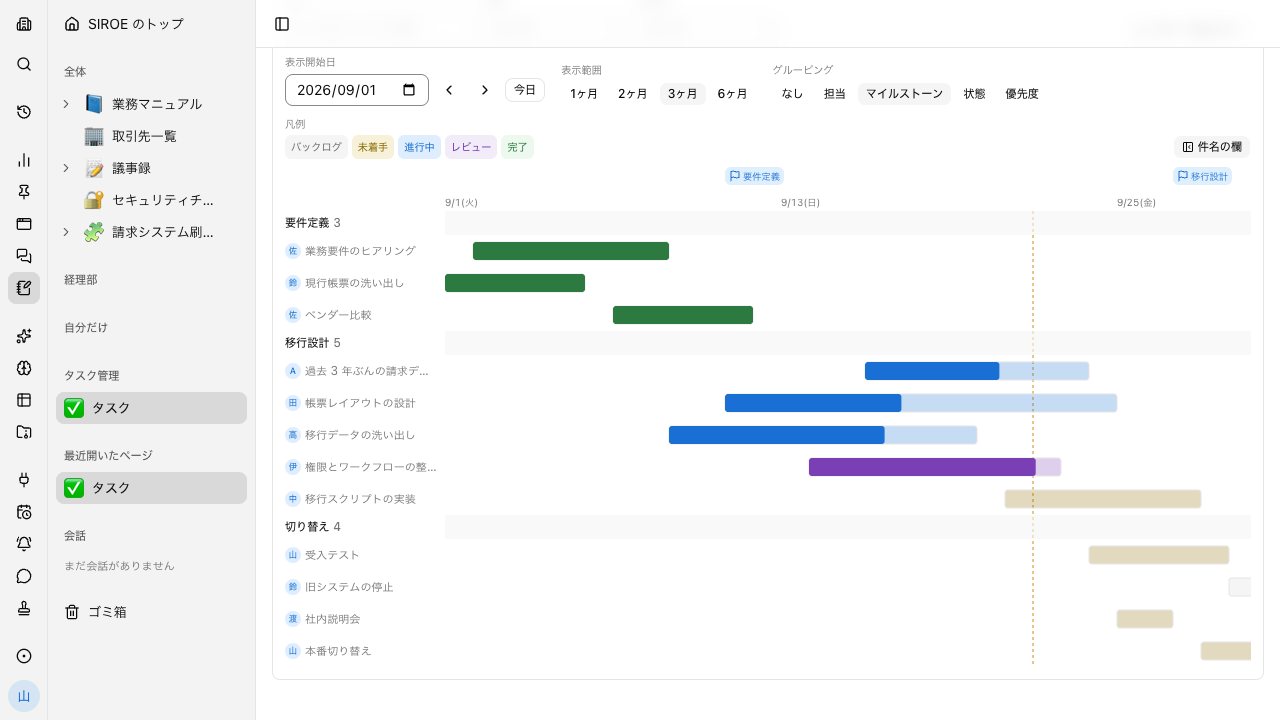
Switch view tabs and the same cards become bars on a Gantt chart or spans on a monthly calendar. There is nothing to copy over.
- The Gantt chart shows 1, 2, 3, or 6 months and groups by assignee, milestone, status, or priority
- In calendar view, drag a span to move its dates
Assign AI to a card, on the same board as people#
AI can be an assignee alongside your members. Ask in chat and the agent builds a board in one go and posts an Open card in the conversation.
- The task list gathers your cards from every board, soonest due first, and can show up to 16 people side by side, AI included
- On a board with AI access turned off, cards cannot be handed to AI
What SIROE wiki can do#
Makes what is where visible at a glance. Within one page, documents, task boards, and diagrams are all handled the same way. Every feature listed here is available to use.
- Pages and blocks
- Place headings, bullet lists, tables, and code as rows. Rows can be nested, and pages themselves can be organized in a hierarchy.
- Task boards
- Kanban, Gantt chart, and table. View the same data in a different format just by switching tabs.
- Canvas
- A canvas for sticky notes, shapes, text, frames, handwriting, and arrows, held inside the same page.
- Full-text search
- Search page text by keyword. Matching pages appear with excerpts.
- Backlinks
- See a list of the pages that link to this one.
- Visibility
- Three levels: only me / group / whole tenant. Set per page.
- Redacted blocks
- Place values you don't want shown in a hidden state. Revealing them requires an unlock password, and the values never reach the model.
- Ask while viewing a page
- Open a conversation beside a page and it works with that page's content in mind. The conversation stays linked to the page.
- File drop
- Covers and galleries
- Saved filters
- Trash (30 days)
- Who is where
- Agents read and write
- AI as a card's assignee
Frequently asked questions#
Can I manage tasks on a Gantt chart?
Yes. There are four views, kanban, Gantt chart, table, and calendar, all showing the same cards. The Gantt chart flags milestones and lets you pick a range of 1, 2, 3, or 6 months.
Can I use the task list in Excel?
Export a board to CSV and open it in Excel. Each card is also a row in a table, so you can read and write it from the Database screen too.
Can card due dates show up on a calendar?
Boards have a calendar view that shows each card as a span from start to end date. Turn on SIROE tasks in the Calendar screen and dated cards assigned to you appear as all-day events.
Can I hand tasks to AI?
You can make AI the assignee of a card. One kind of AI is available as an assignee. Turn off AI access for a board and its cards are not handed to AI.
Everyday work comes together, connects, and becomes the company's strength.