Workflows
Automate routine tasks with AI-powered workflows
A workflow is a sequence of steps that always runs in the order written. Leave only the parts that need judgment, such as classifying or drafting text, to AI, and put approvals and external service actions into the same flow.
Open Samurai AppRequest materials
- How the work was done
People run the same steps by hand every week#
The more fixed the procedure, the more likely a person is still running it.
Routine work eats time every time
Even fixed jobs like tallying, copying data over, and sending notices are done by hand each time. Forget or delay one, and the next step stalls.
AI does it differently every time
Ask an AI and the approach wavers even for the same request. That doesn't suit work that must follow a set order and pass set approvals.
One failure means starting over
When a step in the middle fails, it's unclear how far things got. Starting over sends the same emails twice.
Start on a schedule, an external call, or a service event#
There are four kinds of triggers: scheduled runs at set times, external starts with a URL and secret, events from connected services, and events inside the app.
- Scheduled runs use Japan time, at most once an hour, with an optional end date
- Trigger on Gmail or GitHub events, or when meeting minutes are finalized
- Choose email and webhook reporting of results separately
Build on a canvas, and ask AI for changes#
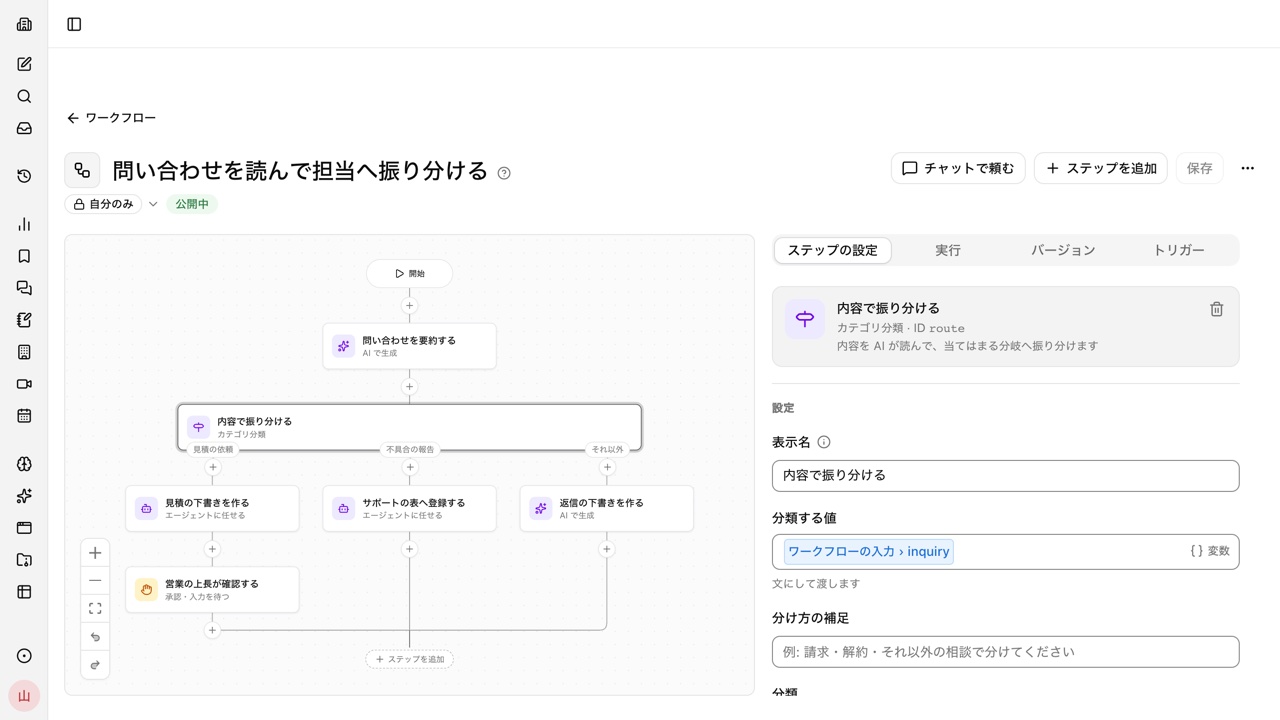
Steps sit on a canvas, and you drag them to reorder. Open "Ask in chat" beside the editor and AI revises the workflow, marking the steps it added or changed.
- "Wait for approval or input" lets you pick up to five approvers, who approve or send back from email or their inbox
- Every save keeps a version. Unattended runs always use the published version
Start from a template, a skill, or an n8n or Dify definition#
Besides starting from scratch, you can create a workflow from a template, a skill, or a bot. Ask in a conversation to "turn what we just did into a workflow", and the work you just did becomes one.
- Import definitions built in n8n and Dify and carry them over
- Turn on "Publish externally" to get a public form anyone can fill in without signing in
Frequently asked questions#
How is a workflow different from asking the AI agent?
The agent decides how to proceed for each request, while a workflow always runs in the order written. Work that must follow the same order and pass the same approvals every time suits a workflow. You can still leave only the steps that need judgment to AI.
What happens if a step fails midway?
Each run records the status, input, output, and errors of every step. "Retry from the failed step" doesn't rerun steps that succeeded, so emails already sent aren't sent twice.
How often can a workflow run automatically?
Scheduled runs use Japan time, at most once an hour. Per-minute runs are not supported. Besides schedules, workflows can start from external calls or service events.
Do actions that need approval go through in unattended runs?
No. In runs started by automation or a public form, actions that need approval are declined. Where you want a person's judgment, add a "Wait for approval or input" step.
Everyday work comes together, connects, and becomes the company's strength.