
Cross the divides inside the company
A company that never has to search, ask around, or start over
Make every piece of company information visible. Everyday work comes together, connects, and becomes the company's strength.
Open Samurai AppTry without signing up
Works on smartphones too
- PeopleandPeople
- DepartmentsandDepartments
- InformationandInformation
- Those who knowandThose who don't
Samurai App
Try it now, no account needed#
Find one of 100 files in your own words, ask a colleague's clone bot, run dashboards and workflows, all on the same screens as the real product.
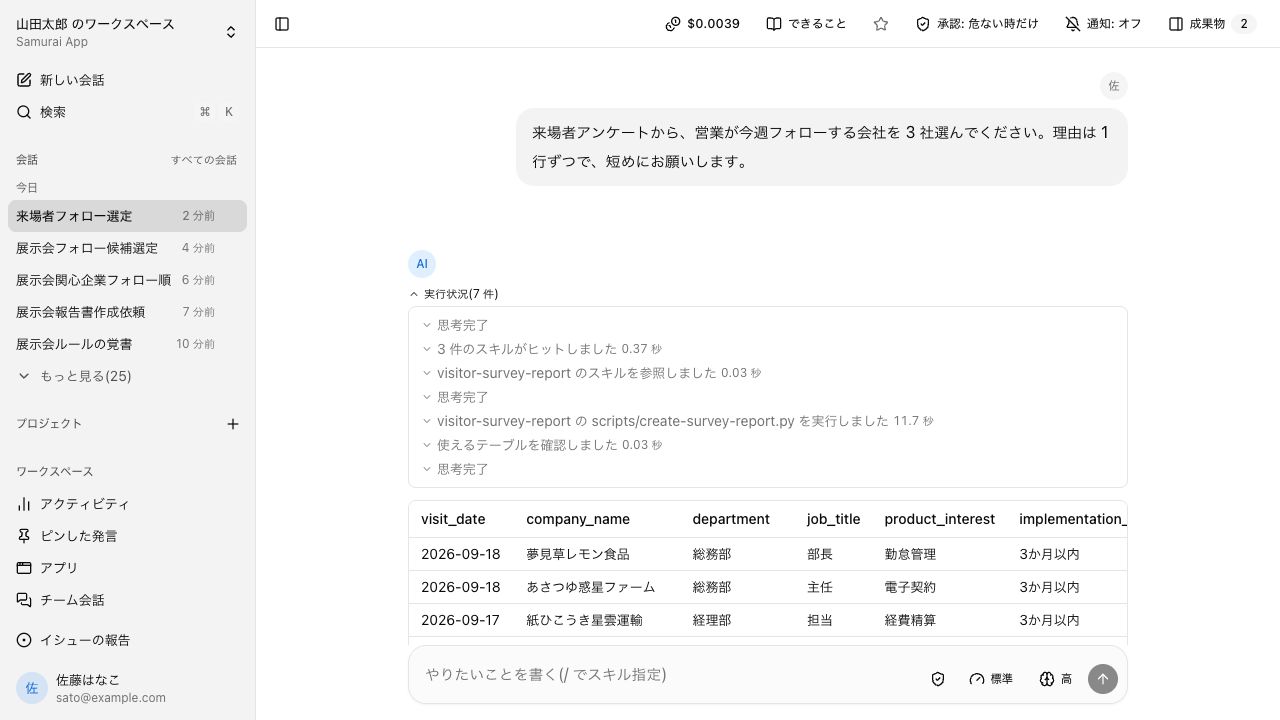
Demo changes stay only in this tab; a new tab starts from the beginning. Chat replies follow a fixed script.
Information is scattered
Only the person who put something somewhere knows where it is.
Work is tied to individuals
Without that person, nothing moves. When they transfer, the way that worked is lost.
No one can see who is doing what
The team next door's work is invisible, so every check takes effort.
Five steps to cross the divides#
No data entry just to build up records. The results of everyday work pile up, step by step.
Kept
As you work, conversations, files, and knowledge stay with the company.
Everyday conversations
Summarize last month's invoices
- Conversation history
- skill
- Memory
- Internal knowledge
Available today
- Conversation history
- Skills (instructions + scripts)
- Memory
- Internal knowledge
- SIROE pages, SIROE task management, SIROE canvas
Ways of working that lived only in someone's head build up into something tangible as you use it.
Automated
The procedures you kept become skills and apps, and repetitive work will move forward on its own.
What worked once becomes the way it runs
- First time, work it out in conversation
- Turn the procedure into a skill
- From the second time, a script
- Same result every time
- AI's part gets smaller
- Faster and cheaper
Available today
- Scripts run from the second time on
- Apps born from conversations
- Scheduled tasks
- Importing n8n / Dify definitions
- AI as the assignee of a task board card
A person approves sensitive operations before they run.
Shared
What was confined to one person becomes the team's and the organization's.
- Individual
- Team
- Organization
Available today
- Share a skill with a team or department
- Just widen an app's visibility
- Channels
- SIROE wiki with several people
Managers and up, plus members an admin approves, can share.
Connected
External SaaS connects too, in the same place.
 Slack
Slack Teams
Teams Chatwork
Call the AI agent from the chat you already use
Samurai App
External business systems
Credentials managed on the tool side
Agents read them when needed
Available today
- Connect to external business systems
- Call the AI agent from Slack / Teams / Chatwork
Credentials for connections are managed on the tool side and never reach users or the model.
Reached by AI
AI agents will reach all of the company's information.
Where's the latest quote for Company A?
Answers come back with sources
- Past conversations
- Internal knowledge and files
- SIROE pages and tables
- Connected services
Within that person's permissions and visibility
From a single conversation, an agent searches and reads these. A tenant is a whole company and isn't split by department, so the search scope is the entire company.
Answers stay within the asker's permissions and the visibility set on internal knowledge.
Become an AI‑native organization#
No one can grasp everything. We build a company the AI can.
Once work is kept, runs, is shared, and connects, you'll be able to ask where anything is and get an answer. Friction between teams will shrink, and the company will transform into an AI-native organization.
Answers stay within the asker's permissions and the visibility set on internal knowledge.
3 reasons teams choose Samurai App#
You can start from your own work, the results don't drift, and it grows to the whole company as is.
- Contract checks
- Meeting minutes
- Documents
- Receipt sorting
- Building apps
- Automation
- Design
- Browser actions
- Task boards
- Table rollups
- Call from Slack
- Scheduled runs
Something that fits your work
From contract checks, meeting minutes, documents, and receipt sorting to building apps, there is an agent for each line of work. Chat, pages, task boards, and tables live in the same app. Start with the one that fits your work.
- First timeWork it out with the AI
- Save as a skillPlaybook + script
- From then onSame result, faster, cheaper
AI that doesn't drift
The first time, you work through it with the AI. The steps that worked become a skill (a playbook plus a script). From the second time on the script runs, so you get the same result, faster and cheaper.
- Individual
- Team
- Organization
Built for organizations
A skill or app one person builds becomes the team's version once an admin approves it, and runs the same for whoever calls it. Audit logs, approval gates, permissions, and SSO are there from the start.
Chat, knowledge, and boards in one app#
No separate places for talking, writing, and moving work forward. Agents read and write the same screens as people, with the same permissions.
SalesLegal
Summarize the contract revisions
Company A proposal memo
Update this table with the latest numbers
To do
In progress
AIDone
Same permissions, same records, same agents
Conversations
Several people can join a channel. Exchanges don't get buried in one person's chat history.
Pages
Ask while looking at a page, and what you asked stays on the page.
Task boards
Kanban / Gantt chart / table. You can assign a card to AI.
One app for the whole company#
A tenant is the company itself. It isn't split by department or site, so what builds up can be used across departments. What each person can see is decided by permissions and groups.
If split by department
- Sales
- Legal
- Accounting
- Engineering
With one tenant per company
- Sales
- Legal
- Accounting
- Engineering
One tenant per company
Not split by department, site, or subsidiary. Groups represent your org structure, and groups also decide who can see internal knowledge.
Split it, and departments can't share
Skills, memory, and internal knowledge grow only inside a tenant. Split it up front, and hand-offs between departments stop there.
Connects to the business systems you already use#
There are four ways to connect. You just hand over credentials; their values never reach users or the model.
Direct to each vendor's official remote MCP
 freee
freee Money Forward Cloud Accounting
 Misoca
 LegalBrain Agent
 Ekispert API
 Oracle Autonomous Database
Services without MCP, through API definitions
 LegalOn
 CloudSign
 SmartHR
 SAP Concur
 HRMOS Kintai
 Smaregi
 Jobcan Expense
 SmartDB
 kaonavi
 Sansan
Everything else, through a shared platform
 Outlook
 SharePoint
 OneDrive
 Gmail
Gmail Google Drive
 Salesforce
 Zendesk
 Jira
Jira
More than 1,000 other services can be connected the same way.
No API or MCP? Operate the screen directly
- Browser use
- Computer use
Call the AI agent from the chat you already use
- Slack
- Microsoft Teams
 LINE
LINE- Chatwork
Company names and logos are trademarks of their respective owners and do not imply partnership or endorsement.
Enterprise-ready as a premise, not a feature#
You can explain who did what, and admins decide what agents can handle. A decision to roll out company-wide needs all of this in place.
Approve execution
Send the invoice to the client by email
Audit log (append-only)
- AgentRequested approval
- ManagerApproved
- AgentSent the email
- Audit log
- Business operations are kept as append-only records. Tampering can be detected.
- Approval gate
- A person approves sensitive operations before they run. Operations left unapproved are treated as rejected.
- Permissions and tenant isolation
- Agents act only within that person's permissions. Data is separated per customer company.
- Credentials kept secret
- Credentials for connecting to external systems never reach users or the model.
Ready for company use, in numbers
Skills for each line of work, connections, permissions, and where data lives. All in place from the start.
32
Bundled skills
Contract review, payment reconciliation, meeting minutes, building slides and apps, and more. Grouped by field: automation, apps, legal, documents, meetings, design, and accounting.
1,000+
SaaS you can connect
The main way to connect is directly to each vendor's official remote MCP. Other SaaS connect through a shared connection platform.
3 tiers
Roles and permissions
Owner and admin, manager, member. Agents act only within that person's permissions.
1
Tenant per company
Each customer company has its own independent database. It never mixes with other companies' data.
Available through a nationwide sales network#
Talk to us through our sales partners, wherever you are in Japan.

Features: AI agents, internal wiki, AI meeting notes
AI agents, skills, employee bots, SIROE docs and kanban boards, meetings, webinars, and PII detection. Sixteen features in four groups.OpenSolutions: knowledge sharing, knowledge silos, shadow AI
Knowledge sharing, work visibility, knowledge silos, internal help desk questions, and shadow AI. The cause and the fix for five common problems.OpenUse cases
Ideas by department and situation, and demo videos run on real work, shown with the features they used.OpenPricing
One base fee per company that doesn't grow with headcount. Roll out to every member right away. No credit card needed for the free trial.Open
Go deeper
Use-case ideas
Ideas for using it, by department and situation, to help you think "with this feature, we could do that." In Japanese.OpenSecurity whitepaper
Isolation, permissions, auditing, and credential handling in one document, written for IT departments. In Japanese.OpenStatus
Whether the service is up right now, published on an external status page.Open
Cross the divides inside the company
From individual to team, from team to organization. The whole company, as one.