PII detection
Detect and mask personal data before it reaches AI
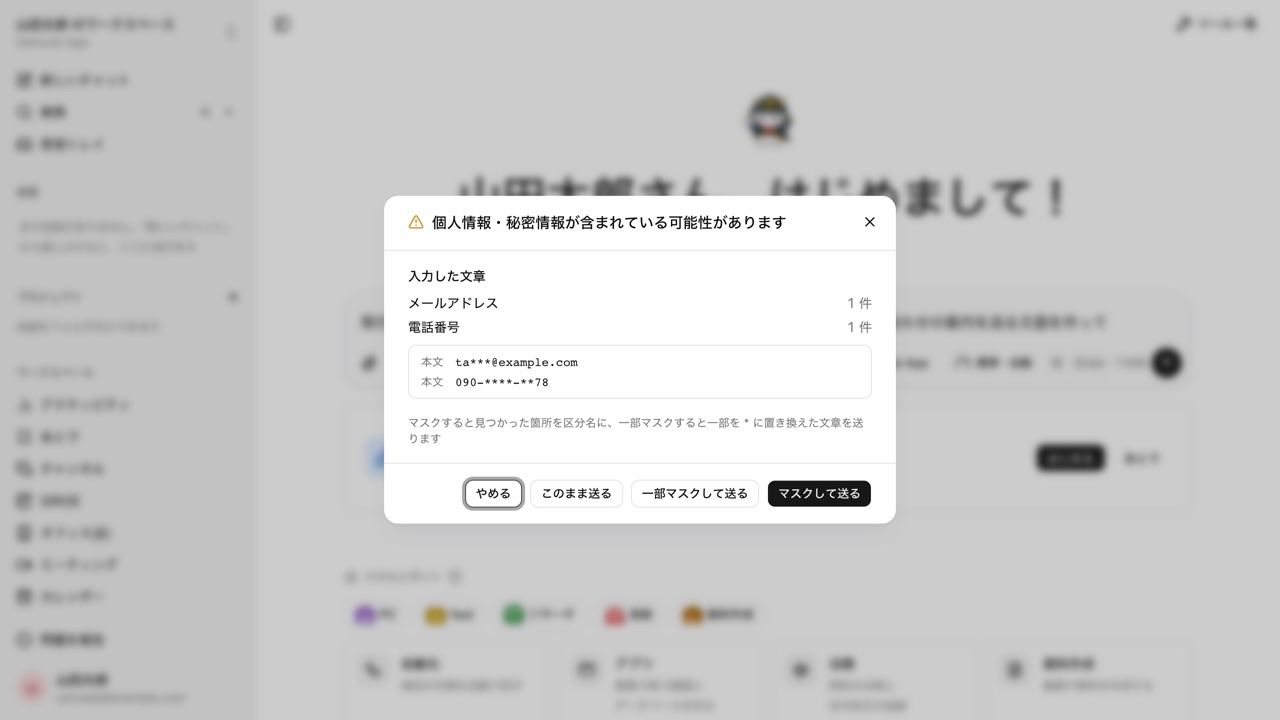
Before a file or message goes to the AI, the browser checks it for email addresses, phone numbers, My Number IDs, and other personal data. When something is found, the person sending it chooses: send as is, cancel, or send a masked copy.
Open Samurai AppRequest materials
- Where things are
Noticing personal data only after the AI has it#
Spotted after attaching
A spreadsheet with a customer list goes to the AI for a quick summary. Once it is sent, it cannot be taken back.
Relying on a visual check
Checking a CSV with hundreds of rows or a long document by eye, without missing anything, is hard for one person.
Redaction takes time
People black out personal data by hand before showing a file to the AI. It is done file by file, so it is the first step skipped when work is urgent.
Check attachments and knowledge uploads before they are sent#
When turned on in settings, the browser checks attachments in AI conversations, attachments on question cards, and uploads from Add knowledge before they are sent. The text typed in the conversation box is also checked once when you press send.
- Finds email addresses, phone numbers, My Number IDs, addresses, card numbers, API keys, and .env secrets
- Also finds the value next to labels such as name, date of birth, and account number
- Send masked replaces each match with its type name, such as [email address], and sends that copy
Checking attachments and pastes on other AI sites before they are sent#
With the browser extension for Chrome and Edge, attachments and pastes on other companies' generative AI sites are checked with the same detector before they are sent. The choices offered are the same as inside Samurai App.
- It covers nine generative AI sites run by other companies
- It works without connecting to Samurai App. Once connected, sending despite a finding records the site name and count in the audit log
- Distributed as an unlisted Chrome Web Store item, and deployable to managed devices through Chrome policy
The sender decides, and what was sent is recorded#
The switch for the check lives on the Compliance settings screen. It is off by default, and admins and managers turn it on. When a file is sent despite a finding, only the file name and the count go to the audit log, never the values themselves.
- Files that cannot be read, such as images or zip files, are marked Not checked, and large files are marked Partially checked, then allowed through
- Sending a masked copy leaves no record at all
Frequently asked questions#
Does PII detection use AI?
No. Detection runs on fixed rules and stays entirely in the browser. File contents are never sent anywhere for the check.
Is sending blocked when personal data is found?
There is no setting that stops sending automatically. The sender chooses between send as is, cancel, and send masked. If a file is sent despite a finding, its name and the count are recorded in the audit log.
Can personal data in PDFs or images be masked?
Masked sending works for text, CSV, Word, Excel, and PowerPoint. PDFs cannot be masked. Files whose contents cannot be read, such as images or zip files, are marked Not checked.
Are uploads to channels or the Files screen checked too?
The check covers attachments and typed text in AI conversations, attachments on question cards, and uploads from Add knowledge. The channel message box and files dropped onto the Files screen are not covered.
Everyday work comes together, connects, and becomes the company's strength.