Meetings
See the key points while you're still talking
Beside the video call, agenda items, decisions, action items, and what's still undecided get organized as the conversation moves. When it ends, minutes and a transcript are left behind, ready to feed your next piece of work.
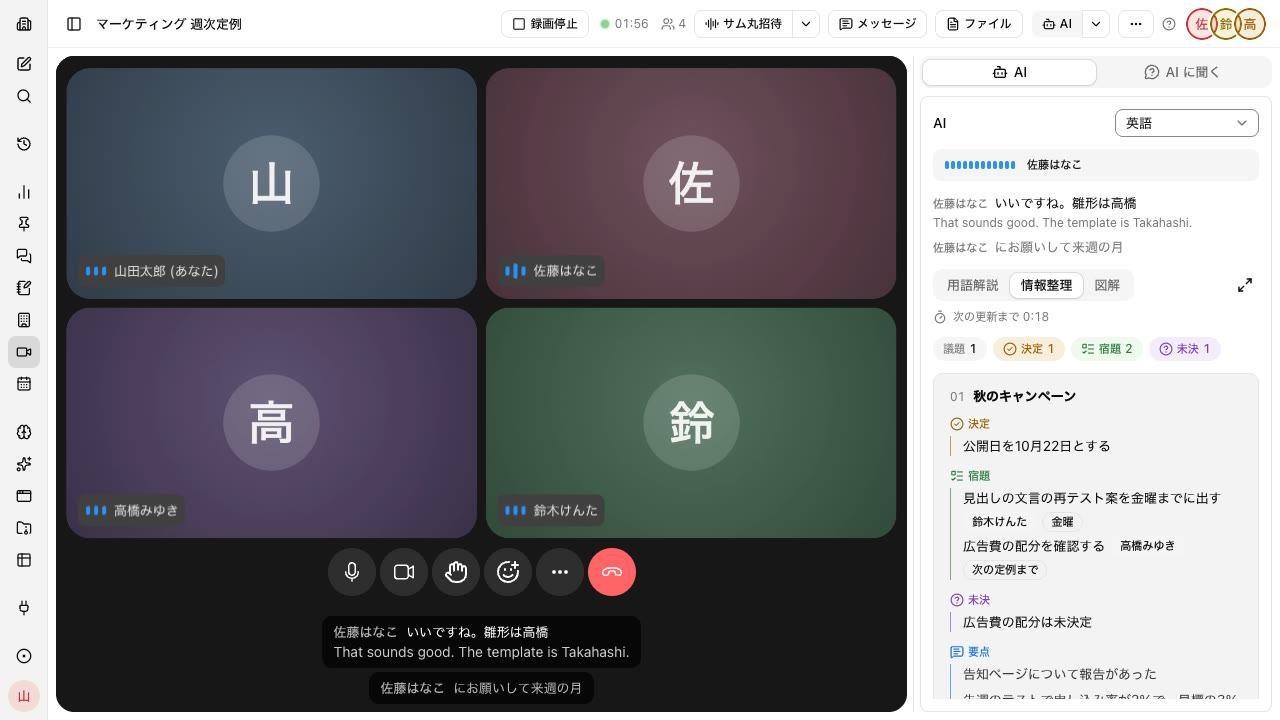
Agenda items, decisions, and action items get organized as you talk#
The AI panel beside the call regroups what was said by agenda item. In the middle of the meeting, everyone can check on the same screen what has been decided and who will do what by when.
- Updates every 60 seconds by default, adjustable from 15 to 90 seconds
- Sorts decisions, action items (owner and due date), unresolved items, and key points by agenda item
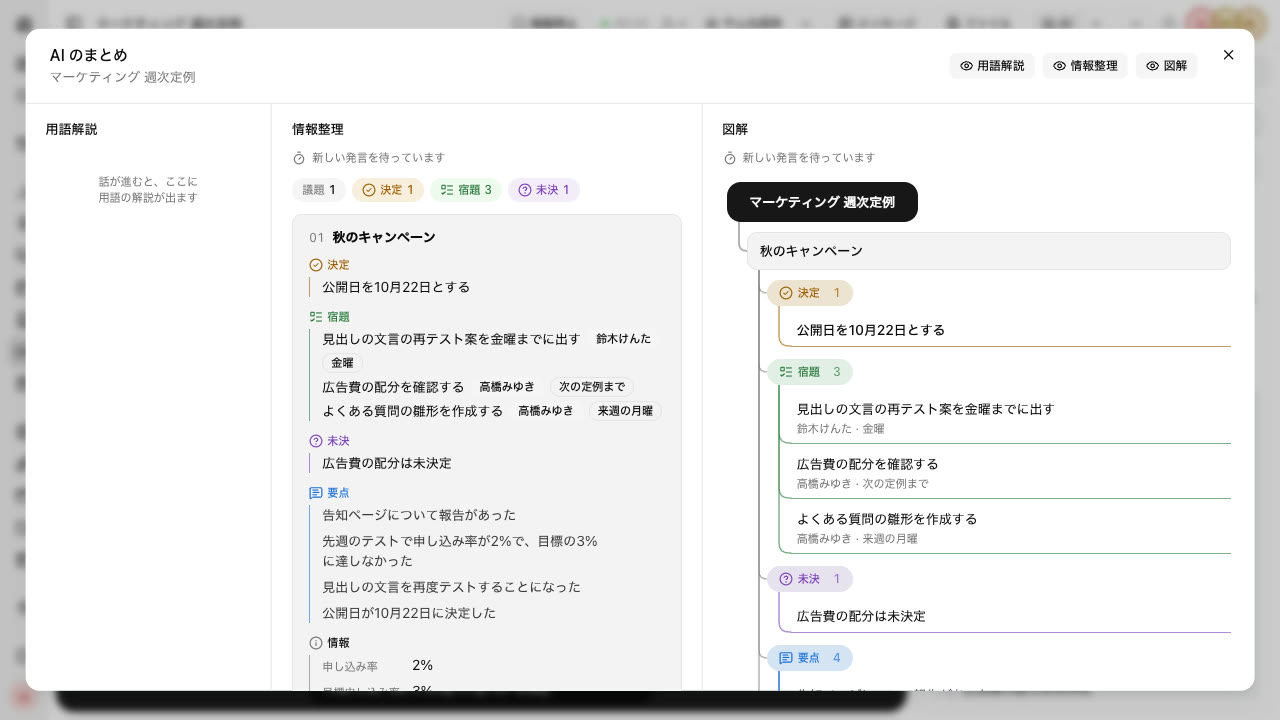
- The "Diagram" tab shows the same content as a diagram branching out from each agenda item
- Unfamiliar terms and abbreviations get a "Glossary" card
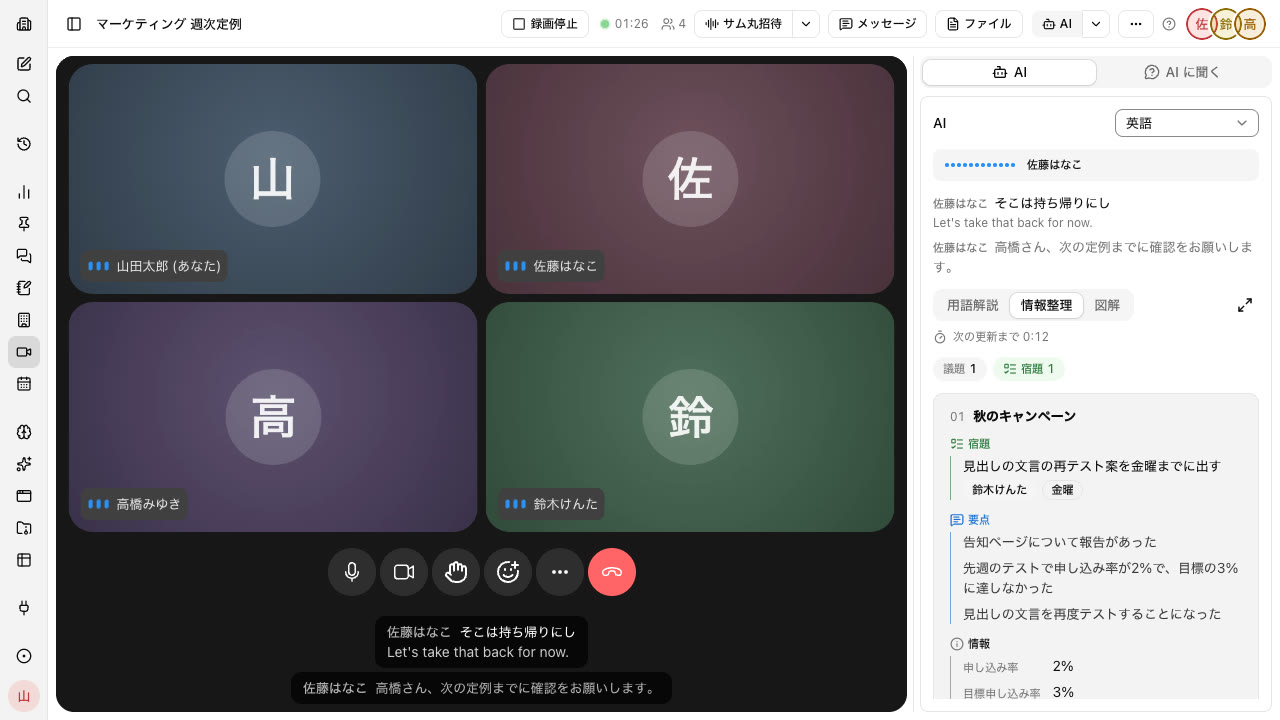
Get past language barriers with real-time captions and translation#
What's said becomes captions labeled with the speaker's name. Choose a translation language and the translation appears below the captions. Each participant can choose their own translation language.
- Japanese, English, Chinese, Korean, Vietnamese, Spanish, Portuguese
- Guests joining from outside the company see captions too
- While someone's mic is off, their voice is not transcribed
When the meeting ends, the AI minutes are already done#
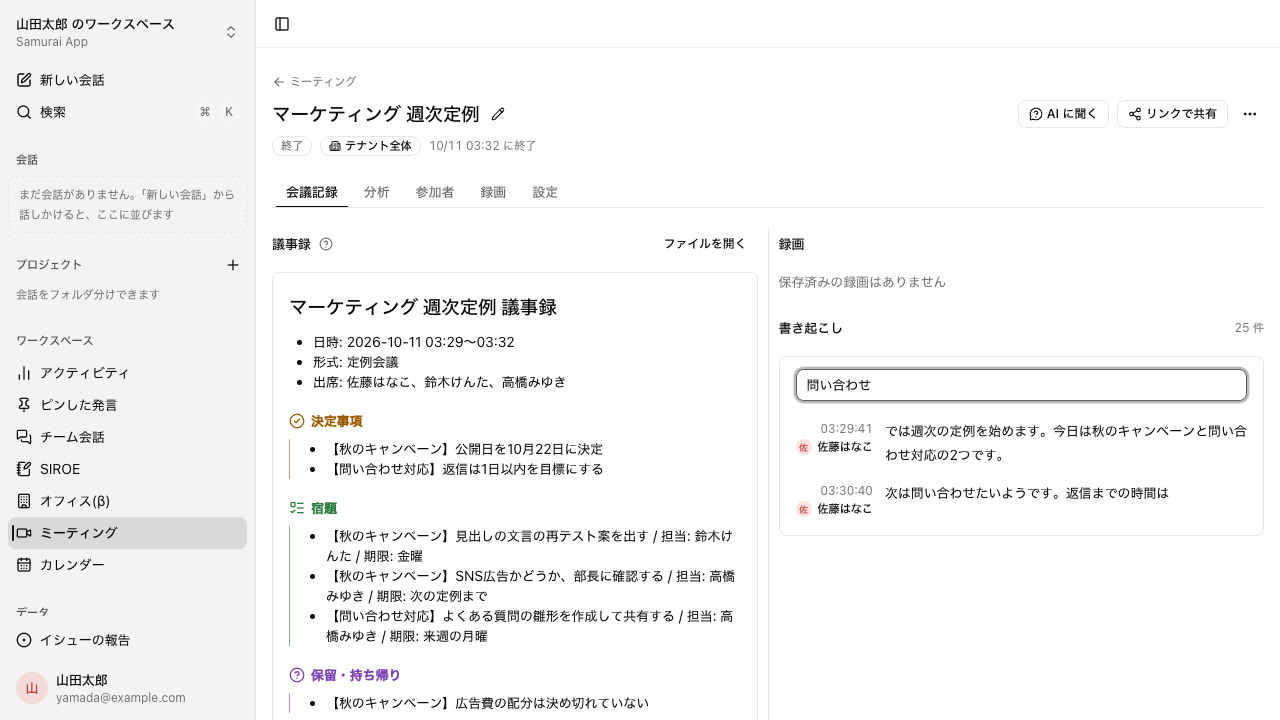
When the meeting ends, minutes are created from what was said. Decisions, action items (owner and due date), items on hold, and items to take back are written out separately.
- 10 formats, including discussions, regular meetings, brainstorms, retrospectives, 1-on-1s, and hiring interviews
- Format and language are suggested from the title
- Minutes and transcripts stay in Files, with the same visibility as the meeting
- Minutes someone has edited by hand are never overwritten
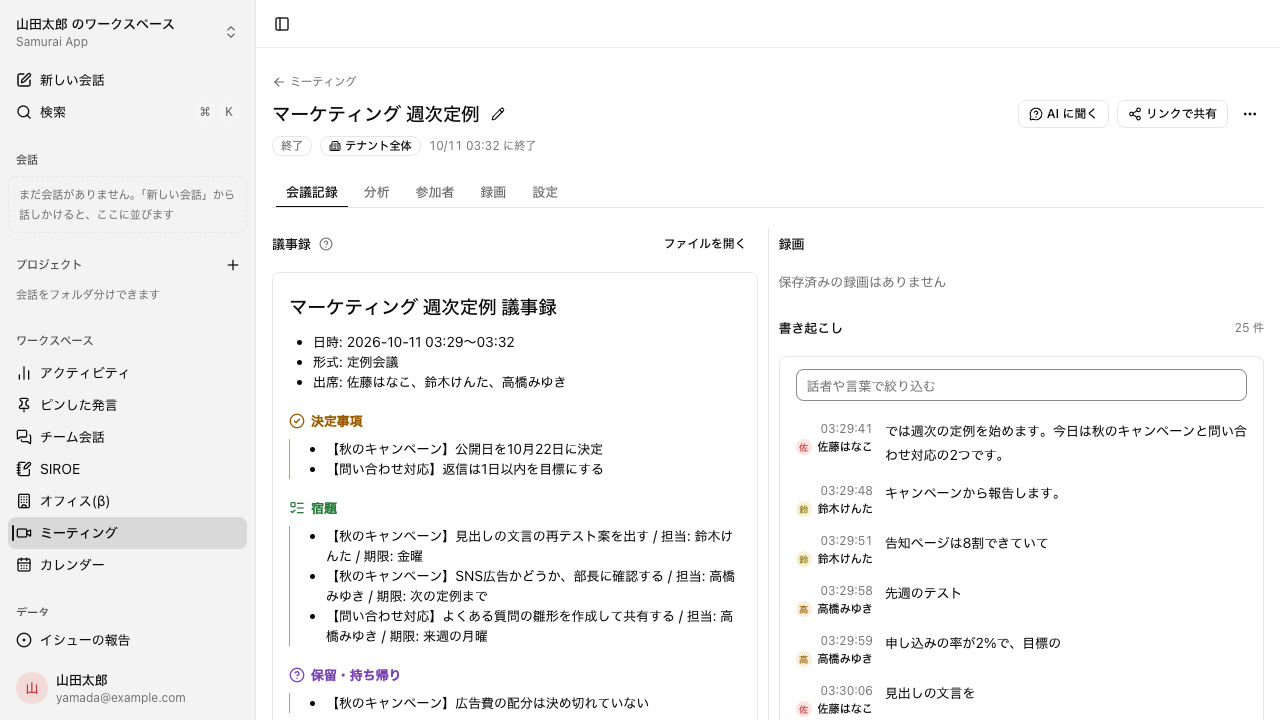
Find exactly when something was said#
The transcript lists each remark with its speaker and time. You can filter by speaker or by word, so you can settle who said what on the spot.
- For meetings with a recording, clicking a line plays the recording from that moment
- Recordings also stay in Files, viewable by the same people as the meeting
- Minutes, transcripts, and recordings can be shared with the visibility you choose
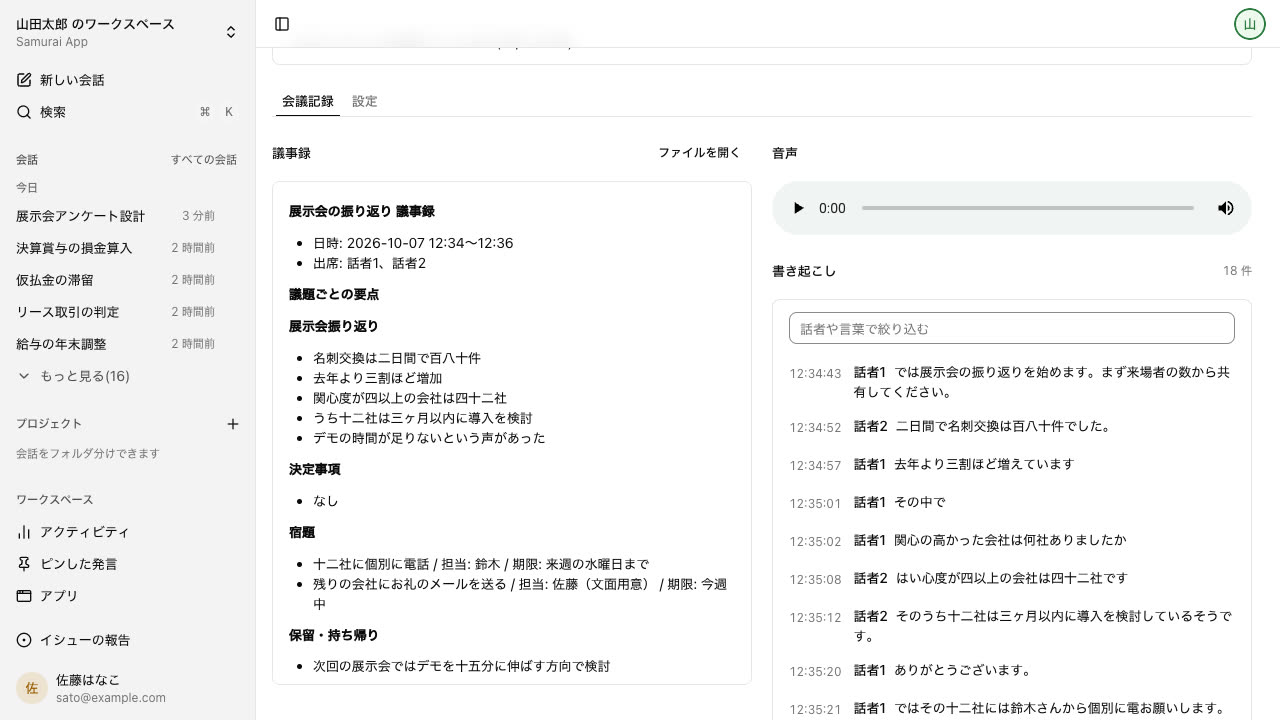
Keep in-person meetings on your own device#
Meetings in a conference room can be recorded on a computer or smartphone too. The recorded audio produces the same minutes and transcript as an online meeting.
- Records even without an internet connection, and uploads automatically once connected
- After upload, the transcript is split by speaker
- When online, agenda items, decisions, and action items are organized while you record
People outside the company can join the same meeting#
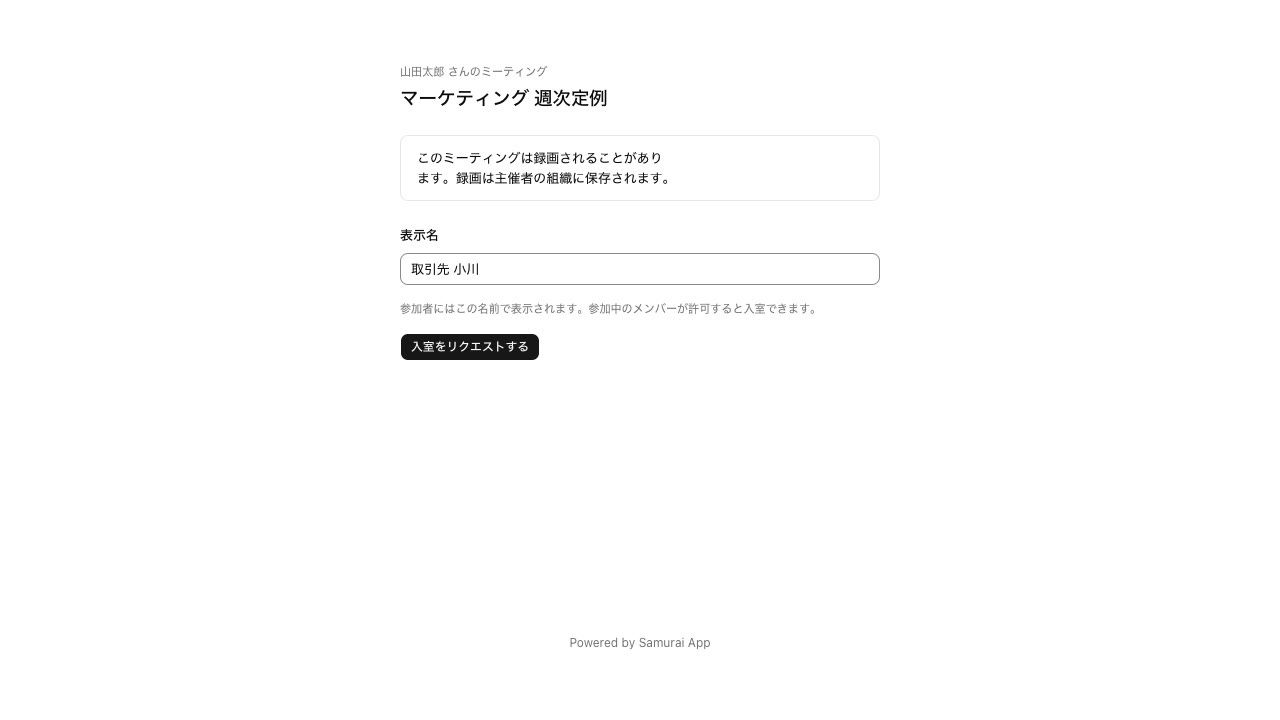
Business partners can join from the join link without an account. They enter a name and request to join, then come in once someone inside the company approves.
- Only the creator and admins can issue, reissue, or disable join links
- You can hide the AI panel from guests
- While guests are present, the voice AI does not use internal company data
What's said in meetings feeds your next piece of work#
Meetings sit in the same place as conversations, Files, and SIROE wiki. No switching to another tool for meetings.
AI chat
During the meeting and after it ends, you can ask the AI with what was said in mind. It also uses your company's files and connected services to sort action items by owner.
Kept in Files
Minutes, transcripts, and recordings go into Files. The AI can read and use them from other conversations too.
Gathered into SIROE wiki
In "AI chat", you can gather decisions into the project's page and action items into SIROE task management cards.
How it differs from video conferencing#
Any of them can handle calls, recordings, and a summary afterward. The differences are whether you can check what's been decided during the meeting, and where the minutes can go next.
| Samurai App | Zoom Workplace Pro | Google Meet | |
|---|---|---|---|
| Pricing basis | Base fee + credits for minutes used | Flat rate per host | Included in Google Workspace's per-user price |
| Monthly | Included in the ¥18,800 base fee. Calls, captions, and recordings by minutes used | $16.99 per user ($14.16 billed annually) | ¥1,600 per user (Business Standard) |
| Length of a single call | Partial or conditional3 hours; the count restarts when you rejoin | Supported30 hours | Supported |
| Webinars | Not available | Partial or conditionalSeparate plan | Partial or conditionalHigher-tier plans |
| Dedicated conference room hardware | Not available | Supported | Supported |
| Agenda items, decisions, action items, and unresolved items organized during the meeting | Supported | Partial or conditional | Partial or conditional |
| Captions with speaker names, and translation | Supported7 languages | Partial or conditionalTranslation on higher-tier plans | Supported |
| Minutes and transcript afterward | Supported | Supported | Supported |
| Record in-person meetings into minutes (records even without a signal) | Supported | Partial or conditional | Not available |
| People outside the company join without an account | Supported | Supported | Supported |
| Update the internal wiki and tasks from the minutes | Supported | Partial or conditional | Partial or conditional |
○ Supported / △ Partial or conditional / − Not available
When Samurai App fits
Companies that want decisions and action items from regular internal and project meetings to flow straight into the next piece of work. Teams with members who speak different languages. Companies with many in-person meetings.
When you don't need Samurai App
When large all-hands meetings or webinars are your main use. If you hold many long meetings, flat-rate Zoom or Google Meet can be cheaper.
When to use both
Hold large external meetings and webinars in Zoom or Google Meet, and hold internal decision-making meetings and in-person meetings in Samurai App.
If you need a feature marked − or △ in the table, send a feature request or feedback directly from "Report a problem" in the app.
Based on each company's public information as of October 11, 2026. Check each company's pages for the latest pricing and features. Sources: Zoom pricing, Google Workspace pricing (Japan pricing)
Meeting content you can safely entrust to us#
Where voice and transcripts go, and how to stop them, are set out in advance.
Not used for training
Voice sent for transcription is processed through a paid-tier API. Your input is never used to train models.
Turn off AI per meeting
Turning "AI access" OFF stops captions, transcription, and minutes, and no voice is sent out. Each switch is recorded in the audit log.
Pay for what you use
Meetings are included in the base fee. Calls and recordings use credits only for the minutes used.
Everyday work comes together, connects, and becomes the company's strength.