Employee bots
Build internal AI bots that fit your work
An employee bot is a job-specific AI that bundles instructions, skills, the tools it may use, knowledge, and a model. In the app, they are simply called "Bots". When a bot runs, it uses the permissions of the person using it.
Open Samurai AppRequest materials
- Where things are
The same people keep answering the same questions#
Questions pile up on whoever knows best, and their time gets eaten away.
Questions all go to the expert
It's always the same person who gets asked about internal rules and past decisions. Every answer stops their own work.
Building a job-specific AI takes effort
Setting up an AI for a particular job means preparing instructions and reference material. Only the person who built it can change it.
Letting AI touch everything feels risky
Give an internal AI broad permissions and it's no longer clear who can read what. You want it limited to what the job needs.
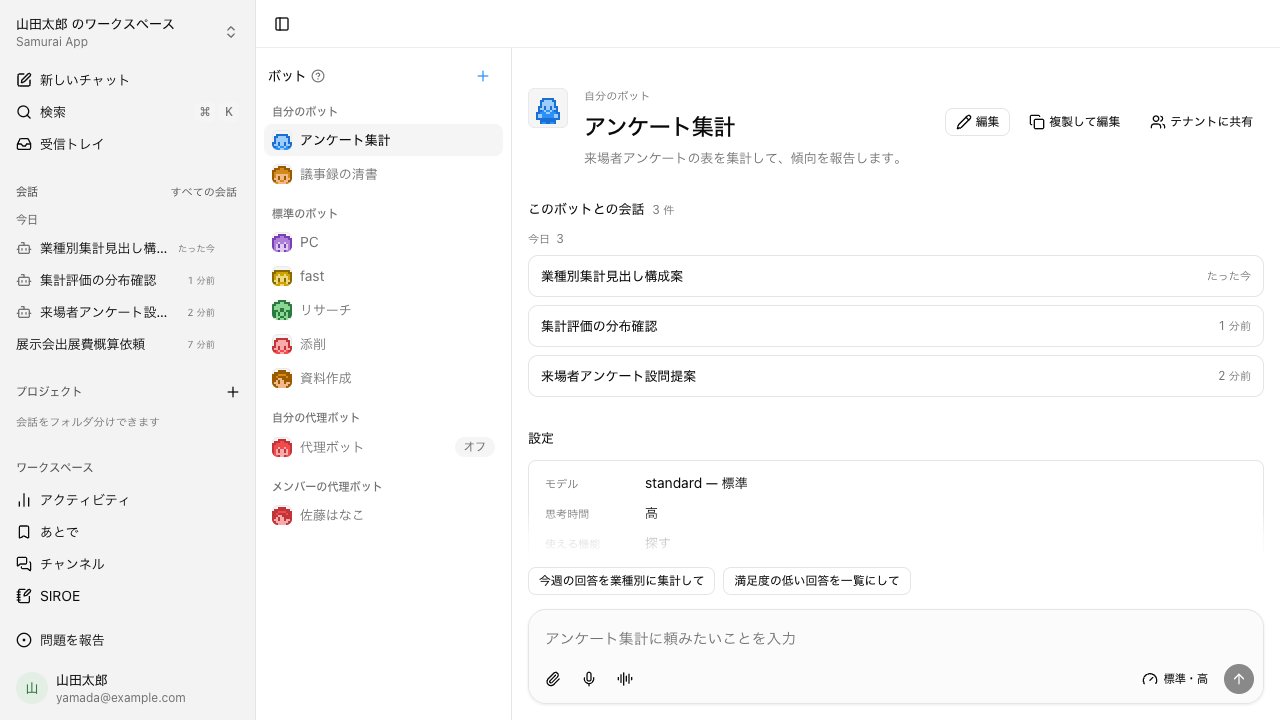
Build a bot for your work, from the screen or in conversation#
Click "+" on the Bots screen, or ask in a conversation to "make a bot for ...". Set the instructions, skills, tools, knowledge labels, model and thinking time, and example prompts, and you can start talking to it.
- Five standard bots: PC, fast, Research, Proofread, and Documents
- Pick a face from 36 pixel avatars; it shows up the same in lists, conversations, and meetings
- Share bots you build with a group you belong to or the whole tenant
Mid-conversation, hand off to a bot with @#
Write @ and the bot's name in a conversation to hand the question to that bot. Bots can also ask each other within the same conversation. In meetings, you can let a chosen bot be the AI that answers, just for that session.
- Up to five bots in a single conversation
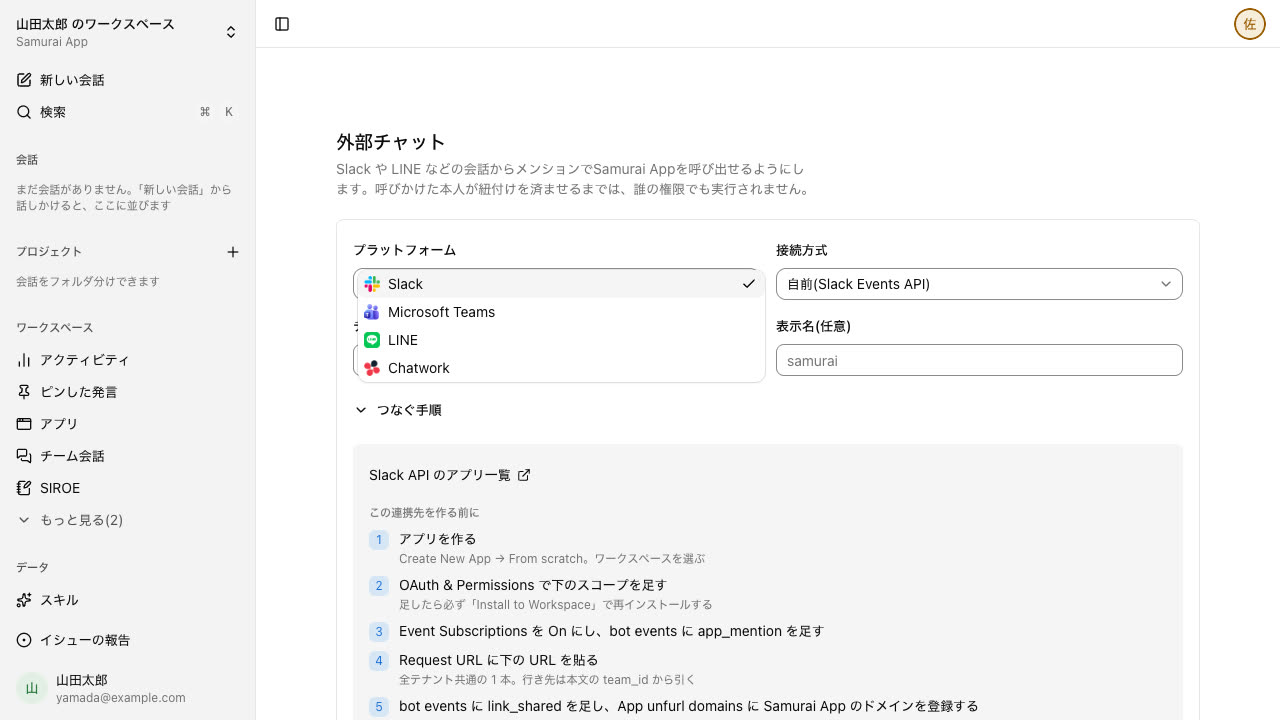
- Register a Slack, Microsoft Teams, LINE, or Chatwork channel to call Samurai App from there
A clone bot drafts answers on your behalf#
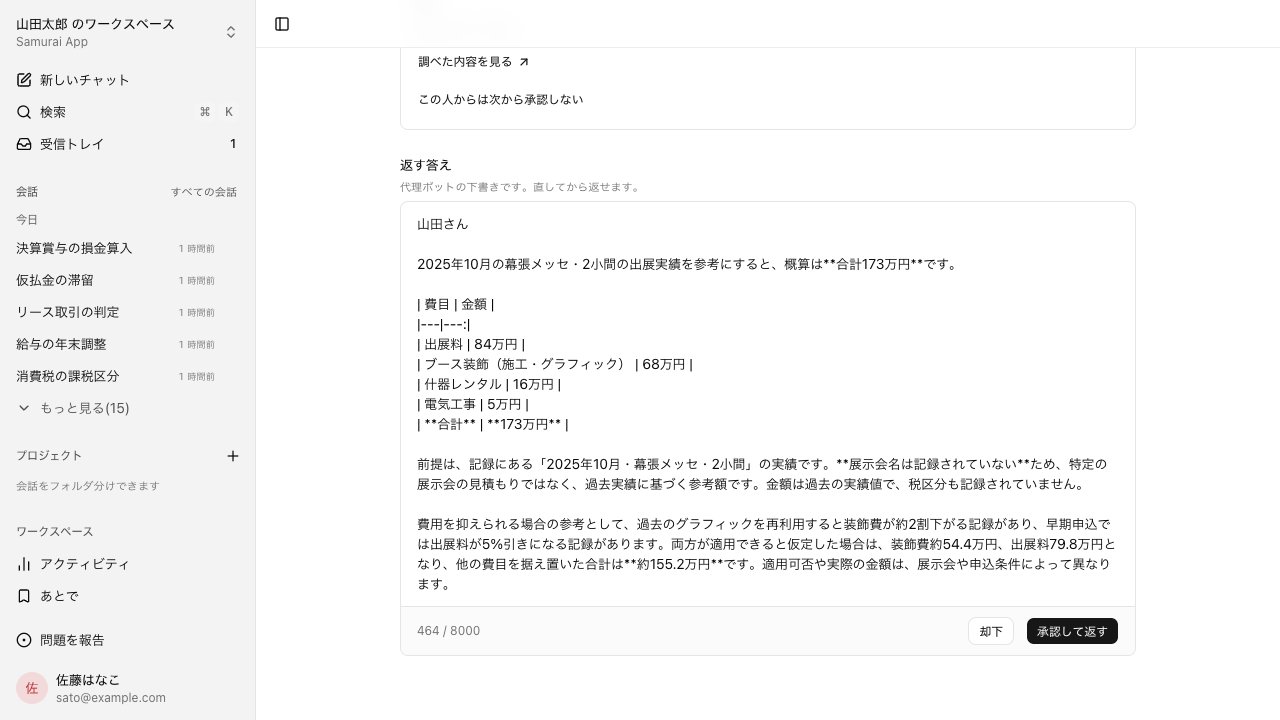
Turn on your clone bot and set what it may answer, and other members can ask, "Ask so-and-so's clone bot." The clone drafts an answer from your files and memory, and you check it before it goes back.
- Nothing reaches the asker until you edit and approve it. You can choose, person by person, whom it may answer without approval
- Unresolved questions expire after 72 hours. You get a push when a draft is ready, and an email if it is still waiting after 24 hours
Bots for each job, and your colleagues' clone bots#
Create AIs with their own name and face for each purpose, and call the one you need in a conversation. A bot only works within the permissions of the person using it. For a colleague who knows the answer, ask their clone bot.
- Standard bots
- Bots for browser work, quick replies, research, proofreading, and making documents are ready from the start. Turn off the ones you don't use, for the whole tenant or just for yourself.
- Custom bots
- Set the instructions, skills, tools, knowledge, and model to build a bot for each purpose. Bots you build can be shared with your tenant.
- Call with @
- Write "@bot name" in a conversation and that bot answers. You can call several bots in one conversation.
- Bots asking bots
- A bot can ask another bot and get its answer back, so research can go to Research and polishing text to Proofread.
- Clone bots
- One bot per member that answers with that member's permissions. It is off by default; only when the member turns it on and writes what it can answer can other members of the same tenant ask it.
- The owner checks before it's sent
- A clone bot's answer stops at a draft and is sent only after the owner edits and approves it. The clone checks with the owner where it is unsure, and the owner can ask the clone to revise before sending.
- Pick a face from 36
- Never wider than the user's permissions
- Bots that don't use memory
- Conversation history per bot
- Choose who gets answers without approval
- Reminder emails for questions
- Costs go to the person asking
Frequently asked questions#
Where do I build an employee bot?
Click "+" on the Bots screen in the sidebar, or copy an existing bot with "Duplicate and edit". You can also ask for one in a conversation; an approval card appears before anything is written.
Can I give a bot special permissions?
No. A bot narrows down which tools and knowledge can be used, and when it runs it uses the permissions of the person using it.
Can I stop a bot from remembering conversations?
Yes. Uncheck "Memory" in the bot's settings, and that bot will neither read nor write memory.
Can people outside my company use a bot?
Bots cannot be published outside your company. For outside audiences, you can embed an externally published app on your own site with a single script tag.
Everyday work comes together, connects, and becomes the company's strength.