Clone bots
Ask an expert's clone bot and get an answer they have checked
A clone bot is an AI clone each member can have one of. When someone on the team asks "ask Suzuki's clone bot", it drafts an answer from Suzuki's files and memory. Suzuki only checks the draft and sends it back, so they no longer answer the same question from scratch again and again.
Open Samurai AppTry without signing upRequest materials
- Who is working on what
Questions piling up on your experts?#
Answering the same question again and again
Expense steps, the history with a client: different people ask the same thing over and over, and each answer stops your own work.
The person you need is too busy
Experts are often in meetings or out of the office, and the person asking waits with their work on hold.
General AI does not know your company
A general AI chat does not know the materials or past conversations that person has, so it cannot answer with your company's context.
Just say "ask Suzuki's clone bot"#
Colleagues ask someone's clone bot from their own chat. The clone bot searches the owner's files and memory and drafts an answer, and the approved answer later arrives in the asker's chat.
- You can also ask directly from the clone bot's own page
- Workflows can ask a clone bot partway through
- You keep working while you wait, and you can cancel the question while it is pending
Answers stop at a draft and arrive after the owner edits and approves#
When a draft is ready, the owner receives the question, the draft, and its sources together. They edit the draft and choose Approve and send, or reject it. Before sending, they can also ask the clone bot for changes in chat.
- A push notification arrives when the draft is ready, and one email follows if it is still undecided after 24 hours
- Questions still undecided after 72 hours expire
- The owner can let chosen members receive answers without approval. Those answers are still recorded in the audit log
The owner decides what it answers and what it may use#
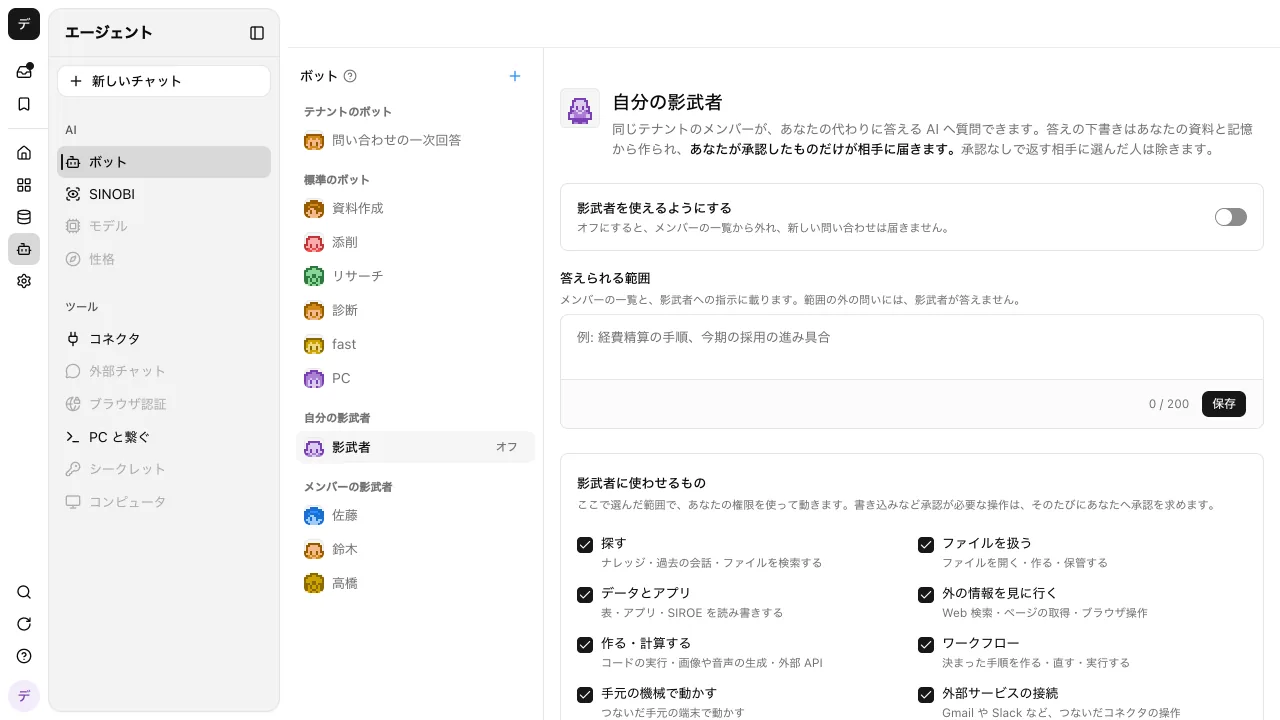
Clone bots start off. When the owner turns on the switch and writes a short description of the topics it may answer, it appears in the member list. Other members see only the name, face, owner, and topics, not its instructions or the features it uses.
- Check what the clone bot may use, such as Search, Files, and connected services
- Writing to memory starts off
- Usage is charged to the person who asked
Frequently asked questions#
Can a clone bot answer from anyone's data?
No. A clone bot uses only the owner's files and memory and the features the owner allows. Only members of the same workspace can ask it.
Does a clone bot send answers on its own?
No. Answers stop at a draft and arrive after the owner approves. Answers skip the check only for members the owner chose to receive answers without approval.
Who pays for it?
The person who asked. Even if the answer is rejected or expires, the cost of drafting it is on the asker.
How is it different from a custom bot?
A custom bot works within the permissions of whoever uses it. A clone bot searches the owner's materials with the owner's permissions and answers after the owner checks. Each member has at most one clone bot.
Everyday work comes together, connects, and becomes the company's strength.