Password manager
Share your team's passwords in an encrypted vault
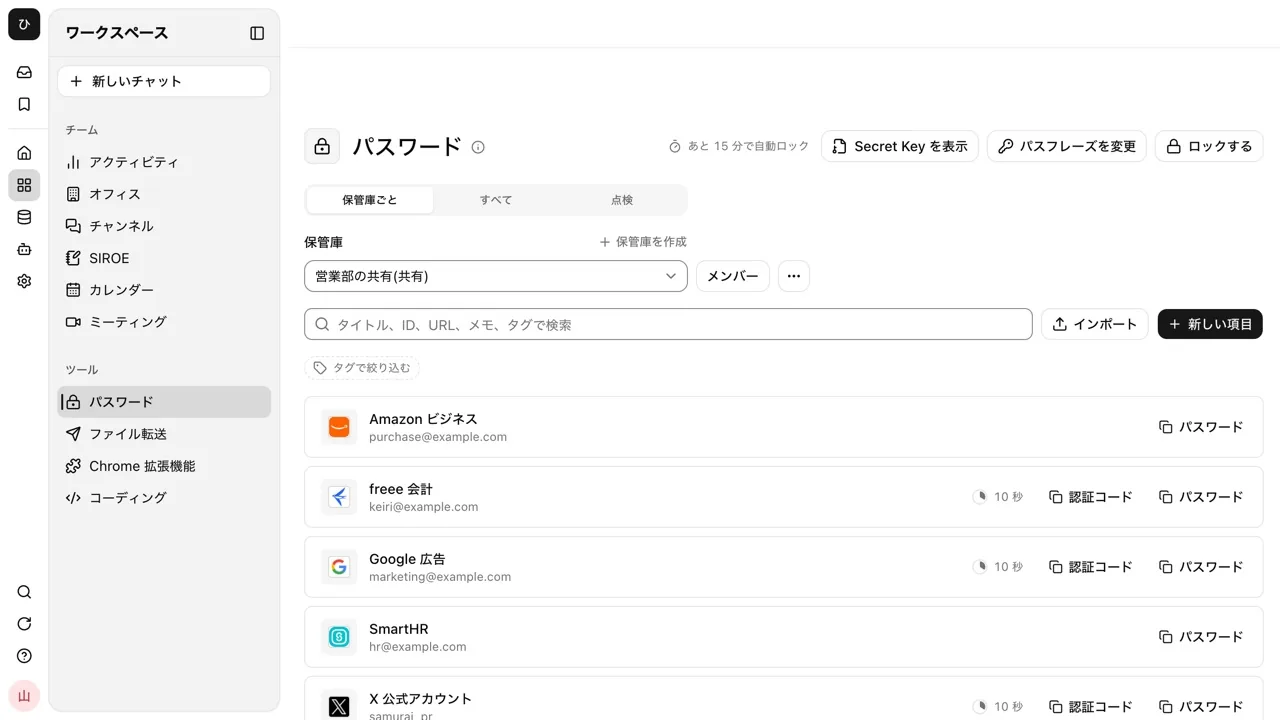
Are shared account passwords passed around in spreadsheets or chat? The password manager lets you decide who shares each vault and with what permission. Contents are encrypted inside the browser before they are saved.
Open Samurai AppTry without signing upRequest materials
- Where things are
Is sharing passwords causing problems like these?#
Passed around in sheets and chat
Shared account passwords sit as they are in spreadsheets and chat history, and nobody knows who has seen them.
Codes live on one person's phone
When the person with the authenticator app is away, nobody on the team can sign in to that service.
Breaches go unnoticed
Passwords that have leaked before, or short ones, stay in use with no way to check them.
Decide who shares each vault, and with what permission#
Create a vault as Shared or Personal. Add people to a shared vault and give each one Manager, Editor or Viewer. Everything, including item titles and URLs, is encrypted in the browser. While stored, neither the server, the operators nor the AI can read it.
- Items come in three types: Login, Note and Card. Add any fields you like, and secret fields stay hidden. Tag items to filter the list
- Save an authenticator key and show or copy two-factor codes from the vault
- Opening a vault takes both the passphrase and the Secret Key saved in your browser. The server's data alone is not enough even to try passphrases
- Register a passkey to open the vault with your fingerprint or face
- Pick a group to add everyone in it to a vault at once
Move from 1Password or Bitwarden, and keep every change in the history#
Import exports from 1Password and Bitwarden, or a CSV from a browser such as Chrome. The file is read in the browser, and item types, cards and custom fields come across as they are. 1Password tags and Bitwarden folders become tags.
- Each save keeps the previous version. See who changed which field in the last 20 versions of an item, and go back
- Deleted items can be restored from the trash for 30 days
- Only vault managers can export, and every export is recorded in the audit log
Find breached and weak passwords#
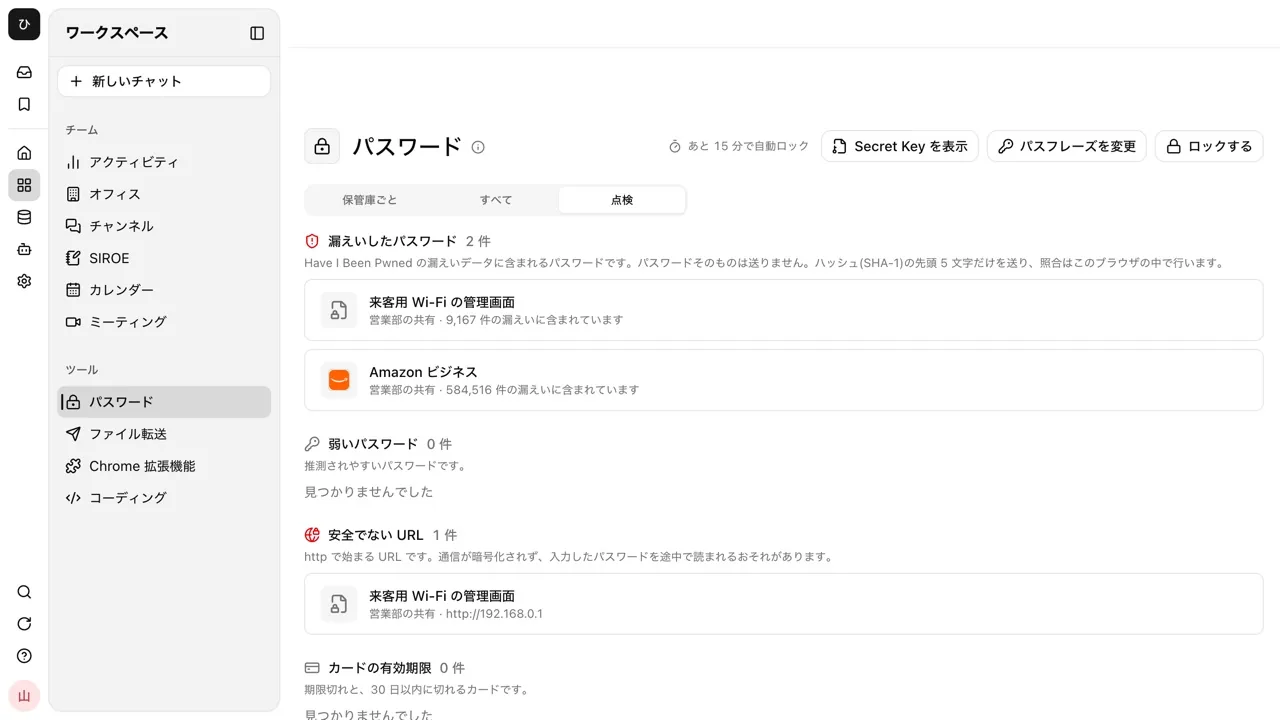
Open the Check tab and every item in the vaults you can open is checked four ways. For breaches, only the first 5 characters of the password's hash are sent, and the rest is compared in the browser. The password itself never leaves.
- The four checks: breached passwords, weak passwords, insecure URLs and card expiry
- Open an item and fix it, and the results update right away
Fill IDs and codes from the vault, on your own sign-in pages and in the AI's browser#
When the AI is browsing and a site asks for a two-factor code, a card appears in the conversation. Press it, and your own browser tab computes the code from the matching item and types only that code into the page.
- The AI never sees the code or the key. It runs only when a person presses the card, so it does not work in unattended runs
- Works in the cloud browser and in the browser on your own PC (samuraiapp tunnel or the Chrome extension)
- The password extension for Chrome types IDs, passwords, and two-factor codes into sign-in pages you open. It can also enter codes sent to Gmail or Outlook
Ready for a company‑wide rollout decision#
Companies already have divides. Bringing in an AI tool adds one more: between the people who can use it and those who can't. We built what a company-wide rollout needs in as a given, not as add-on features. Every setting applies only within your company's tenant, and the agent acts only within the permissions of the user.
- Approval gate
- A person approves sensitive operations before they run. Operations left unapproved are treated as rejected.
- Audit log
- An append-only record of business operations. Tampering can be detected.
- Roles and permissions
- Owner / Admin / Manager / Member. Owners and admins have the same permissions, so there are three levels of operational permission. The agent acts only within the permissions of the user.
- Two-factor auth, IP restrictions, SSO
- SSO supports OIDC / SAML and works with Entra ID, Okta, and Google Workspace. Source IP addresses can be restricted to the ones you allow.
- Tenant isolation
- Each customer company has its own independent database. Your data never mixes with other companies'.
- Prompt injection screening
- Text taken in from outside reaches the model only after passing screening.
- Compliance review
- Reviews conversations after the fact to detect issues. It does not block messages as they are sent.
- Usage ledger
- Records who used what, when, and how much. Viewable in three units: tenant / user / payer.
- Approval requests by email to outside approvers
- Unanimous approval
- Audit log tamper detection
- Add your own criteria in free text
- Always shown on screen during review
- Groups
- Credentials kept secret
- No-training setting with model providers
- Three levels of usage limits
- Activity dashboard
- No per-seat charges
- Password vault
- Breached password check
Frequently asked questions#
Can the AI use passwords from the vault?
No. The vault is for people to read and share, and it cannot be opened by the AI, MCP or the CLI. Register sites the AI should sign in to under browser logins separately; the AI uses those without seeing the values.
What happens if I forget my passphrase or Secret Key?
With the recovery code in the emergency kit you save at setup, you can set a new passphrase and get your Secret Key back. Without it, you delete your personal vaults and start again. Neither operators nor admins can reset a passphrase or open a personal vault. A shared vault opens again once one of its managers hands you the key again.
What happens to passwords when a member leaves?
Remove them from the vault and nothing more reaches them. They may still have values they saw before, so change the passwords at those services.
Is there a limit to how much I can store?
Up to 2,000 items per vault, and 256MB for the whole workspace. Items in the trash count toward the 2,000.
Everyday work comes together, connects, and becomes the company's strength.