Unified inbox
Bring outside chats and email into one list
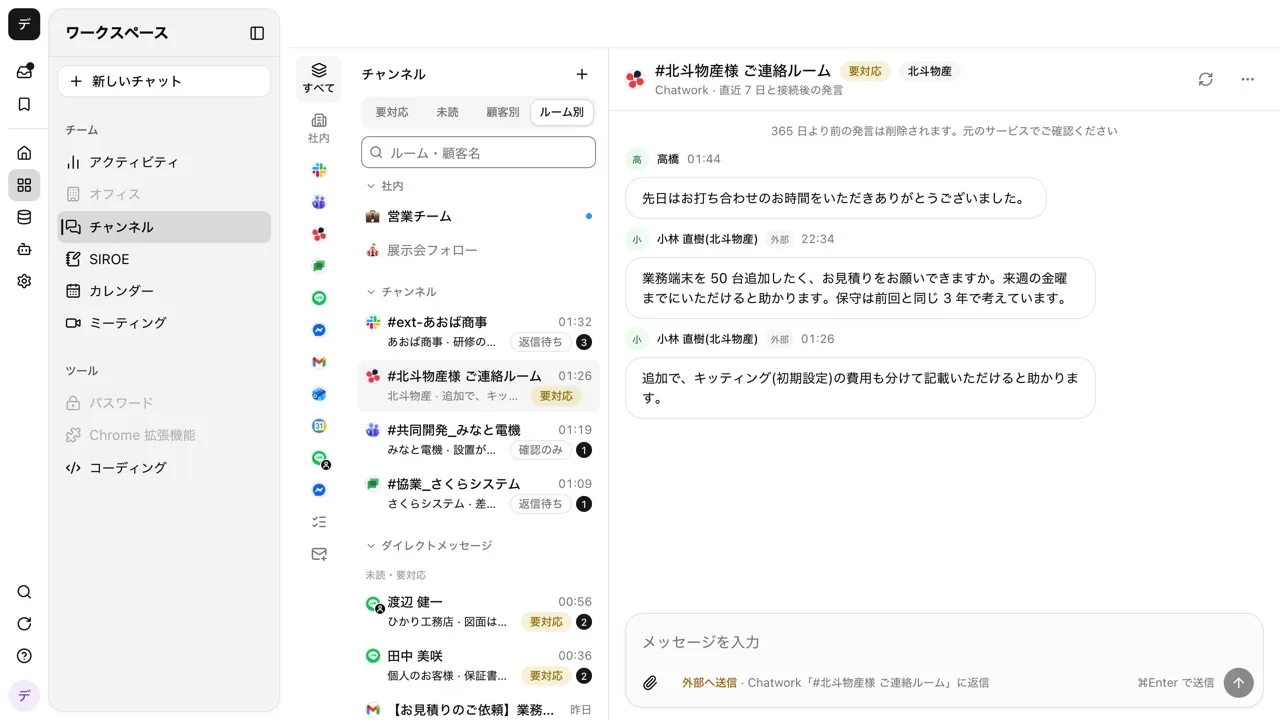
Slack with one partner, Chatwork with another, LINE and email with customers. The unified inbox gathers conversations split across services into the same list as your internal channels. AI marks the rooms still waiting for a reply, and drafts the reply too.
Open Samurai AppTry without signing upRequest materials
- Where things are
- Who is working on what
Are your outside conversations split across as many services as you use?#
Missed replies go unnoticed
Each service keeps its unread messages on its own screen. A customer's question sits waiting in the app you did not open.
Switching between apps
Opening Slack, Chatwork, LINE and email in turn takes longer than writing the replies.
Even short replies take time
A thank-you or a quick acknowledgement still means thinking up the wording every time.
From Slack to LINE to email, all in one list#
Chats from Slack, Microsoft Teams, Chatwork, Google Chat, LINE and Messenger, mail from Gmail and Outlook, and invitations from Google Calendar and Outlook appear as rooms in the same list as your internal channels. Filter by service in the left column, and use the Needs reply, Unread and By customer tabs to show only the rooms you want.
- When a new message arrives, AI reads the room and labels it Needs reply, Waiting for them, or FYI
- Each person picks the channels they receive, and only channels they belong to in the original service
- Messages in outside rooms are kept for 365 days after they are sent
Reply on the spot without opening the original service#
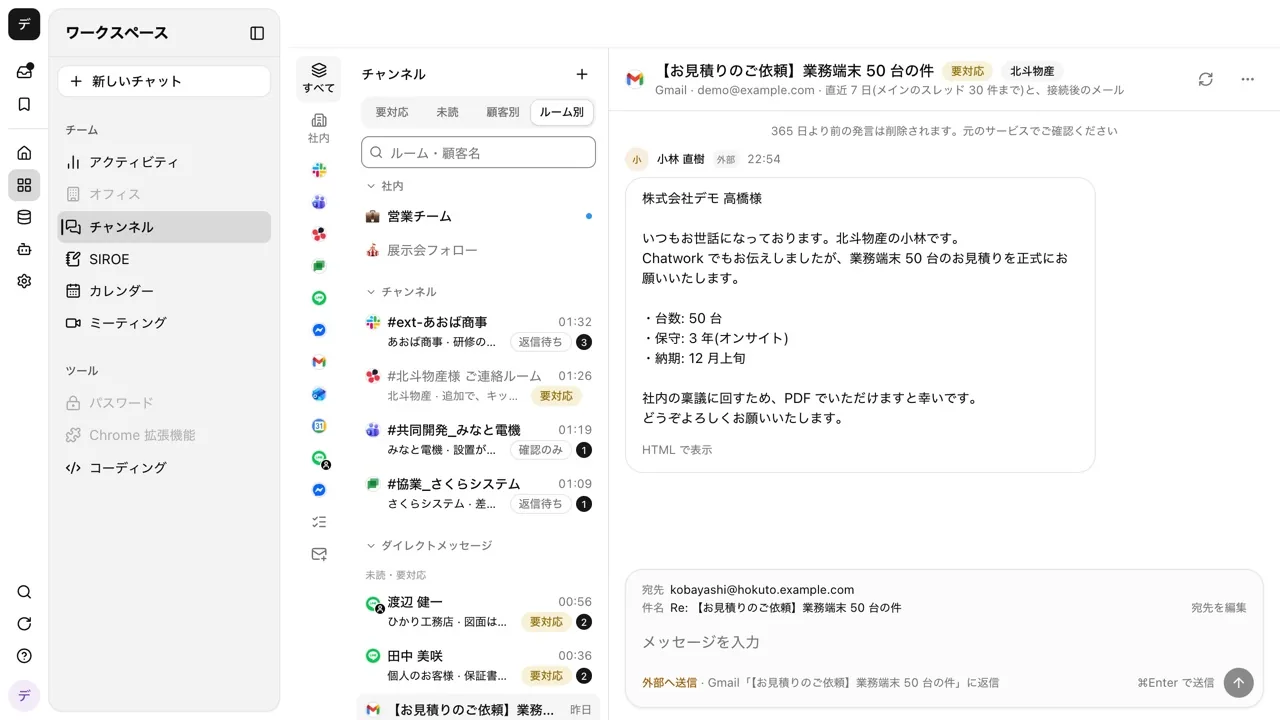
Reply from the room's input box, straight to the original service. If you have connected your own Slack or Microsoft Teams account, the reply is posted as you; otherwise the connected bot sends it with your name.
- Attach files in Slack, Chatwork, personal LINE and Teams rooms (images only on Teams)
- In Slack and Chatwork, type @ to mention members and : to insert emoji
- Reply to mail with To, Cc and Bcc, or forward it. Your signature for each sending address is added
Leave reply drafts, and automatic replies to chosen people, to AI#
For each room, choose Labels only, Write drafts, or Send automatically. AI reads the flow of the conversation and the tone you have used in that room, and does nothing when it judges that no reply is needed. In group rooms you can set this per sender.
- Even when sending automatically, anything about prices, fixing dates or deadlines, contracts, payments, complaints or personal data is left as a draft for a person
- Choose a bot to write replies, and it looks up files, tables and schedules first. Anything that changes something waits for approval
- After a draft or an automatic reply, the person who set it up is told by push notification and in the inbox
Connect to outside business systems#
It connects to external services, and external AI clients can connect to it. Credentials are only stored with us; there is no way to read their values back.
- Connectors (MCP)
- The main way to connect is directly to each vendor's official remote MCP. Beyond that, you can connect to over 1,000 SaaS apps through a shared connection platform.
- Credential profiles
- Named credentials, several of which a single connection can hold. Each can be bound per tool.
- MCP endpoint
- External AI clients can operate Samurai App.
- CLI
- samuraiapp — login / chat / request / tunnel. No config file needed.
- External chat
- Call it with a mention from conversations in Slack / Microsoft Teams / LINE / LINE WORKS / Chatwork / Google Chat. It acts with the permissions of the person who linked their account, and answers in the same thread. A Facebook page on Messenger shows up in the unified inbox, and people send the replies.
- Embeddable chat widget
- Place it on your company's site and have conversations right there.
- Model routing
- Routes each conversation to a suitable model. You can also use your own API keys (BYOK).
Direct to each vendor's official remote MCP
 freee
 Money Forward Cloud Accounting
 Misoca
 LegalBrain Agent
 Ekispert API
 Oracle Autonomous Database
Services without MCP, through API definitions
 LegalOn
 CloudSign
 SmartHR
 SAP Concur
 HRMOS Kintai
 Smaregi
 Jobcan Expense
 SmartDB
 kaonavi
 Sansan
 LINE WORKS
 note
Everything else, through a shared platform
 Outlook
 SharePoint
 OneDrive
 Gmail
 Google Drive
 Salesforce
 Zendesk
 Jira
More than 1,000 other services can be connected the same way.
No API or MCP? Operate the screen directly
- Browser use
- Computer use
Call the AI agent from the chat you already use
 Slack
 Microsoft Teams
 Chatwork
 Google Chat
 LINE
- LINE WORKS
Company names and logos are trademarks of their respective owners and do not imply partnership or endorsement.
- Call APIs directly
- Reaches only allowed hosts
- Credentials can't be read back
- Find services to connect
- Find actions after connecting
- Just paste one connector URL
- Billed per event received
- Outside chats and mail in one list
- Reads what was said before the call
- Approve in external chat
- Ask an admin for a connection
Frequently asked questions#
Can I connect my personal LINE too?
Only if an admin turns on letting members connect personal LINE. Each person then connects their own LINE with a QR code. It uses an unofficial method that LINE does not provide, and may go against LINE's terms of use. It is off by default.
Can I keep outside conversations away from AI?
Yes. Turn off AI access for a room and AI neither labels it nor writes replies. Messages are still kept, and people can still reply. Admins can turn it off for a whole connection at once.
Can I ask about the unified inbox from my usual chat?
Yes. Ask in your own conversation, for example "What has been discussed in the sales room of the unified inbox lately?", and it finds the rooms you can read and answers. You can ask it to send to a room too; by default an approval card appears before anything is sent.
If an automatic reply is wrong, can I take it back?
A sent reply cannot be taken back, so send a correction yourself. Automatic replies are capped at 30 per room per hour, and anything that should be left to a person becomes a draft instead.
Everyday work comes together, connects, and becomes the company's strength.