Videos, design data, and batches of photos quickly outgrow what you can attach to an email. That is where file transfer services come in: you upload the files and hand the recipient a URL. Look around a company, though, and you often find each employee using a different free service, with nobody knowing who sent what to where.
This article is for IT and general affairs staff who want to review how large files are exchanged, and for the production, sales, and design staff who send files every day. We compare nine file transfer services by how much you can send at once, how long files are kept, what you can use for free, and business features such as logs and approvals. In a separate section, we also lay out what goes wrong when a company uses free services meant for individuals.
Prices and specifications reflect only what each vendor's official website showed as of November 9, 2026. Values we could not confirm officially are marked "Not confirmed officially."
Bottom line: how to choose by use
- You are an individual and just want to send very large files for free: GigaFile and firestorage. Both let you send up to 300GB per file (300GiB for firestorage)
- You want to send without ads for a small fee: Data Deliver's Business plan (from ¥330/month incl. tax) or a GigaFile paid membership (from ¥198/month incl. tax)
- You already subscribe to Dropbox: Dropbox Transfer. It is included in your plan, and Professional and above let you send up to 100GB at a time
- Your company wants to manage sending and keep approvals and logs: Crypto-bin, GigaCC ASP, and Biz Storage File Share. These are business services with IP restrictions and manager approval
Three types of file transfer services
| Type | Characteristics | Best for | Products in this article |
|---|---|---|---|
| Free, for individuals | Usable without registration, with large capacity. Shows ads | Personal exchanges, one-off sends | GigaFile, firestorage, Data Deliver, WeTransfer, Smash |
| Bundled with storage | Sending is one feature of an online storage service | You already subscribe to that storage | Dropbox Transfer |
| For businesses | The company can manage sending, with logs, IP restrictions, approvals, and revoking sends | Sending confidential information to clients, keeping a record of sends | Crypto-bin, GigaCC ASP, Biz Storage File Share |
Free services for individuals are easy and offer large capacity, but the company cannot see a record of what was sent. Business services cannot send as much at once, but in return administrators can check who sent what and when.
How to choose a file transfer service
How much you can send at once
First, check the size of the files you usually send. Video footage and 3D data can run to tens of GB. GigaFile and firestorage can send around 300GB per file, but some business services cap a single send at 20MB or 2GB. Some products, like Crypto-bin, let you raise the limit with a large-capacity option.
Retention period and revoking
How long the recipient can download a file is exactly how long your information sits outside the company. GigaFile lets you choose 3 to 100 days, firestorage 3 hours to 14 days, and Data Deliver's free version 1 hour to 7 days. Also check whether you can disable a URL after sending it, in case you sent it to the wrong person.
Effort for the recipient
Whether recipients can download without creating an account matters when you deal with people outside the company. Most services in this article let recipients receive files with just a URL and a password. In some products, whether recipients also see ads depends on the paid plan. GigaFile Premium and Data Deliver's Business plan are examples.
Whether the company can manage sending
For business use, check whether a history of sends is kept, whether administrators can see it, whether a manager's approval can be required, and whether connecting IP addresses can be restricted. GigaCC ASP includes history log management and IP address restrictions, with manager approval as an option. Biz Storage File Share lists manager approval, access history, revoking sends, and restricting recipients as features.
How pricing is counted
Paid memberships for individual services are a monthly fee per person, while business services are often priced by number of users or IDs, or by disk capacity. Biz Storage File Share is a monthly fee per disk capacity and allows a maximum of 1,000 to 10,000 users. Estimate both the number of people who send and the amount of data held at the same time before comparing.
File transfer service comparison table
| Service | Type | Size per send | Retention period | Free plan | Typical paid plan |
|---|---|---|---|---|---|
| GigaFile | Free, for individuals | 300GB per file, unlimited number of files | Choose from 3 to 100 days | Yes (no registration, ads shown) | Standard ¥198/month (incl. tax) |
| firestorage | Free, for individuals | 300GiB per file | Choose from 3 hours to 14 days | Yes (no registration) | Lite ¥1,320/month (incl. tax) |
| Data Deliver | Free, for individuals | Free version 2GB (members 5GB); Business unlimited | Free version 1 hour to 7 days; Business up to 30 days | Yes | Business ¥330/month (incl. tax) |
| WeTransfer | Free, for individuals | Free: 10 transfers or 3GB total per 30 days | Free: up to 3 days | Yes | Not confirmed officially |
| Smash | Free, for individuals | Free: priority up to 2GB; paid: unlimited | Free: up to 7 days; paid: up to 30 days | Yes | Not confirmed officially |
| Dropbox Transfer | Bundled with storage | Basic 2GB, Plus 50GB, Professional and above 100GB | Not confirmed officially | Basic (2GB) | Plus ¥1,200/month |
| Crypto-bin | For businesses | 5 to 20MB per send (up to 10GB with the large-capacity option) | Up to 25 days for 20MB or less | No | ¥900 to ¥1,000 per user per month |
| GigaCC ASP | For businesses | Not confirmed officially | Not confirmed officially | No (free trial available) | From ¥12,000/month for 10 IDs (excl. tax) |
| Biz Storage File Share | For businesses | Not confirmed officially | Not confirmed officially | 2-week free trial | ¥15,000/month for 1GB of disk (excl. tax) |
Note: The official page for Crypto-bin did not state whether its prices include tax. For Dropbox, we could not confirm whether prices are monthly or annual billing, or whether they include tax.
Key features of the main services
GigaFile
A free file transfer service you can use without registering. You can send up to 300GB per file, with no limit on the number of files. You can choose a retention period from seven options between 3 and 100 days, with 7 days as the default. You can set a download password, a deletion key, and an email notification when the download is complete.
The free version shows ads. The Standard paid membership (¥198/month incl. tax) removes ads and lets you see your upload and download history. With Premium (¥999/month incl. tax), recipients can also download without ads, and the vendor officially describes it as "recommended for business use too." We could not confirm officially any feature that lets a company administrator see a combined record of sends.
firestorage
A file transfer service that lets you send up to 300GiB per file for free, and it also offers business plans. You can choose a retention period from 3 hours to 14 days; if you do not specify one, it is in principle 7 days or more. Free members also get 2GiB of storage.
Paid memberships are Lite at ¥1,320 per month (incl. tax, 25GiB) and Regular at ¥2,420 per month (incl. tax, 100GiB); both let you track downloads, and Lite and above remove ads. Business plans are a monthly fee per organization, starting with Plan5 (1TB, 100 accounts) at ¥54,780 incl. tax and a ¥55,000 setup fee. All business plans keep access logs, and fixed IP restrictions are available on the higher Plan1 and Plan2. Data is stored in data centers in Japan.
Data Deliver
A file transfer service with a free version and a low-cost Business plan. The free version allows 2GB per send on Lite, which needs no registration, and 5GB per send on Free, which requires registration, with expiry from 1 hour to 7 days, and it shows ads.
The Business plan costs, per account (one email address), ¥330 per month for sending only, or ¥550 per month with a Receiving Box that lets others send you files (both incl. tax). Capacity is unlimited, files can be kept up to 30 days, and recipients do not see ads either. It offers download count limits, required passwords, download notifications, and two-factor authentication, and keeps 6 months of send history. It suits small teams that want to go ad-free while keeping costs down.
WeTransfer
A file transfer service from the Netherlands, used around the world. The free plan allows 10 transfers or 3GB in total per 30 days, and free transfers expire after at most 3 days. You can set a password on every plan.
The paid Starter plan allows 10 transfers or up to 300GB per 30 days, and Ultimate and above have no limit on the number of transfers and let you set your own expiry. Teams, for teams, has 5TB of storage. We could not read the official pricing page this time, so paid-plan prices are unconfirmed. It is a candidate when you deal with overseas clients and want a service they are already used to.
Smash
A file transfer service from France that lets you send files over 2GB even on the free plan (the portion over 2GB is not given priority processing). Free transfers last up to 7 days, with passwords, virus protection, and encryption in transit and at rest. The free plan does not let you track views or downloads.
Pro and Team (10 to 50 users) have unlimited transfer size and keep files for up to 30 days. You can also track views and downloads, receive notifications when files are received, and use two-factor authentication. Enterprise supports SSO and SCIM. We could not confirm the prices of Pro and Team officially this time.
Dropbox Transfer
A file transfer feature included in Dropbox plans. You can send 2GB at a time on the free Basic plan, 50GB on Plus, 100GB on Professional, Standard, and Advanced, and 250GB with the Creative Tools add-on. You can set a password, an expiry, and download notifications.
Listed prices are Plus at ¥1,200 per month, Professional at ¥2,000 per month, and, for teams, Standard at ¥1,500 per user per month and Advanced at ¥2,400 per month (both for 3 users or more). Companies already using Dropbox can handle large sends without subscribing to a separate service.
Crypto-bin
A business file transfer service from NRI SecureTechnologies, used by financial institutions and others. Pricing is per user per month: Entry (20 users, 5MB per send, 100 sends per month) and Lite (50 users, 10MB per send, 400 sends per month) cost ¥1,000, and Standard (100 users, 20MB per send, 1,000 sends per month) costs ¥900. There is also a setup fee, but the amount is not on the official page.
With the large-capacity option you can send up to 10GB per send, and anything over 20MB is billed by usage. The download deadline is up to 25 days for 20MB or less, and up to 7 days above 20MB. IP address restrictions are a standard feature, while pre-approval, post-approval, multi-step approval, and device authentication are options. The vendor states compliance with ISO 27001, 27017, and 27018 and with PCI DSS, and registration with ISMAP. It suits companies that want to send highly confidential information through an approval step.
GigaCC ASP
A business file transfer service from Japan Wamnet. Prices exclude tax: the setup fee is ¥50,000, and the monthly fee starts at ¥12,000 for 10 IDs and at ¥280,000 for 1,000 IDs. There are three plans: STANDARD, ADVANCED, and PREMIUM.
It includes history log management, IP address restrictions, and authentication by ID and password, while manager approval, download request notifications, required passwords, and automatic log export are options. We could not confirm officially the size per send or the retention period this time. A free trial is available. It suits companies that want to manage employees' sends with approvals and logs.
Biz Storage File Share
A business file transfer and sharing service from NTT Docomo Business. Pricing is a flat monthly fee per disk capacity: 1GB is ¥15,000 (¥16,500 incl. tax, up to 1,000 users), 100GB is ¥95,000 (¥104,500 incl. tax, up to 10,000 users), and 1TB is ¥200,000 (¥220,000 incl. tax). The setup fee is free if you order online. The minimum term is 3 months.
It offers manager approval, manager review, download restrictions, access history, revoking sends, restricting recipients, access notification emails, and two-factor authentication. Data is stored in the company's own data centers in Japan. With the feature for receiving files from clients, uploaded files can be downloaded for up to 90 days. A 2-week free trial is available. It suits larger companies that want to manage sending, including the approval flow.
Cautions when a company uses free file transfer services
The company cannot see what is sent
When employees use free services at their own discretion, the company cannot check which service was used, who sent what, or to whom. Even if information is suspected to have leaked, there is no record to trace.
You may not be able to revoke after sending
Whether you can disable a URL you sent to the wrong person depends on the service and how it is used. GigaFile lets you set a deletion key, but only the person who sent the file can revoke it. For company use, also check whether administrators can see and revoke sends.
Do not make retention periods too long
The longer the retention period, the longer files sit outside the company. Set rules such as deleting files soon after the recipient has them and keeping the period to only the days needed.
When to go paid, and when to go with a business service
If you only want to remove ads or make things easier for recipients, a paid membership for individuals is enough. But if you want to manage employees' sends in one place, require approval, or keep logs, you need a business service or a system the company can manage. If you are reviewing every route by which information leaves the company, including bringing files into generative AI, our article collecting cases of information leaks through generative AI is also useful.
Samurai App as an option
File transfer in Samurai App sends large files outside your company as a URL, from the same screen where you do your work. You can send up to 100 files and 300GB in total at once, and recipients can download without an account. You can add a subject and a message, and set a password and a maximum number of downloads (1 to 1,000). You choose a retention period of 1, 3, 7, 14, or 30 days, with 7 days as the default.
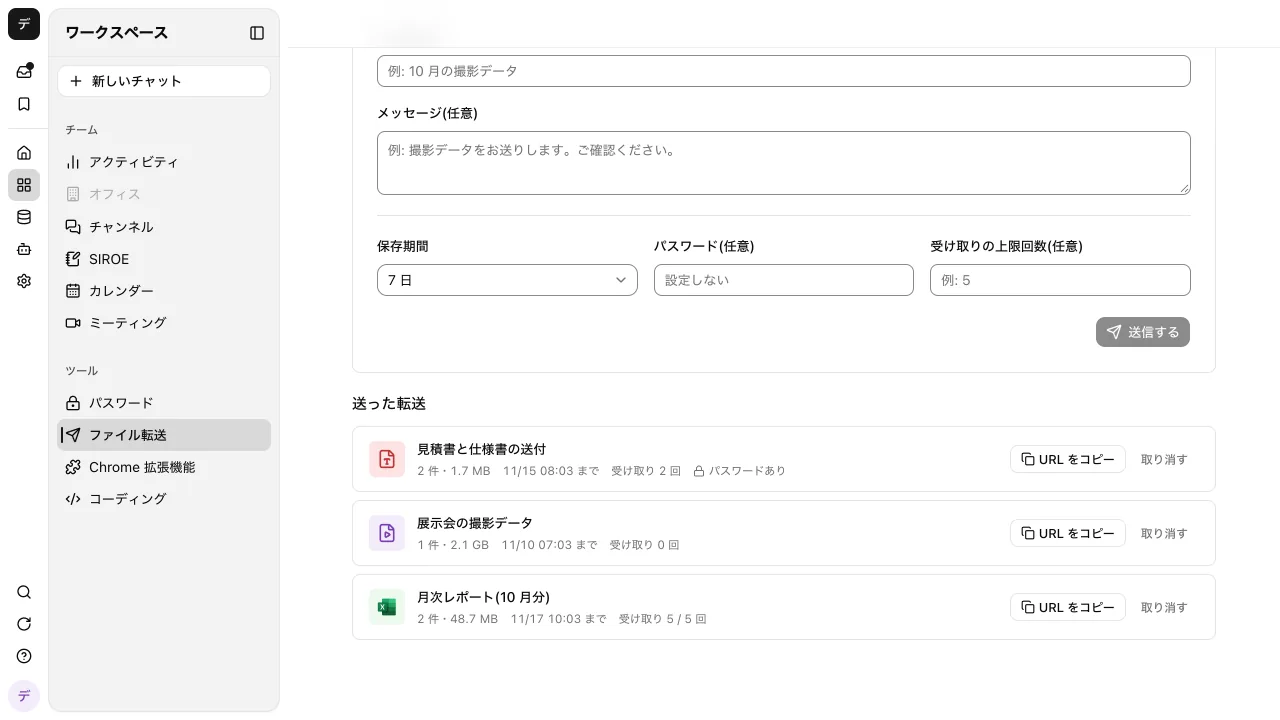
The send form shows an estimate of the credits storage will use. Files you send use credits for file storage for as many days as they are kept, and if you revoke early, that stops from that day. If a send stops partway, you can pick the same files again within 24 hours and resume where it left off. Press "Revoke" and the URL stops opening even for people you already gave it to, and the files are deleted.
Administrators and managers can decide whether the feature is used and the longest retention period that can be chosen. Creating and revoking transfers and changing settings are recorded in the audit log.
On the other hand, recipients cannot send files back (upload), and cannot download everything at once as a ZIP. Each person can have up to 20 transfers at a time, and the whole workspace up to 1TB. There is no flow for sending only after a manager approves, so companies that require approval are better served by a dedicated business service.
Frequently asked questions
Is it OK for a company to use free file transfer services?
It depends on company policy. Free services are easy, but the company cannot see a record of what was sent, and managing files after they are sent is left to individuals. If you send confidential or personal information, it is safer to choose a service the company can manage and standardize on that one service.
Which service can send the largest files?
In this article, GigaFile (300GB per file, unlimited number of files) and firestorage (300GiB per file) handle the largest files, and Data Deliver's Business plan and Smash's paid plans set no size limit. Some business services have a small limit per send, so check whether an option can raise it.
What is the difference between file transfer and online storage?
File transfer means temporarily depositing files to hand them to someone, with the files disappearing when they expire. Online storage means keeping files in place and sharing them inside and outside the company. Some products, like Dropbox Transfer, have a transfer feature inside the storage service.
Do recipients need an account?
With most services in this article, recipients do not create an account; they open the URL (and enter the password, if there is one) to download. Some business services let you add identity verification for recipients.
Sources
- GigaFile
- firestorage membership plans
- firestorage business plans
- Data Deliver plans
- Data Deliver Business plan
- WeTransfer plan limits (help)
- Smash pricing
- Dropbox Transfer
- Dropbox plans
- Crypto-bin
- GigaCC ASP pricing plans
- Biz Storage File Share pricing
- Biz Storage File Share
- Samurai App guide: File transfer
Prices and specifications were checked on each vendor's official website as of November 9, 2026. Please check each vendor's site for the latest information.