Requests and approvals
From request to approval, one button passes it on
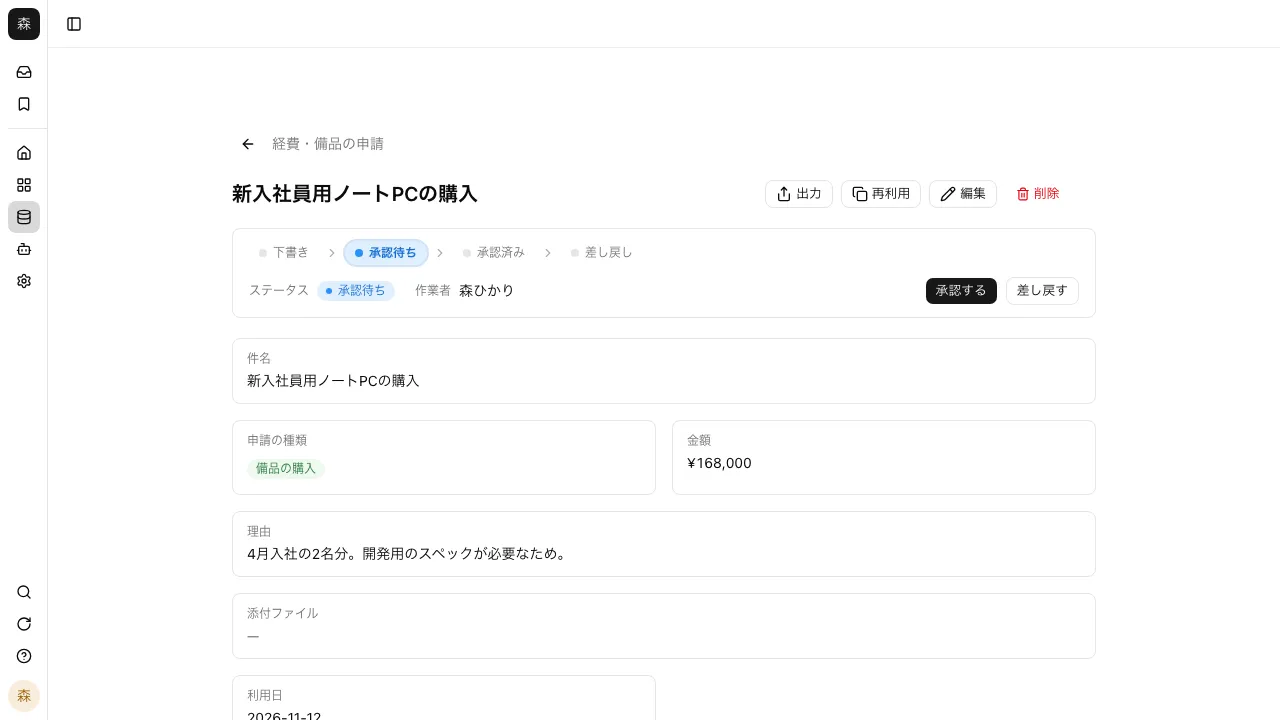
Set statuses such as "Draft → Awaiting approval → Approved," then add the buttons that move a record and the next assignee. Each record moves on to the next person, and everyone can see whose turn it is.
Open Samurai AppTry without signing upContact us
- Who is working on what
- How the work was done
Do requests and approvals run into these problems?#
No one knows who has the request now
When requests go around by email or chat, just finding where one is stuck takes time.
Multiple approvers lead to miscounts
Whether it needs everyone's approval or just one person's is unclear from request to request.
You can't trace what happened later
There's no record anywhere of who changed the amount, or when.
Set the flow with statuses and buttons#
Under "Process management" in "App settings", set the order of statuses and the buttons that move between them. Give each button a name like "Approve" and choose which status it moves from and to.
- The "Requests and approvals" preset starts with the status flow already set up
- Turn off process management, and the statuses already written stay on the records
- Switch the list to kanban to see records grouped by status
Set the next assignee and how many approvals it takes#
For each button, choose who works on it next: the person who created the record, a set person, the creator's manager (the group admin), the person in a user field on the form, and more.
- Up to 20 approvers
- Require any one assignee, all of them, or a majority to press it
- Until enough have approved, the record shows a count like "Approved 1 / 3"
Each record's history and comments keep the full story#
"Change history" lists, newest first, who changed what and how, when, and whether it came from the screen or the AI. Changes in status and assignee are kept too.
- @mention someone in a comment and a notification reaches their browser
- Opening the notification opens that record
- Row permissions can limit a record to its creator and assignees
When purchase requests went around by email, finding where they were stuck was a struggle. Now an Approve button moves each one to the next person, and the list shows who has it.
Purchasing For contract approvals, I set it so nothing moves on until every approver has pressed the button. The record shows something like "Approved 1 / 3," so I can see at a glance how many are left.
Legal I check each record's change history to see who edited an amount and when. It also records whether the change came from the screen or from AI, so tracing what happened is straightforward.
Internal audit
Frequently asked questions#
What if the manager is away?
If the app's creator or a group admin presses the button, the record moves on right away even though they aren't the assignee.
Can an approval result kick off other work?
An app's buttons can start a workflow. Leave notifications after approval, and writing to outside services, to the workflow.
Can people outside the company submit requests?
Publish the form externally, and people who aren't signed in can send requests. Submitted requests land in the app inside the company, and from there go into the approval flow.
Everyday work comes together, connects, and becomes the company's strength.