As remote work continues, you lose the ability to "just ask the person at the next desk." Questions that are not worth a chat message pile up, and you cannot tell who is free. Virtual office tools are software that build an office on screen and show presence with avatars or photos, making it easier to start a conversation.
This article is for general affairs, IT, and team leaders who want to bring back casual conversation and quick consultations in teams working remotely or in a hybrid style. Note that this article is not about the "virtual office" as a service for renting an address or phone number, but about tools for an online office (also called a virtual workspace or metaverse office). We compare 8 major products by what you can use for free, pricing units, how presence is shown, and security.
For pricing and specifications, we write only what is published on each vendor's official site as of November 9, 2026. Values we could not confirm officially are marked "could not confirm officially."
Bottom line: choose by the shape of your team
- A company in Japan that values administration features and support: oVice. It has SSO and IP restrictions, and data is stored in the AWS Tokyo region
- You want to start free with a team of up to 25: MetaLife. The free Standard plan allows up to 25 people at the same time
- You want to share presence via camera, suited to a quiet way of working: Remotty. It shares presence with photos from the PC camera
- You want to talk casually by voice only: roundz. A voice-only tool that does not use the camera
- You have members overseas and an English interface is fine: Gather, Kumospace, WorkAdventure
3 ways virtual office tools show presence
Virtual office tools differ in character depending on how they show presence.
| How it shows presence | How it works | Teams it suits | Products in this article |
|---|---|---|---|
| Avatar map | Avatars move around a floor on screen, and you can talk when you get close | Want more casual and chance conversations | oVice, Gather, MetaLife, Kumospace, WorkAdventure, Sococo |
| Presence by photo | Shares photos taken periodically by the PC camera | Value the reassurance of seeing faces | Remotty |
| Voice only | No camera; shows only who is available to talk | Want to reduce the burden of video | roundz |
With the avatar map type, people who come close can hear each other, so you can start talking without booking a meeting room. The photo type lets you see how others are doing, but some people are uncomfortable being on camera. Asking members before rollout which style they could keep up with prevents the failure of the tool going unused.
How to choose a virtual office tool
How many people and how much time you get for free
Free plan limits differ widely by product. MetaLife is free for up to 25 people at the same time, but video and screen sharing are limited to 40 minutes per person per day. Kumospace's free plan allows up to 5 registered members, WorkAdventure up to 10 people at the same time, and oVice's Free plan gives one S-size space. Gather has no free plan without a time limit, but offers a 30-day free trial.
Pricing unit: per space or per person
Some products price by space (room), and others per person. oVice's pricing depends on the space size, and guests are free. Gather, Kumospace, WorkAdventure, and Sococo are a monthly fee per person. If you expect headcount to grow, estimate the cost a year out under both ways of counting.
Integration with the tools you already use
When presence is linked to the calendar, you are less likely to accidentally talk to someone in a meeting. oVice supports Google Calendar and Teams on Entry and above, and Kumospace supports Slack, Google Calendar, Outlook, Teams, and Zoom. Remotty lists integrations with Slack, Teams, Google Calendar, Zoom, Meet, and others.
Security and administration
For company use, check SSO, access restrictions, and where data is stored. oVice offers SSO and access restrictions (password, email, IP) on Entry and above, and has ISO/IEC 27001 certification. MetaLife supports SSO on all plans, with IP restrictions on Business and above. Gather and Kumospace limit SSO to their top-tier plans.
Running it without it becoming monitoring
Depending on how it is used, a virtual office can make people feel "watched." What matters is whether people can choose what to show and what not to show. Before rollout, set rules on whether people can switch their own presence status and how much of their photos and screen content is shared. Sharing with the team from the start that the goal is to make it easier to start a conversation, not to record people's behavior, helps it last.
Virtual office tool comparison table
| Tool | How it shows presence | Free plan / trial | Paid plan guide | Pricing unit | SSO |
|---|---|---|---|---|---|
| oVice | Avatar map | Free (1 S-size space) / 14-day free trial | Entry-S ¥7,315/month (annual billing, incl. tax) | Space | Entry and above |
| Gather | Avatar map | 30-day free trial | Essential $12/member/month | Per person | Custom only |
| Remotty | Presence by photo | Free trial available | From ¥3,500/month (excl. tax, 5 users) | Headcount | Could not confirm officially |
| MetaLife | Avatar map | Standard (free for up to 25 people at the same time) | Business from ¥22,000/month (incl. tax) | Plan (concurrent connections) | All plans |
| Kumospace | Avatar map | Free (5 registered members, 1 floor) | Business $16/user/month (annual billing, from 5 people) | Per person | Enterprise only |
| WorkAdventure | Avatar map (2D) | Free (10 people at the same time) | Business from 8€/user/month | Per person | Event and Business |
| Sococo | Avatar map | 14-day trial | SOCOCO 13.49/seat/month (no currency shown, from 10 seats) | Per seat | Could not confirm officially |
| roundz | Voice only | Free demo available | Could not confirm officially | Could not confirm officially | Could not confirm officially |
Note: Gather, Kumospace, and WorkAdventure prices are listed as shown on the official pages we checked (US dollars, euros). MetaLife's pricing page has annual and monthly tabs with two amounts side by side, so we list the lower one with "from."
Key features of the main tools
oVice
A virtual office from oVice, Inc. of Nanao, Ishikawa Prefecture, which states it has been adopted by about 4,000 companies. Bringing avatars close starts a conversation, and several people can share their screens at the same time. It also has real-time transcription and summaries to keep a record of conversations.
Pricing is per space, including tax. Entry-S (10 people recommended, up to 50 concurrent connections) is ¥7,315 per month with annual billing (¥8,778 with monthly billing), and Entry-M (40 people recommended, up to 200 concurrent) is ¥27,316 per month with annual billing. Business Starter includes 20 people and is ¥36,300 per month with annual billing, and guests are free. SSO and access restrictions are on Entry and above, and data is stored in the AWS Tokyo region. There is a 14-day free trial. It suits companies that value administration features and support in Japan.
Gather
A virtual office from Gather in the United States. It shows presence as "Available," "Focusing," or "In a meeting," and you can hear the conversations of people nearby. It also has simultaneous screen sharing and meeting recording and transcription.
Essential is $12 per member per month, and the annual/monthly billing toggle shows "-20%," but we could not confirm officially which billing method the $12 price is for. Large-scale use is on the Custom plan, and SSO is Custom only. There is no free plan without a time limit, but there is a 30-day free trial with no card required. It supports Google Calendar and a Chrome extension. It suits teams that include members overseas.
Remotty
A virtual office from Sonic Garden that shares photos taken every 2 minutes by the PC camera with the team. It also has a mode that uses the camera only to determine whether you are present, and virtual backgrounds. When you want to talk to someone, you can start a call with one click.
Pricing is shown as "from ¥3,500 per month (excl. tax, 5 users)," and we could not confirm the plan name officially. One environment can be used by up to 100 people. It lists integrations with Slack, Teams, Google Calendar, Zoom, Meet, and others. It suits teams that feel reassured by seeing faces, but check first whether any members are uncomfortable with sharing photos.
MetaLife
A Japanese virtual office where you enter from a single URL and people who come close can exchange voice and video. You can build your own map and place lockable meeting rooms.
Its distinguishing feature is that the free Standard plan allows up to 25 people at the same time. However, video and screen sharing are limited to 40 minutes per person per day, voice also has a daily limit, and some integrations are restricted. The paid Business plan (50 concurrent) is ¥22,000 / ¥26,400 per month, and Enterprise (300 concurrent) is ¥44,000 / ¥48,400 per month (all incl. tax), and we could not confirm on the pricing page which amount is annual and which is monthly. SSO is available on all plans, and IP restrictions on Business and above. It suits small teams that want to try it for free.
Kumospace
A virtual office from Kumospace in the United States, with spatial audio and screen sharing on all plans. The free plan allows up to 5 registered members, 50 guests, and 1 floor. Business is $16 per person per month (annual billing, from 5 people), and you can try it for 14 days. Guests are limited to 4 hours per week on every plan.
It integrates with Slack, Google Calendar, Outlook, Teams, Zoom, Google Drive, and Miro. Password and email access control is on Business and above, and SSO is Enterprise only. It suits overseas teams that want to connect it to the tools they already use.
WorkAdventure
A virtual office built on a 2D map, from WorkAdventure in France. It is published as open source and can also be run on your own servers. It states that all of its services are hosted within the EU.
The free plan allows up to 10 people at the same time with no time limit. Business starts at 8€ per person per month, and Event, for events, starts at 4€ per person per day. SSO and integrations with Teams, Google Calendar, Outlook, and Meet are available on Event and Business. It is a candidate for companies that want to keep their data in-house or that have offices in Europe.
Sococo
A virtual office from Sococo in the United States, where rooms are laid out on a floor plan and you can see who is in which room. Meetings are held by connecting to the Zoom, Webex, Meet, or Teams accounts you already use.
SOCOCO is 13.49 per seat per month (from 10 seats, including 500 minutes per seat per month), and SOCOCO UNLIMITED is 24.99 (from 100 seats, annual contract). The pricing page shows no currency symbol, and it does not match the "from $12" shown elsewhere, so you need to confirm before contracting. There is no free plan, but there is a 14-day trial. It suits companies that want to keep their meeting tools as they are and add only a map of who is present.
roundz
A voice-only virtual office that does not use the camera. You can see who is available to be talked to, and while someone is in a meeting on Zoom or similar, they are automatically set to unavailable. It states a cumulative total of 400 companies have adopted it. Pricing, free plans, integrations, and security are not published on the official site; you confirm them by applying for a free demo. It suits teams that want to reduce the burden of video and bring back only voice consultations.
Tips for rolling it out and making it stick
Set "times to be there"
If no one is in the virtual office, no one will come. For the first month, setting times to gather, such as "we are here in the mornings" or "we hold the morning meeting here," helps it take hold.
Make rules for how to start a conversation
Decide how to show when you want to focus and what signals that it is okay to talk to you. If the tool lets people switch their own presence status, aligning how the team uses it means the person starting a conversation does not have to hesitate either.
Let people choose how much they show
How much of their photos, on-screen work, and work content to show lasts better when each person can choose, rather than being decided uniformly by management. Talk as a team about where the line is between the help that comes from being visible and the burden of feeling watched.
Divide roles with chat and meeting tools
A virtual office is an entry point for casual chat and short consultations. If decisions and materials are kept in chat or documents, and long meetings are held in your usual meeting tool, information does not stay only inside the virtual office. How to choose a chat tool is covered in our business chat comparison, and meeting tools in our web meeting tool comparison.
Samurai App as an option
Samurai App has an "Office" screen where you see what the team is working on, on an isometric floor (viewed from diagonally above). Desks belong only to members; AI has no desk and appears next to someone only while that person is working with AI. Work that no person is typing in, such as scheduled tasks and workflows, stands by the server racks.
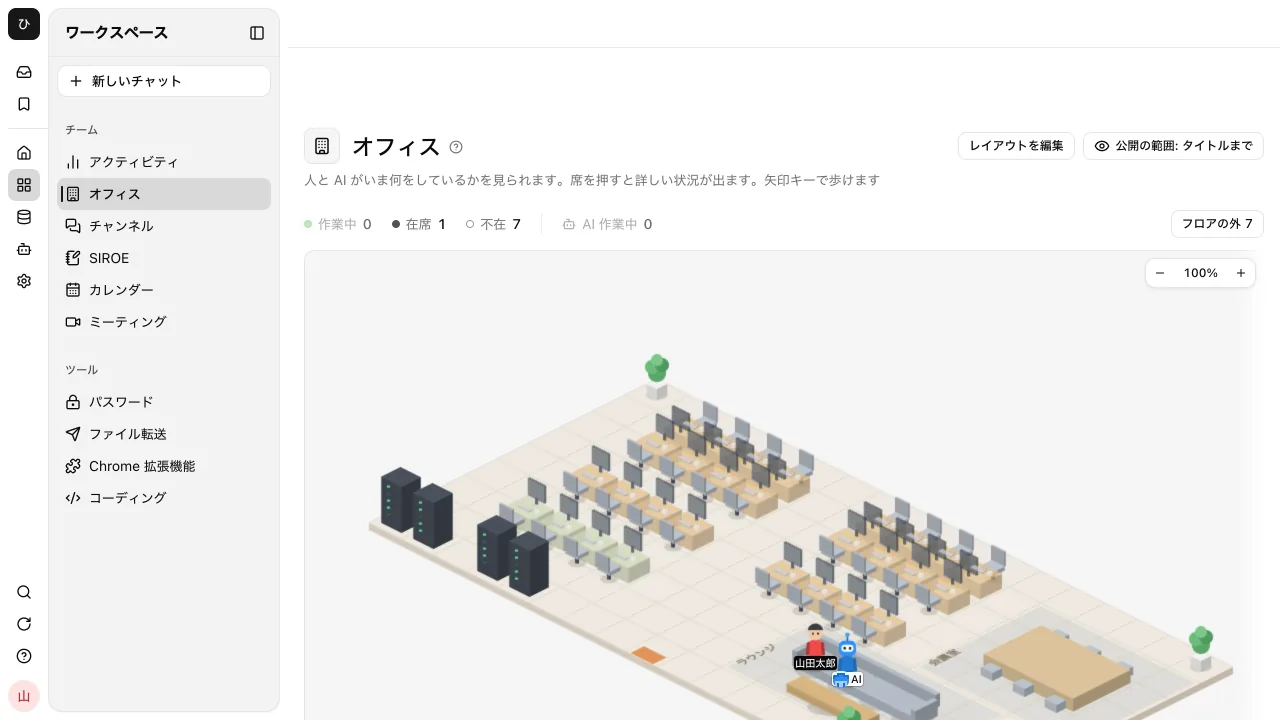
The numbers of people "Working," "Present," and "Away" are shown above the floor. People in a Samurai App call or in a meeting being recorded with the browser extension show "In a meeting," and during a calendar event, "Busy until 15:00" appears. While SINOBI, which gathers suggestions nobody asked for, is checking in the background, a ninja walks nearby. On a PC, you walk the floor with the arrow keys, and when you "Talk to" someone nearby, a channel for just the two of you opens.
How much colleagues can see is chosen by each person in "Visibility," from three levels: "Presence only," "Status too," and "Up to titles." The default is "Up to titles," which shows conversation titles, so narrow the range if you want to hide them. At every level, message bodies are never visible to others. The Office is a screen that shows how work is going, not a feature that records what people do.
On the other hand, there is no mechanism where voices connect when you get close; talking to someone opens a chat. To talk by voice, use Samurai App's Meetings or your usual meeting tool. There is only one floor, and guests from outside the company are not shown. The thinking behind making work progress visible is introduced on the work and progress visibility page.
See work and progress visibility
Frequently asked questions
Can I use virtual office tools for free?
Yes. MetaLife is free for up to 25 people at the same time, WorkAdventure for up to 10 people at the same time, Kumospace for up to 5 registered members, and oVice for one S-size space. However, there are limits on video time and integrations, so compare paid plans if you will use one in earnest.
How is this different from a virtual office where you rent an address?
A virtual office where you rent an address is a service for renting an office address used for company registration and receiving mail. The virtual office tools covered in this article are software that create an online space where remote members gather, which is something completely different.
I am worried it will become employee monitoring.
That is a common concern. Constantly requiring photo or screen sharing is easily perceived as monitoring. Choosing a tool where people can choose their own presence status and how much they show, and sharing before rollout that the goal is to make it easier to start a conversation, helps it last.
If we have Slack or Teams, do we not need a virtual office?
If your team gets things across in chat, there is no need to force one in. A virtual office helps when you are struggling because consultations and casual chat that are not worth a chat message have dropped off. Start with a free plan and use it only at set times, such as the morning meeting, to see whether it fits.
Sources
- oVice pricing
- oVice features
- oVice security
- Gather pricing
- Remotty
- MetaLife pricing
- Kumospace pricing
- WorkAdventure pricing
- Sococo pricing
- roundz
- Samurai App guide: Office
Pricing and specifications were checked on each vendor's official site as of November 9, 2026. Please check each vendor's site for the latest information.