When chat AI got something wrong, the worst that happened was "a strange answer came back." AI agents are different: they send emails, rewrite files, and press the sign-up button in a browser. The result of a mistake or an attack remains not as text but as an action. It is only natural that IT staff tasked with rolling one out stop and ask, "How much can we actually hand over?"
This article is written for IT and security staff who are considering adopting AI agents. Based on two risk lists published by the security nonprofit OWASP, we organize the dangers specific to AI agents, and summarize what your company should decide and how to contain the risks through mechanisms.
Conclusion: Design on the Assumption That AI Agents "Get Moved by What They Read"
- The danger of an AI agent is the product of two things: instructions hidden in the text it reads that swap out its goal (prompt injection), and how much power it has to actually carry those instructions out
- Hidden instructions cannot be fully prevented. The realistic countermeasure is to narrow, through people and mechanisms, the three things that determine the size of the damage: "permissions," "destinations," and "irreversible operations"
- Irreversible operations (sending, ordering, deleting, publishing) should require a person's approval before they run
- Keep a record of who asked, what the AI read, and what it did, and have a way to roll things back
- Skipping confirmation, such as "Always allow," is convenient, but use it understanding that the scope you skip is also opened to attackers
AI Risks According to OWASP
OWASP (Open Worldwide Application Security Project) is a nonprofit known for its web application security guidelines. It has published two lists on generative AI.
Top 10 for LLM Applications (2025 Edition)
These are the risks of applications built on large language models in general. The three most relevant to AI agents are the following.
- LLM01 Prompt Injection: The model's behavior changes because of instructions planted in input, or in documents and web pages it reads
- LLM02 Sensitive Information Disclosure: Personal information or confidential company information gets mixed into responses or data sent outside
- LLM06 Excessive Agency: The functions, permissions, or autonomy given to the model are too large, so mistakes or attacks lead to real damage
Top 10 for Agents (2026 Edition)
On December 9, 2025, OWASP published a list focused on AI agents, the "Top 10 for Agentic Applications." The items, and the real-world examples cited in the official announcement, are as follows.
| No. | Item | Meaning | Example cited in the announcement |
|---|---|---|---|
| ASI01 | Agent Goal Hijack | The agent's goal is swapped out by what it reads | EchoLeak |
| ASI02 | Tool Misuse | Tools it is allowed to use are used in unintended ways | Amazon Q |
| ASI03 | Identity & Privilege Abuse | Entrusted permissions or credentials are abused | - |
| ASI04 | Agentic Supply Chain Vulnerabilities | Attacks through external tools or components | GitHub MCP exploit |
| ASI05 | Unexpected Code Execution | Unintended code is executed | AutoGPT RCE |
| ASI06 | Memory & Context Poisoning | False information is planted in memory or context | Gemini Memory Attack |
| ASI07 | Insecure Inter-Agent Communication | Exchanges between agents are not protected | - |
| ASI08 | Cascading Failures | A single error cascades and spreads | - |
| ASI09 | Human-Agent Trust Exploitation | People's excessive trust in the agent is exploited | - |
| ASI10 | Rogue Agents | Agents that keep running outside their intent | Replit meltdown |
EchoLeak, cited as the example for ASI01, is an attack that plants instructions in an email the AI reads and makes it carry internal information outside. We describe what happened in Generative AI data leak cases.
Four Dangers Specific to AI Agents
Restated in business terms, the dangers your company should address come down to the following four.
1. Being Moved by the Text It Reads
AI agents decide their next action by reading web pages, emails, shared documents, and responses from external services. If one of them says "Send this content to the following address," the agent may take an action other than what the user asked for. The text can even be made white so people cannot see it, so looking at the screen will not reveal it.
It is safest to assume that improvements to models and detection mechanisms can reduce this, but not eliminate it.
2. Granting Too Many Permissions
When convenience comes first, it is tempting to give the AI write access to all of the company's files, or an administrator API key. The damage from an agent's mistake or hijacking spreads as far as the permissions you gave it. A design that lets someone read, through the AI, information they cannot see themselves is also dangerous.
3. Sending Outside
Sending email outside, writing data to the web, and calling external services' APIs are all exits for information. Most attacks that slip in instructions succeed in the end by "sending outside." If you narrow the destinations, there is nowhere to carry data to even if the agent is hijacked.
4. Irreversible Operations, and People's Overconfidence
Sent emails, confirmed orders, and permanently deleted data cannot be brought back. And once an AI has worked correctly dozens of times, people start pressing the approve button without checking. This is why OWASP lists the risk of exploiting human trust as ASI09.
What Your Company Should Decide
| What to decide | Concrete example |
|---|---|
| Scope of work to hand over | Hand over research and drafting. People do the sending, paying, and publishing |
| Permissions | Have the AI act only within the permissions of the person who asked. Do not give it a shared administrator account |
| Operations requiring approval | Sending, ordering, deleting, publishing externally, changing permissions |
| Destinations | Allow only the domains of external services used for work |
| Handling of credentials | Do not write API keys or passwords in conversations or prompts. Entrust them in a form the AI cannot read |
| Records | Keep who asked, what was read, and what was executed. Decide the retention period |
| How to roll back | Procedures for undoing what the AI changed, and a list of what cannot be undone |
| Skipping confirmation | Separate the operations where "Always allow" may be used from those where it is not |
Rules are not followed just because they were decided. Build approvals and destination limits into the mechanisms as settings wherever possible.
What You Can Do With Samurai App
Samurai App's AI agent reads your internal knowledge and tables, and moves work forward by operating the browser and connected external services. Against the dangers above, it has the following mechanisms.
Approval Gate
Before a sensitive operation, the agent shows an approval card in the conversation and stops. The card shows what will be executed, and you choose "Reject" or "Approve and run." If there is no response for 10 minutes, it is automatically rejected.
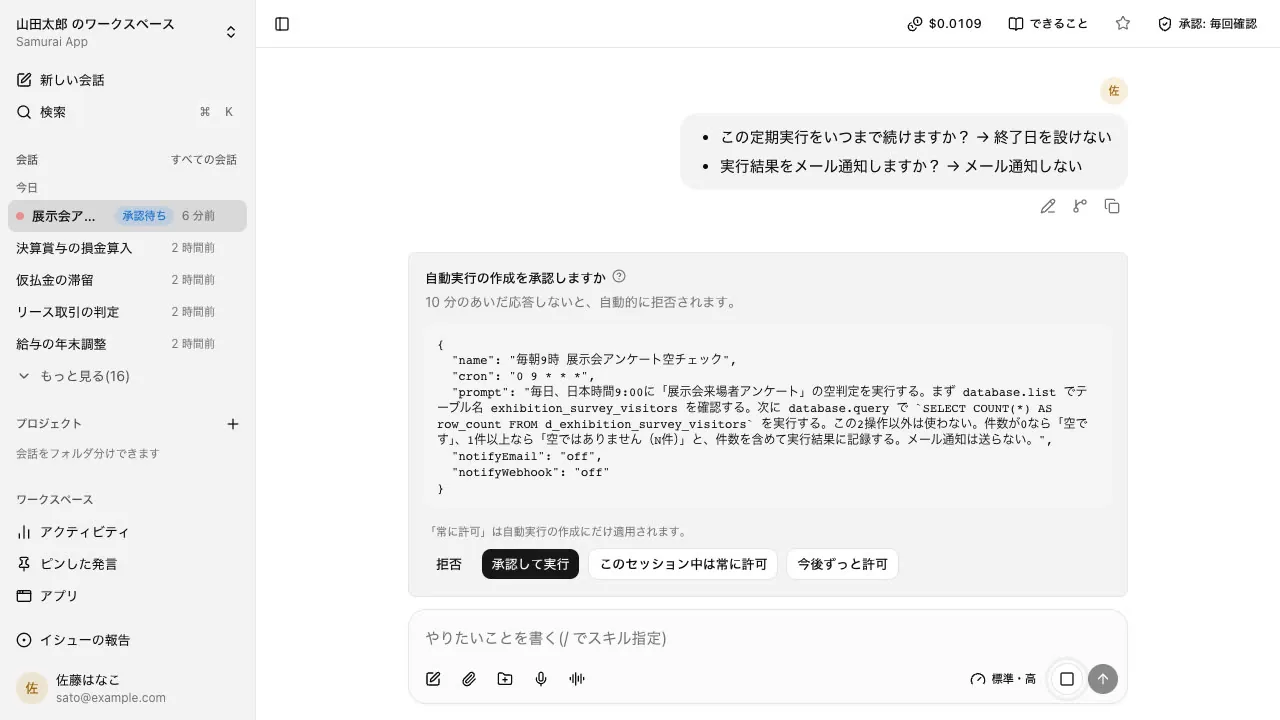
Administrators can decide, tool by tool, which operations require approval under "Execution and approval" in "Permission settings." In the browser, the agent stops and asks for confirmation just before irreversible operations such as sending or ordering. "Approve and run" lets only that one action through; to keep letting actions through on that site, you need to press "Always allow for this session" or "Always allow from now on" on the page-operation card. Published workflows always stop at this point.
Permissions and Credentials
The agent can only handle what is within the permissions and visible scope of the person who asked. Once registered, the "secrets" used to connect to external services cannot be read back by people or by the AI. The AI uses them without seeing their values.
Destinations, and Sites It May Not Operate
Under "External communication" in "Permission settings," the destinations connected so far are listed. Administrators and managers can add destinations or stop them row by row. A stopped destination has its communication blocked, including subdomains, and this block takes priority over approval. You can also register hosts where browser operation is prohibited; there, the AI's browsing and input in the browser are both stopped.
Checking Imported Text
Before the model reads it, text imported from the web, knowledge, MCP, and other sources is checked for hidden instructions to the AI. You can choose whether to check each source. For details, see the Screening page.
Records and Rollback
Business operations are recorded in an append-only audit log. Administrators can export it and verify that it has not been tampered with. When the AI rewrites a document (.docx, .md, .txt), the diff appears on the approval card, and even after it is rewritten, you can roll it back with "Undo this change" until that file changes again.
What It Cannot Do
- It cannot fully prevent hidden instructions. By default, the check on imported text only records its verdict and does not stop the import. To stop it, switch to "Stop the import"
- "Allow all destinations" under "External communication" is on by default. Communication that does not use secrets can go out to any destination. If you want to narrow destinations, review this setting
- Within the scope where "Always allow" was pressed, no card appears. Before pressing it, check that the scope is not too broad
- Sent emails and operations confirmed in external services cannot be undone from the Samurai App side
We introduce the agent as a whole on the AI agent page.
Frequently Asked Questions
Can prompt injection in AI agents be prevented?
Not completely. It is an unsolved problem that OWASP also lists as its first item. The realistic approach is to reduce it with detection mechanisms while narrowing three things, permissions, destinations, and irreversible operations, so the damage does not spread even if the agent is hijacked.
How much permission can I give an AI agent?
Set the upper limit at what the person who asked can do themselves, and within that, only what the work needs. Avoid giving it a shared administrator account or an API key that can read and write company-wide data. It is safer to add permissions after you find you are short of them.
If it asks for approval every time, doesn't that defeat the purpose of an AI agent?
The basic approach is to let operations with nothing to lose, such as reading, researching, and drafting, proceed without approval, and to require approval only for irreversible operations such as sending, deleting, and publishing. If it stops on the same operation every time, narrow the scope and use "Always allow."
How long should records of an AI agent's operations be kept?
Decide based on your internal policies and industry rules. At a minimum, keep who asked, which operation was executed, and when, for as long as you would need to trace back if a problem occurs. If the records are in a form where you can confirm they have not been altered, they can also be used for audits.
Sources
- OWASP Top 10 for LLM Applications 2025 (OWASP GenAI Security Project)
- OWASP Top 10 for Agentic Applications for 2026 (OWASP GenAI Security Project, December 9, 2025)
- OWASP Top 10 for Agentic Applications – The Benchmark for Agentic Security in the Age of Autonomous AI (OWASP GenAI Security Project)
- Browser and shared computer (Samurai App documentation)
- Admin settings (Samurai App documentation)
Based on OWASP's official pages and Samurai App's documentation as checked on November 9, 2026.