"When is the deadline for expense reports?" "Where do I apply for paid leave?" People in general affairs, accounting, and IT get the same questions almost every day. Each one takes only a few minutes, but every time, their work stops, and they can't find a solid block of time for their own tasks.
This article explains how to reduce repeat questions in this order: count the inquiries, write the answers, consolidate where people ask, and hand off to a bot. It also covers what to do before bringing in a tool, the steps for setting up a bot in Samurai App that answers from internal documents, and what you can't leave to a bot.
Bottom line
- The first thing to do is log inquiries for about two weeks and count them. Once you know which questions come in how many times, the order in which to write answers is settled.
- Write each answer in one place per question, with the last-updated date and the person in charge. When the same answer lives in several places, people read the old one.
- Consolidate where people ask into one channel. When questions come in through private chats, the answers aren't seen by others, and the same questions keep coming.
- Bring in the bot last. A bot can only answer what's written in your documents. If you bring it in before the documents are in order, questions it can't answer come back to people.
Why the same questions keep coming
- The answer isn't written down. It lives only in the head of the person in charge, so asking is the only option.
- It's written down but can't be found. Even if it's on page 12 of a policy PDF, people figure asking is faster than searching.
- What's written is out of date. Once someone has read an outdated answer, they stop trusting the documents and ask the person in charge directly.
- Answers get buried in private messages. When you answer in a one-on-one chat, others with the same question never see it.
Before any of these is a tool problem, they're problems of where answers are kept and how people ask.
Steps to reduce repeat questions
1. Log and count inquiries
For about two weeks, record incoming questions in a table. These five columns are enough.
| Date | Question (in the asker's own words) | Category | Answer given | Time taken |
|---|---|---|---|---|
| Nov 4 | By when do I need to submit my travel expenses? | Expenses | By the 5th business day of the following month | 3 min |
| Nov 4 | Where's the request form for a new PC? | IT | The URL of the request form | 2 min |
Record questions in the words they arrived in, without rephrasing. Later, when you write document headings, they give you clues to the words people search with.
2. Write answers starting with the most frequent questions
In order of frequency, write one page per question.
- Write the heading in the words of the question as it arrived ("Deadline for travel expense reports")
- Put the answer in the first one or two sentences, with steps and exceptions after
- Add links to request forms and applications
- Write the last-updated date and the person in charge
A short page pulling out only the frequently asked parts gets read more than the full text of a policy. Add a link to the original policy at the end.
An answer page might look like this.
Deadline for travel expense reports

The deadline is the 5th business day of the following month. Submit through the expense system.

- How to submit: sign in to the system > "Travel expenses" > enter the route and amount
- If you've missed the deadline: talk to the person in charge in accounting (it is not accepted automatically)
- Related policy: Travel Expense Policy, Article 4

Updated: 2026-11-01  Owner: Accounting Section
3. Consolidate where people ask into one place
Decide where to ask for each area, such as "Expense questions go to this channel," and let everyone know. When you answer in the channel, others with the same question can read the exchange. For questions sent to you privately, ask the person to repost in the channel, or post the answer in the channel too.
4. Answer with a link to the document
Instead of writing out the answer each time, reply with a link to the page you wrote in step 2. The asker learns where the page is and looks it up themselves next time. Log questions with no page as candidates for new pages.
5. Let a bot handle the first response
Once you've gotten this far, what a bot can take on becomes clear. The bot answers from the documents, and people take only the questions it can't answer.
6. Review once a month
Look at the log and find questions whose counts aren't going down. What you fix depends on whether the page is hard to find, the wording is hard to follow, or the policy itself is confusing.
How to do it in Samurai App
In Samurai App, you write company rules in SIROE pages, create a bot that reads those pages to answer, and put it in a channel.
1. Write answers in SIROE pages
Write the steps for expense reports and where to find request forms in SIROE pages. You can choose who sees a page: yourself, a group, or the tenant. Set company-wide rules to "Tenant." The bot reads materials with the permissions of the person asking, so pages the asker can't see aren't used for the answer.
2. Create a bot that answers
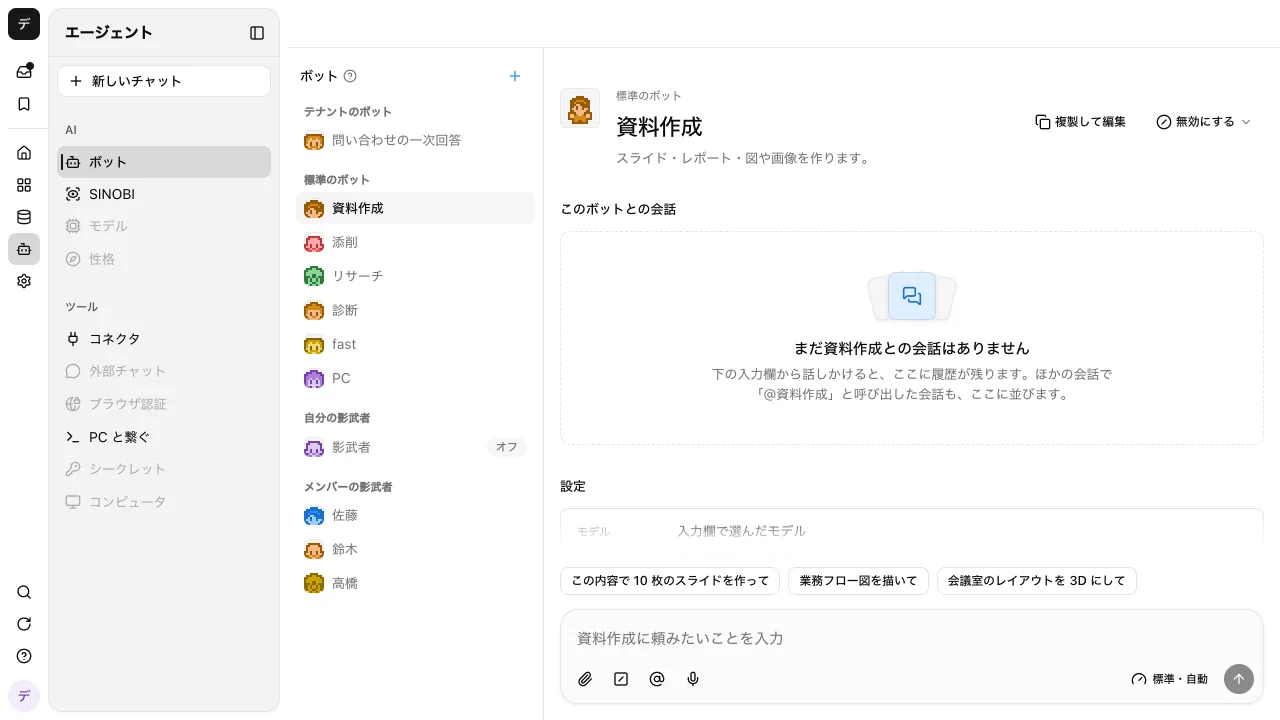
You can create a bot by clicking "+" on the "Bots" screen, or by asking in a conversation, "Create a bot that answers expense report questions." A bot holds its instructions, the features it uses, the knowledge labels it reads, example questions, and so on. Write instructions like these.
- Answer only based on what's written in internal pages and knowledge
- Include the page the answer is based on
- Don't guess about anything not written down; answer "Please check with the person in charge"
Share the bot you created with the whole tenant or your group using "Share" on the bots screen.
3. Put it in a channel and call it with "@"
From the button in an internal channel's header, add the shared bot to the channel (the channel's creator and administrators can set this). In the channel, type "@" followed by the bot's name, and the bot will always answer.
Bots in channels answer by reading the web, knowledge, files, tables, and procedures. They don't write anything or run apps. Answers based on materials that only one person can see are not shown to other members until the owner of those materials allows them to be shown.
4. Call it from Slack or Microsoft Teams
If your internal conversations happen in Slack or Microsoft Teams, once an administrator registers the workspace or bot in "External chat," you can call Samurai App's AI from channels where the app or bot has been added. One Slack workspace can be registered to only one tenant.
Take questions that go to specific people with a "clone bot"
Questions that depend on a specific person's experience rather than policy, such as "What's the history with this client?", are hard to turn into pages. Samurai App's "clone bot" is an AI you can set up, one per member, that drafts answers from that person's files and memory. The draft reaches the asker only after the person checks and approves it (there's also a setting to skip approval depending on who's asking). The person can set the "scope they can answer" (up to 200 characters).
For details, see the repeated questions page and the bots feature. How to choose a tool for gathering internal documents in one place is summarized in Internal Wiki Tools Compared.
What you can't leave to a bot
- It can't answer what isn't written down. If you skip logging and documenting and bring in a bot, the questions it can't answer go straight back to people.
- Outdated documents produce outdated answers. When a policy changes, update the page first. The bot's answers will follow the updated page.
- People make judgments on exceptions. For judgment calls such as "I missed the deadline; can I still file?", write in the instructions that the bot should not answer and should pass it to the person in charge.
- It can't submit the request on someone's behalf. Bots in channels only read; they don't write or perform requests.
- AI processing costs money. Each time the bot answers, it uses credits for the AI processing.
Frequently asked questions
Which should we build first, an internal FAQ or a bot?
The FAQ (the answer documents) comes first. The bot answers by reading documents, so without them it can't answer. If you write about 20 to 30 FAQ entries and cover the top questions from your inquiry log before putting a bot in place, the effect is easier to see.
How should we count inquiries?
A spreadsheet is enough at first. Record five things for two weeks (date, question, category, answer, and time taken), and you'll see which categories take up your time.
What if the bot gives a wrong answer?
First, check the content of the page it based the answer on. If the page is outdated, update it. If the page is correct but the answer is wrong, add "Don't answer anything not on the page" to the bot's instructions. If you instruct it to include the source page with its answers, the asker can check too.
What if the person asking says they want to ask a human?
The bot handles first-line responses; it doesn't close the human help desk. Decide that questions the bot couldn't resolve go to the person in charge. Those questions become candidates for answers to add to the documents.
Sources
- Workspace (bots) (Samurai App documentation)
- Channels (Samurai App documentation)
- SIROE pages (Samurai App documentation)
- External chat settings (Samurai App documentation)
Confirmed in the Samurai App documentation as of November 9, 2026.