Attach an Excel customer list or a contract PDF to a generative AI as is, and the summary or tally is done in an instant. Convenient as that is, even if a confidential file is uploaded to ChatGPT on a personal account, IT has no way to see it. You may want to "at least block file attachments," but whether writing it into a policy is enough, and what you need to stop it with a system, is surprisingly rarely laid out.
This article is for IT and security staff who decide the company's rules and systems for generative AI. It splits the ways to block or restrict file uploads into four: policy, per-site blocking, DLP (data loss prevention) products, and browser extensions, and for each, lays out what it stops, what it does not, and which licenses it needs, as confirmed in official documentation. Where to draw the line on what information may be entered is covered in Is it safe to put personal information into ChatGPT?, so here we focus on "the mechanisms that stop it."
Bottom line: choose a mechanism that "looks at the contents and stops it" over a total ban
- A policy ban alone leaves the decision at the moment of attaching to the individual. The national guidelines also ask users to take care not to inappropriately enter confidential or personal information
- Blocking whole sites (such as Chrome's URL blocking) costs nothing extra, but generative AI itself becomes unusable, and it remains usable from personal devices and smartphone apps
- To look at a file's contents and stop it only when it contains confidential information, you need a DLP product. Microsoft Purview requires an E5-class license, and Chrome requires Chrome Enterprise Premium
- As of November 9, 2026, we could not find in the official documentation a setting on ChatGPT's business plans that lets an admin block only file attachments to conversations
- Every method has gaps. Combine the stopping mechanisms with a way to notice before attaching and a record of what was sent
Why file uploads are a problem
Files are sent "without anyone seeing all of the contents"
When you paste text, the contents at least appear on screen, but files are different. With an Excel file of thousands of rows or a PDF of dozens of pages, even the person attaching it has not seen everything. Personal information left on another sheet, or another customer's information buried in a quote file, is sent as is.
A personal account is invisible to the company
On a business plan the company has contracted, the company can control training use and retention periods. When employees use personal accounts, the company has no way to know which files were sent.
The thinking in the national guidelines
The AI Guidelines for Business by the Ministry of Internal Affairs and Communications and the Ministry of Economy, Trade and Industry (version 1.2, March 31, 2026) ask businesses that use AI to take care not to inappropriately enter personal or confidential information into AI systems and services. The Digital Agency's guideline on the procurement and use of generative AI for the advancement and innovation of public administration is for government agencies, but it states that, as a rule, confidential information cannot be handled in cloud-based generative AI that can be used just by agreeing to terms. It is a useful reference for private companies drafting their own rules.
4 ways to block or restrict uploads
| Method | What it can stop | What it requires | What it cannot stop |
|---|---|---|---|
| Ban it in internal policy | Nothing (compliance is up to the individual) | A policy and awareness | Attachments by people who do not know or forgot the policy |
| Block whole sites | The generative AI site itself | Browser or network settings | Personal devices, smartphone apps |
| Use DLP to inspect contents and stop | Attachments of files containing confidential information | Licenses such as Microsoft Purview or Chrome Enterprise Premium | Browsers outside its scope, information that does not match the conditions |
| Check before attaching with a browser extension | Attachments the person noticed and stopped | Distributing the extension | Browsers without the extension, attachments where the person chose "send" |
1. Ban it in internal policy
The easiest method. Write into the policy which generative AI may be used, when files may be attached, and what kinds of information must not be attached, and make it known. It costs nothing, but compliance depends on the individual, and there is no way to notice violations. Think of it as something to decide first, on the assumption that it will be combined with other methods.
2. Block whole sites
This method makes generative AI sites you do not want used impossible to open through browser or network settings. In Google Chrome, you can register up to 1,000 URLs in "URL blocking" in the Admin console (URLBlocklist as a policy).
However, only whole sites can be blocked. Fine-grained control such as "block only file attachments but allow questions" is not possible. For the Gemini app in Google Workspace, you can turn it on or off per organizational unit or group under "Generative AI" > "Gemini app" > "Service status" in the Admin console. Here too, we could not find a setting that blocks only file uploads.
A realistic combination is to allow only the generative AI the company has contracted and block everything else.
3. Use a DLP product to inspect contents and stop
This method inspects a file's contents and blocks the upload only when it contains confidential information. Generative AI itself stays available, and only risky files are stopped.
Microsoft Purview (Endpoint DLP)
With Microsoft Purview Endpoint DLP, "Browser and domain restrictions to sensitive data" lets you set uploads to cloud service domains to "Audit only," "Block with override," or "Block." Among the groups of sensitive service domains, a "Generative AI websites" group is provided in advance.
There are three caveats. It applies to files that match the DLP policy conditions (sensitive information types or labels), not to all uploads. In Chrome and Firefox, uploads and pastes are covered only when the Microsoft Purview extension is installed. The license is included in Microsoft 365 E5, the Purview suites, and others.
Inline protection in Microsoft Edge for Business
Edge for Business has a mechanism that allows, blocks, or audits, within the browser, uploads to unmanaged generative AI such as ChatGPT (consumer), Google Gemini, DeepSeek, and Perplexity. It requires Windows devices managed with Intune and Edge for Business (version 144 or later). Files of up to 3 MB are inspected, and the documentation states that it may not work well with apps like ChatGPT that encode content before sending. Protection for data sharing to unmanaged apps is pay-as-you-go.
Microsoft Defender for Cloud Apps
In the list of cloud apps, you can mark an app as "Unsanctioned." However, the official documentation says that "unsanctioning an app doesn't block use," and actually blocking it requires integration with Microsoft Defender for Endpoint or similar.
Chrome Enterprise Premium (data protection rules)
With the Chrome Enterprise Premium add-on, you can create rules to block, warn, or audit when files are uploaded or content is pasted in Chrome, among other conditions. You can narrow the conditions by URL, URL category, and the signed-in account (personal or organizational). Text inspection is limited to 10 MB per file, and rule changes can take up to 24 hours to take effect.
4. Check before attaching with a browser extension
When a file is attached or text is pasted on a generative AI site, a browser extension checks the contents and alerts the person if it finds personal or confidential information. It is less burdensome to roll out than a DLP product, and companies whose device management is not yet in place can start with it.
On the other hand, most of these are mechanisms to "make people notice," not to "stop." If the person chooses "send," it is sent. It can also be sent from browsers or desktop apps without the extension. If you distribute it with Chrome's ExtensionInstallForcelist policy, users cannot remove or disable the extension.
What the company should decide
- Decide which generative AI may be used. Standardize on business plans the company has contracted, and prohibit personal accounts for work
- Decide which files may be attached, by classification. Divide into published materials, internal-only materials, files containing personal information, contracts, and so on, and write down whether each class is allowed
- Decide the scope of the stopping mechanisms. Based on the state of device management and your licenses, decide how far to use site blocking, DLP, and browser extensions
- Write down the gaps. List the routes that remain outside the mechanisms, such as personal devices, smartphone apps, and desktop apps, and cover them in the policy
- Decide how the records are reviewed. Decide who reviews records of what was stopped and what was sent, and when
The problem of generative AI use spreading beyond the company's view is organized on the shadow AI countermeasures page.
What Samurai App can do
Samurai App's Chrome extension "Samurai App Data Guard" falls under the fourth method above. On the ChatGPT, Gemini, Claude, Copilot, Perplexity, NotebookLM, DeepSeek, Grok, and Genspark sites, it checks file attachments and pasted text before they are sent.
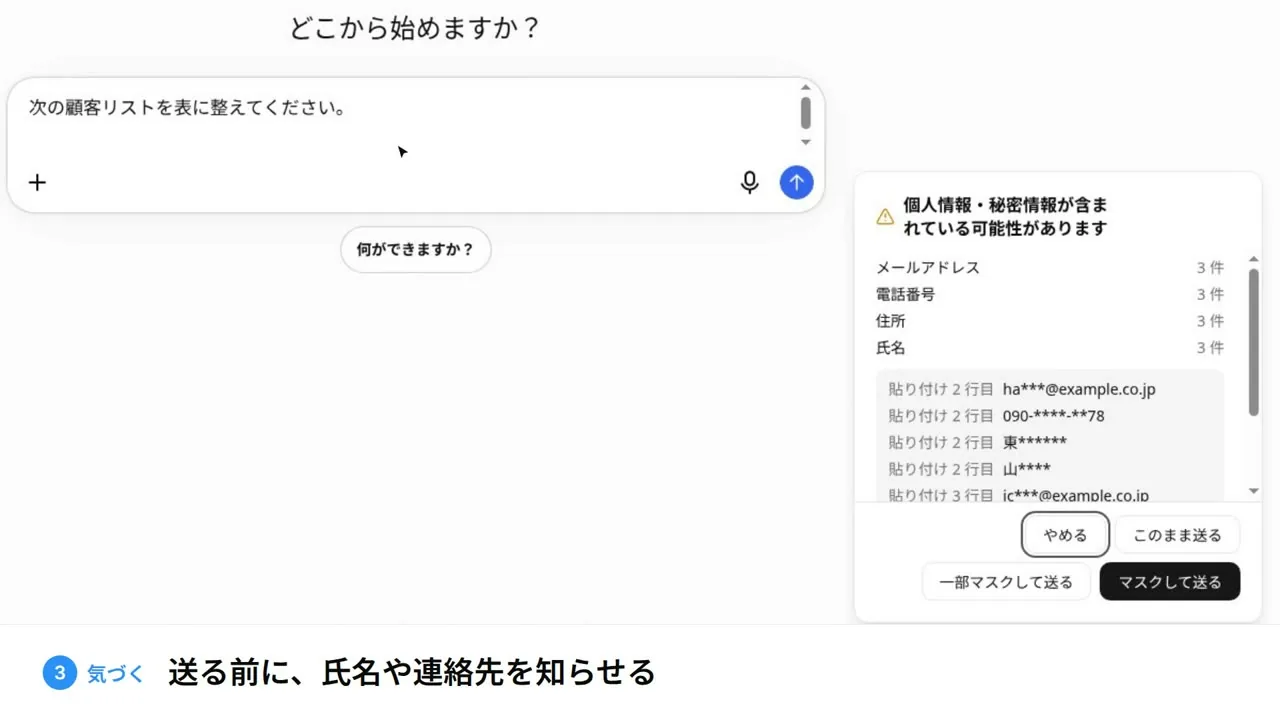
- What it checks: email addresses, phone numbers, My Number IDs, addresses, card numbers, and secret values such as API keys and
.enventries. If there are headings or labels such as "Name," "Date of birth," or "Account number," it also finds the values in those columns or next to them - Options: cancel, send as is, or send masked (send a copy in which the found information is replaced with its category name). "Send partly masked" replaces part of each found value with *
- Checks happen only in the browser: no AI model is used, and file contents are not sent outside for the check
- Distribution: it can be installed from the Chrome Web Store and distributed to managed devices with Chrome's ExtensionInstallForcelist policy. The extension ID and the settings line are shown under "Data Guard extension" in Samurai App's "Compliance"
- Records: when the extension is connected to Samurai App, sending something with findings leaves the site and the count (not the values) in the audit log. The check works without connecting; only the record is not kept
Here is what it cannot do as well.
- It does not ban. It finds things and lets the person choose; if the person chooses "Send as is," it is sent. If you want to stop uploads entirely, combine it with site blocking or a DLP product
- It does not check characters typed into the input field or the send button. It covers attachments and pastes
- Images, zip files, and files it could not read pass through as "not inspected." It cannot create a masked copy of a PDF
- It works in Chrome and Edge. Sending from Firefox, Safari, or desktop and smartphone apps is not covered
Files attached in Samurai App's chat and uploads to knowledge are also checked with the same rules when "Pre-upload check" is turned on. For details, see the PII detection page.
Frequently asked questions
Can I block only file uploads to ChatGPT?
As of November 9, 2026, we could not find in the official documentation an admin setting on ChatGPT's business plans that blocks only file attachments to conversations. To stop them, use a mechanism that inspects uploads on the browser side, such as Microsoft Purview, Edge for Business, or Chrome Enterprise Premium.
Is there a free way to restrict uploads to generative AI?
Chrome's URL blocking can make generative AI sites themselves impossible to open. However, it cannot stop just files; the whole site becomes unusable. Inspecting contents and stopping requires a DLP product license.
Can I also prevent uploads from personal smartphones?
Browser settings and DLP do not reach devices the company does not manage. Cover this with a policy that prohibits handling work files on personal devices and with mechanisms that keep work files off personal devices (device management and restrictions on storage sharing).
Should we ban file attachments to generative AI entirely?
A total ban tends to push use toward personal accounts and personal devices. Allowing attachments of files without personal or confidential information in the generative AI the company has contracted, and stopping only risky files or making people notice before sending, is more likely to be followed.
Sources
- AI Guidelines for Business (Ministry of Internal Affairs and Communications and Ministry of Economy, Trade and Industry, version 1.2, March 31, 2026)
- Guideline on the procurement and use of generative AI for the advancement and innovation of public administration (Digital Agency, June 12, 2026)
- Configure endpoint data loss prevention settings (Microsoft Learn)
- Learn about browser data loss prevention (Microsoft Learn)
- Microsoft Purview service description (Microsoft Learn)
- Govern discovered apps (Microsoft Learn)
- Use Chrome Enterprise Premium to integrate DLP with Chrome (Google Workspace Admin Help)
- Allow or block access to a list of URLs (Chrome Enterprise Help)
- Turn the Gemini app on or off (Google Workspace Admin Help)
- ExtensionInstallForcelist (Chrome Enterprise policy)
- Admin settings (Samurai App documentation)
The official pages of each vendor and ministry and the Samurai App documentation were checked as of November 9, 2026.