When your browser warns that a password has been leaked, or you see news of a large breach, you start to wonder whether your own passwords are safe. Yet typing a password into some website to check it probably feels risky in itself.
This article is for anyone who wants to check whether their own or their company's passwords have been leaked, and for IT staff deciding how to run checks inside the company. In order, we lay out what a leak check tells you, the method that lets you match passwords without sending them, and what to change first when one is found.
The descriptions of Have I Been Pwned and Google reflect what their official sites showed as of November 9, 2026.
Bottom line: check two things, your "address" and your "password"
- There are two kinds of leak checks. One checks whether your email address was included in a service that suffered a breach; the other checks whether the password itself appears in breach data
- Passwords can be matched without sending them. Have I Been Pwned's Pwned Passwords receives only the first 5 characters of the hash, and the final match is done on your side
- "Not leaked" does not mean "safe." Short passwords and reused passwords stay easy to crack even if they are not in breach data
- If one is found, start with the accounts tied to money and admin privileges. Change any other services that use the same password at the same time
- Do not type your password as-is into sites that claim to check it. Fake sites are mixed in among them
What "leaked" means
Your email address was included in a breached service
When member information leaks from a service, email addresses and passwords (usually hashed) circulate together. Enter your email address on the Have I Been Pwned home page, and you see a list of the breaches that included that address. As of November 9, 2026, the home page shows about 17.8 billion accounts from 1,049 breached sites.
What this tells you is "which service it leaked from." It prompts you to check whether you use the password you used on that service anywhere else.
Your password is included in breach data
The other check is whether the password string itself has appeared in past breach data. Whose account it belonged to does not matter. Passwords that appear in breach data are on the lists attackers try first when guessing. Even a string you think only you use is just as dangerous if someone else used the same one and it leaked.
The US NIST guidelines (SP 800-63B) also require services to check new passwords against a blocklist that includes past breach data when accepting them.
How passwords are matched without being sent (k-anonymity)
Have I Been Pwned's Pwned Passwords does not receive your password to match it. It uses a method called k-anonymity, matching in the following four steps. As an example, take the password password.
- Hash it on your side. The SHA-1 of
passwordis5BAA61E4C9B93F3F0682250B6CF8331B7EE68FD8 - Send only the first 5 characters. You query
https://api.pwnedpasswords.com/range/5BAA6 - Receive the rest of every hash starting with the same 5 characters, all at once. The response lists the remaining 35 characters of each hash beginning with
5BAA6, along with the number of times each appeared in breach data - Match on your side. If the rest of your hash,
1E4C9B93F3F0682250B6CF8331B7EE68FD8, is in the list, that password is included in breach data
Only 5 characters are sent. Many hashes start with the same 5 characters, so the service cannot tell which password you checked. The official page also explains that you can match without sending either the password itself or the full hash.
In addition, if you add Add-Padding: true to the query, rows with a count of 0 are added so that the response has a random number of rows between 800 and 1,000. This makes it harder for someone watching the traffic to guess which 5 characters you queried from the size of the response. The added rows have a count of 0, so you ignore them when matching. The official documentation says no API key or subscription is needed, and that Pwned Passwords has no rate limit.
Ways to check whether a password has leaked
Have I Been Pwned
You can check for email address breaches on the home page. You can also sign up to be notified of future breaches. Matching passwords is usually done through password managers and services that use Pwned Passwords, described above.
Google Password Checkup
You can check all the passwords saved in Chrome or your Google account at once. According to Google's help, it checks three things: whether passwords are "compromised," "reused across multiple accounts," or "weak." In Chrome, open Google Password Manager and choose "Checkup" on the left. In browsers other than Chrome, open passwords.google.com.
Password managers' check features
Many password managers used by companies have a feature for checking saved passwords. If you want to check the company's shared accounts together rather than one person's browser, this is the better fit. We compare the products in our password manager comparison.
What to watch out for
Some sites claim to "check how secure your password is" and ask you to type it in. Some of them are fake sites that simply collect what is entered. Also avoid opening a site from a link in an email or text message saying "Your password has been leaked." When you check, use the feature built into your browser or the tool your company has chosen.
What to do when one is found
- Change the password on the service where it was found to a new value. Make it completely different, not a slightly altered value (such as adding a number at the end)
- Also change other services that use the same password. Attackers try leaked email and password pairs on other services too
- Set up two-step verification. Even if a password leaks, nobody can sign in without the second step
- Look at the sign-in history. If there are sign-ins you do not recognize, follow that service's procedure to deal with them
If a leak is found in a company account, deciding the order of changes in advance saves hesitation. A rough guide is: things tied to money (banking, payments, advertising), then things with admin privileges (cloud, domains, admin screens of internal systems), then things that speak in the company's name (social media, email distribution).
The website of Japan's Ministry of Internal Affairs and Communications says that regular password changes are unnecessary as long as there has been no leak. Put the other way, learning of a leak is a clear reason to change a password.
What Samurai App's Check tab tells you
The "Passwords" screen in Samurai App has a "Check" tab that checks all the items in the vaults you can open from four angles.
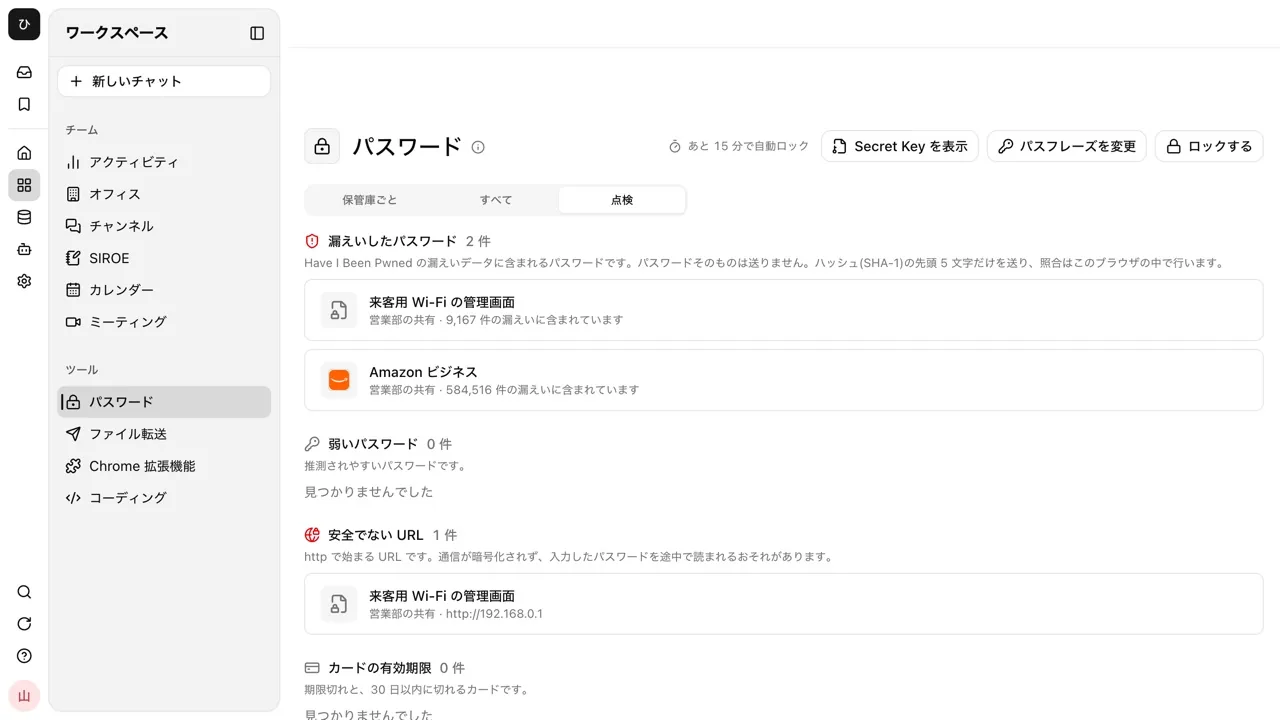
- "Breached passwords": lists passwords included in Have I Been Pwned's breach data, and shows the count, as in "Found in N breaches." Matching uses the k-anonymity method above: the browser sends only the first 5 characters of the SHA-1 hash, and the rest is matched inside the browser. Queries include
Add-Padding. They do not pass through Samurai App's servers - "Weak passwords": lists common passwords (such as
123456andpassword), passwords shorter than 8 characters, and passwords shorter than 12 characters that use only one type of character (lowercase, uppercase, numbers, or symbols) - "Insecure URLs": URLs starting with
http. Traffic is not encrypted, so a password you enter could be read along the way - "Card expiry": cards that have expired and cards that expire within 30 days
Matching starts as soon as you open the tab, and each password is queried only once. Even if matching fails, the other three are still shown, and "Retry" re-runs just the matching. Click an item, fix it, and save, and the results update.
There are also things it cannot do.
- It does not check for reuse. Items in a vault that use the same password are outside the check
- It does not check for email address breaches. Check addresses on the Have I Been Pwned home page
- The strength check is simple. It does not measure how easy a password is to guess with a dictionary
- Vaults you cannot open are not checked. Vaults you are not a member of are outside the check
For details, see the Password manager page.
Frequently asked questions
Can I check for leaked passwords for free?
Have I Been Pwned's email address check and Google Password Checkup are free to use. The official site also says the Pwned Passwords API can be used without an API key or subscription.
What should I do if Chrome warns me that a password has been leaked?
Change the password for the site shown, and also change other sites that use the same password. You can also check whether any other passwords have leaked with "Checkup" in Chrome's Google Password Manager.
If a password has not leaked, can I keep using it as is?
Even if it is not in breach data, a short or reused password stays easy to crack. The basics are a different long password for each service and two-step verification.
Can I check the company's email addresses for leaks all at once?
Have I Been Pwned has a feature that lets you register and search your company's domain after signing in. Check the registration steps and pricing conditions on the official site. We also cover leak cases and what to decide inside the company in Cases of information leaks through generative AI.
Sources
- Have I Been Pwned (Have I Been Pwned)
- Pwned Passwords (Have I Been Pwned)
- API v3 documentation (Have I Been Pwned)
- Domain Search (Have I Been Pwned)
- Password Checkup (Google Account Help)
- NIST SP 800-63B Digital Identity Guidelines: Authentication and Authenticator Management (NIST)
- Setting and managing secure passwords (Ministry of Internal Affairs and Communications, Cybersecurity Site for Citizens)
- Passwords (guide) (Samurai App)
The descriptions from Have I Been Pwned, Google, and public agencies were checked against each official site as of November 9, 2026.