Plenty of companies leave their internal passwords to spreadsheets or individual browsers. Start researching password managers, and you find that most products come from overseas, prices are in dollars, and the features available vary from plan to plan. We often hear, "They all look alike, and I don't know what to base the choice on."
This article is for the IT and general affairs staff choosing a password manager for their company. We compare eight business products by official pricing, headcount conditions, how sharing works, audit logs, and breach checks, and lay out what to look at when choosing.
Prices and features reflect only what each vendor's official website showed as of November 9, 2026. Values we could not read because the pricing page renders amounts on screen after loading are marked "Not confirmed officially." Check the latest official pages before adopting a product.
Bottom line: compare "the unit of sharing" and "the steps when someone leaves" more than price
- Only some products state their prices officially. We could read prices for 1Password (Business is $8.99 per user per month, billed annually), Bitwarden (Teams is $4 per month, billed annually), and Proton Pass (Essentials is $1.99 per month, billed annually). The others were quote-based or showed amounts on screen
- The unit of sharing differs by product. Check first whether sharing works by vault, folder, or collection, and whether you can create view-only permissions
- If you are thinking about people coming and going, look at audit logs and the operation for removing members. No product can take back values a removed person noted down. After removing someone, you need to change the passwords for the services in question
- If you start small, watch the headcount conditions. 1Password's Teams Starter Pack is up to 20 users, LastPass Teams up to 50, and Proton Pass Essentials 3 to 30
- How easy it is to switch depends on the export format. 1Password and Bitwarden state officially that exported files are not encrypted. We cover the migration steps in How to migrate between password managers
How to choose a password manager
Encryption method (can the server operator read the contents?)
With a method that encrypts on the device before sending to the server, even the service operator cannot read the contents on the server. Check each vendor's security documentation on its official site to see whether it uses this method. Also, whether an administrator can open the vault of an employee who forgot their password (the recovery mechanism) differs by product. Deciding first whether you want the company to handle recovery, or prefer that nobody but the person can open it, narrows the candidates.
Unit of sharing and permissions
If you share accounts used by a team, check the unit of sharing (vault, folder, or collection) and the permission levels. Bitwarden shares through collections, and user groups are available from Teams. LastPass offers shared folders from Teams, and groups are a Business feature. Proton Pass lets you share vaults and items even on Essentials, and sharing with groups is a Professional feature. Even with a "can view but not copy" permission, a value shown on screen can still be noted down; that is true of all of them.
Audit logs and the admin console
Whether you can trace who added, changed, or shared an item and when tends to differ by plan. Bitwarden includes "Event and audit logs" from Teams. LastPass reports are basic on Teams and detailed on Business. Proton Pass puts detailed activity logs in Professional. If you need records that will hold up to an audit, check the feature tables for the higher plans as well.
Single sign-on and automatic account creation
At companies that manage employee accounts with Entra ID or Okta, support for SSO and SCIM (automatic account creation and deletion) determines how much work there is after rollout. Bitwarden supports SCIM from Teams, and passwordless SSO is in Enterprise. LastPass SSO integration is not available on Teams, and is limited to 3 apps on Business. Proton Pass puts SSO and SCIM in Professional.
Checking for breached and weak passwords
Another point of comparison is a feature that checks whether saved passwords appear in past breach data or are too short. 1Password offers Watchtower alerts on Business, Bitwarden offers vault health reports from Teams, Dashlane offers a Password Health dashboard, and LastPass and Proton Pass offer dark web monitoring. We explain how the methods differ in How to check whether your password has been leaked.
Recovery when someone forgets
With products that encrypt on the device, if you forget your master password (a passphrase, in some products), even the operator cannot recover the contents. Some business products provide a way for administrators to help with recovery. Bitwarden includes an "Account recovery workflow" in Enterprise. On the other hand, a mechanism that lets administrators recover vaults can also become a way to open everyone's vault if an administrator's account is taken over. Which to choose is something to decide as company policy.
How pricing is counted
Even when a price is written as per user per month, many products base that unit price on annual billing. 1Password's Teams Starter Pack is a flat rate for up to 10 users, Keeper's Business Starter is for 5 to 10 users, and Proton Pass and Zoho Vault have minimum headcounts. When estimating, compare not just "users x unit price x 12 months" but also the minimum headcount and how exchange rates and taxes are handled.
Password manager comparison table
Prices are monthly per user. For products priced in dollars, prices exclude tax and are the annual-billing unit price.
| Tool | Typical business price | Headcount conditions | Free plan / trial | Sharing and management highlights |
|---|---|---|---|---|
| 1Password | Business $8.99 (billed annually). Teams Starter Pack is a flat $24.95 per month for up to 10 users | Teams Starter Pack up to 20 users; Business from 1 user | 14-day free trial | Role-based permissions; Watchtower and identity provider integration on Business |
| Bitwarden | Teams $4 / Enterprise $6 (billed annually) | No limit | Free plan available (business headcount limit not confirmed officially) | Sharing through collections; audit logs and SCIM from Teams |
| Keeper | Not confirmed officially (billed annually; Enterprise by quote) | Business Starter is for 5 to 10 users | Free trial available (length not confirmed officially) | Admin console; SSO and SCIM on Enterprise; some reports cost extra |
| LastPass | Business $7 (billed annually). Teams not confirmed officially | Teams up to 50 users; Business no limit | 14-day free trial | Shared folders, dark web monitoring; SSO up to 3 apps on Business |
| Dashlane | Not confirmed officially (billed annually) | Not confirmed officially | 14-day free trial | Sharing, SSO and SCIM, Password Health |
| Proton Pass | Essentials $1.99 / Professional $4.99 (billed annually) | Essentials 3 to 30 users; Professional from 3 users | Not confirmed officially | Dark web monitoring; SSO, SCIM, and detailed logs on Professional |
| Zoho Vault | Not confirmed officially (10% off with annual billing) | Professional and Enterprise from 5 users | Free plan available; 15-day Enterprise trial (up to 5 users) | Unlimited passwords even on the free plan |
| GMO Trust Login | SSO Pro ¥300 / SSO Pro + SaaS Management ¥500 (excl. tax, 12-month contract) | Not confirmed officially | Basic plan is free | Centered on SSO. Password input assist is Chrome only |
Key features of the main tools
1Password
There are three business plans: Teams Starter Pack, Business, and Enterprise. Teams Starter Pack is a flat $24.95 per month for the first 10 users ($299.40 per year billed annually); from the 11th user you add $4.99 per seat per month, up to 20 users. Business is $8.99 per user per month (billed annually, $107.88 per year) and can be purchased from 1 user. Enterprise is by quote. Every plan can be tried for 14 days without a credit card.
Even Teams Starter Pack includes password sharing, role-based permissions, and security alerts. Business adds Watchtower alerts, integrations with Okta, Entra ID, OneLogin, Duo, and others, and vault sharing and permissions by role. Companies likely to exceed 20 users can avoid switching later by getting a Business quote from the start.
Bitwarden
An open source password manager. For businesses, Teams is $4 per user per month and Enterprise $6 per month, both billed annually. There is no headcount limit.
At the Teams level you already get unlimited sharing through collections, user groups, audit logs, Directory Connector, SCIM, and vault health reports. Enterprise adds passwordless SSO, organization policies, custom roles, an account recovery workflow, and the option to run it on your own servers. With public pricing and audit logs included even in the lower plan, it is a candidate for companies that want management features while keeping costs down.
Keeper
There are three plans, Business Starter, Business, and Enterprise, all paid as a monthly per-user price billed annually. The pricing page renders amounts on screen, and we could not read the prices as of November 9, 2026. Business Starter is aimed at sole proprietors and small teams and is described as protecting 5 to 10 users. Enterprise is by quote.
The admin console is available from Business Starter, and Business adds shared team folders. SSO (SAML 2.0) and SCIM are described as Enterprise features. Compliance reports, advanced reporting and alerts, and SIEM integration are paid add-ons. Check which plan includes the features you need at the quoting stage.
LastPass
For businesses there are Teams and Business. Teams is up to 50 users, and Business has no headcount limit. The product page says Business is $7 per user per month (billed annually). We could not read the Teams price from the pricing page. Both have a 14-day free trial.
Shared folders, the admin console, and dark web monitoring are included in Teams too. SSO integration is not available on Teams, and is limited to 3 apps on Business. Reports are basic on Teams and detailed on Business, and security policies number 25 on Teams and 100 or more on Business. Groups, SIEM integration, and directory integration are Business features.
Dashlane
For businesses there are the Password Management and Credential Protection (Omnix) plans, both paid as a monthly per-user price billed annually. We could not read the amounts on the pricing page. Password Management has a 14-day free trial. No free plan for businesses is listed.
The Password Management plan includes secure password sharing, SSO and SCIM integration, admin policies, and the Password Health dashboard.
Proton Pass
A password manager from Proton in Switzerland. For businesses, Pass Essentials is $1.99 per user per month ($23.88 per year billed annually) and Pass Professional $4.99 per month ($59.88 per year). Both can be purchased from 3 users, and Essentials goes up to 30 users.
Even Essentials offers sharing by vault, item, and link, and dark web monitoring. SSO and SCIM, detailed activity logs, organization policies, sharing with groups, and attachments are Professional features.
Zoho Vault
A password manager from Zoho, with an official Japanese-language page. The free plan can be used with no time limit and is described as having unlimited passwords, storage, and devices. Paid plans are a monthly per-user price, with a choice of monthly or annual billing; annual billing is 10% cheaper. Professional and Enterprise are purchased from 5 users. We could not read the amounts from the pricing page.
Enterprise can be tried free for 15 days with up to 5 users. If you do not switch to a paid plan after the trial, you move to the free plan and your data is kept, according to the vendor.
GMO Trust Login
An IDaaS (cloud identity management) from GMO, formerly called SKUID. Rather than a tool for storing passwords, it centers on single sign-on that lets you use internal systems and cloud services with one sign-in. The home page says the basic plan is free. The pricing page lists SSO Pro at ¥300, SSO Pro + SaaS Management at ¥500, and SaaS Management at ¥290 (all excl. tax, 12-month contract), and "password input assist" for sites that do not support SSO is included in SSO Pro and above. Input assist supports Chrome only.
It suits companies that want to manage each employee's sign-ins together more than sharing the same accounts within a team. It is a candidate if you want a product made in Japan with Japanese-language support.
Free plans vs. business plans
Among the products compared, Bitwarden, Zoho Vault, and GMO Trust Login have free plans. What tends to fall short on free plans is sharing and management. Bitwarden's free plan is described as allowing sharing with one other person, but audit logs and groups are features of Teams and above.
Business plans mainly add these four things.
- Sharing by department or team, and view-only permissions
- Audit logs of who did what
- Automated onboarding and offboarding with SSO and SCIM
- A way for the company to help with recovery when someone forgets their password (Bitwarden's "Account recovery workflow" in Enterprise)
If employees store company passwords in personal free accounts, the company cannot check the contents when they leave. Work passwords should be kept on a plan the company has contracted.
Five things to check during the trial
Many products have a free trial of 14 to 15 days. Putting a little real data in and testing the following five things prevents rework after rollout better than reading feature tables.
- Can you import your current list? Import a CSV exported from a spreadsheet or browser, and check whether IDs, passwords, URLs, and notes land in the right fields. Also check whether it can read Japanese column headings and CSVs saved in Shift_JIS
- Can you create department sharing? Create two, such as one for sales and one for accounting, and add someone with view-only access
- What happens when you remove someone? Remove one trial member, and see whether the shared items disappear from their screen and whether it is logged
- Can it fill sign-in pages? Pick 3 to 5 services your company uses often, and check whether the browser extension can fill them. Also decide at this point whether to handle two-step verification codes in the same product
- Can you export? To prepare for a future switch, check the export format and who can export (admins only, or everyone)
Samurai App as an option
Samurai App is a business platform for your company built around AI agents. Within it, the "Passwords" screen is a vault of passwords for people to read and share. Unlike the other products, it is not a standalone password manager; it sits in the same workspace as chat, meetings, and file transfer.
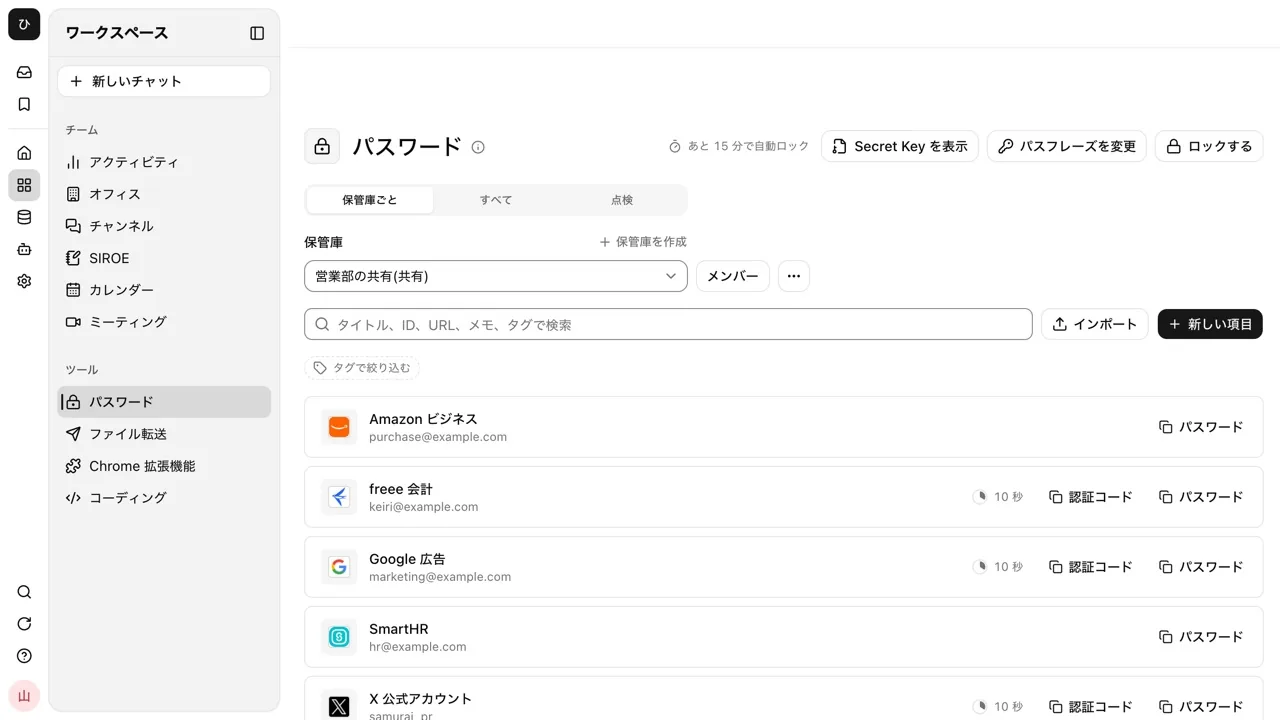
- Contents are encrypted in the browser. Even titles and URLs are encrypted, and while stored, neither the server, Samurai App's operators, nor the AI can read them. Opening a vault requires a passphrase of 12 characters or more and a Secret Key starting with
SK1- - Sharing is by vault. There are three roles, "Manager," "Editor," and "Viewer," and up to 100 people can be in one vault. Choose a group to add everyone in it at that moment
- You can store three item types, Login, Note, and Card, plus authentication codes (TOTP). Reading QR code images also happens inside the browser
- The "Check" tab lists breached passwords, weak passwords, URLs starting with http, and cards nearing expiry
- You can import files exported from 1Password and Bitwarden, and CSVs from browsers
Here is what it cannot do.
- The AI cannot use the vault. It cannot be opened from MCP or the CLI either. For sites you want the AI to sign in to, open the item, press "Copy to browser logins," and register it separately as a login for the AI
- Neither your company's admins nor the operators can reset a passphrase. A personal vault can no longer be opened if you lose both your passphrase and your recovery code. A shared vault opens again once one of its managers hands you the key again
- It does not check for reuse. The Check tab looks at four things: breaches, weakness, URLs, and card expiry
- There are limits: 2,000 items per vault, 200 vaults you create yourself, and 256MB for the whole workspace
- Only the Chrome extension supports filling sign-in pages automatically
- We cannot say it is "absolutely secure." As a limit shared by every method that encrypts in the browser, if the code being delivered were itself tampered with, your passphrase could be stolen
For details, see the Password manager page.
Frequently asked questions
Can business password managers be used for free?
Bitwarden and Zoho Vault have free plans. However, in most products management features such as audit logs, groups, and SSO are in the paid plans. If people come and go at your company, assume it will be hard to run on a free plan alone.
What is the difference between 1Password and Bitwarden?
They differ in price and in the management features included in the lower plans. As of November 9, 2026, 1Password Business is $8.99 per user per month and Bitwarden Teams is $4 per month (both billed annually). Bitwarden includes audit logs and SCIM at the Teams level. With 1Password, you can choose the flat-rate Teams Starter Pack for up to 20 users.
How much does it cost per year for 50 users?
For the products whose unit price we could read officially, annual-billing unit price x 12 months x 50 users comes to $2,400 for Bitwarden Teams, $2,994 for Proton Pass Professional, $4,200 for LastPass Business, and $5,394 for 1Password Business (all excl. tax, as of November 9, 2026). Proton Pass Essentials is for up to 30 users, so it cannot be used for 50. The actual amount changes with exchange rates, taxes, and discounts, so confirm with a quote.
Are there password managers made in Japan?
Among the products compared, GMO Trust Login is made in Japan. However, it centers on single sign-on and input assistance rather than a vault for sharing passwords within a team. If Japanese-language support matters to you, products made overseas that have official Japanese-language pages (Zoho Vault, Keeper, and others) can also be candidates.
Can a password manager replace managing passwords in Excel?
Many products support CSV import, so you can move your spreadsheet list over. After moving it, however, you need to delete the original file and any copies left in shared folders or email. We cover the risks of managing passwords in spreadsheets in The risks of managing passwords in Excel.
Sources
- 1Password Business Pricing (1Password)
- Bitwarden Business Pricing (Bitwarden)
- Keeper Business and Enterprise Pricing (Keeper Security)
- LastPass Business Pricing (LastPass)
- LastPass Business (LastPass)
- Dashlane Pricing (Dashlane)
- Proton Pass for Business Pricing (Proton)
- Zoho Vault pricing plans (Zoho)
- GMO Trust Login (GMO)
- GMO Trust Login pricing (GMO)
- Passwords (guide) (Samurai App)
Prices and features were checked against each vendor's official website as of November 9, 2026.