Tasks like "copy an email into a spreadsheet when it arrives" or "post form responses to chat" no longer need anyone's hands once you connect them with a no-code automation tool. But once you start comparing tools, the "tasks," "operations," "credits," and "executions" in their pricing tables do not mean the same thing. At the same monthly price, how much you can run can vary several times over depending on how it is counted.
This article is written for IT, operations improvement, and back-office staff tasked with automating routine work. Using Zapier as the baseline, we compare seven products, Make, Power Automate, Yoom, IFTTT, n8n, and Workato, on three points: what counts as one run, how often they run, and whether you can insert a person's approval along the way. We covered their use as AI agents in our AI agent comparison article, so here we focus on the differences as tools that run fixed procedures automatically.
Prices and specifications include only what was published on each company's official site as of November 9, 2026. Values we could not confirm officially are marked "Not confirmed officially."
Conclusion: How to Choose by Purpose
- To connect mainly overseas SaaS quickly: Zapier. It supports more than 9,000 apps, and you can start on the free plan
- To run processes with many branches cheaply: Make. It counts credits per module rather than per run
- To build approval flows within Microsoft 365: Power Automate. Approvals are a standard connector, and you can approve from Outlook or Teams
- To use a Japanese interface with Japanese SaaS: Yoom. Prices are in yen, and you build in a Japanese interface
- To run on your own servers, or at high volume: n8n. There is a free self-hosted edition, and the cloud version bills by executions
How to Choose a No-Code Automation Tool
Billing Unit: What Counts as "One Run"
You cannot compare no-code automation tools' pricing tables without knowing how they count differently.
| How it counts | Products | What counts as one |
|---|---|---|
| Tasks | Zapier, Yoom | One successful action (Zapier does not count triggers or filters) |
| Credits | Make, IFTTT | Make: one module operation; IFTTT: applet runs and AI usage |
| Executions | n8n | One workflow execution (regardless of the number of steps inside) |
| Licenses | Power Automate | Monthly fee per user or per bot |
| Custom quote | Workato | Usage is estimated per feature |
For example, if you run a flow that "receives an email, writes it to a spreadsheet, and posts to chat" 500 times a month, Zapier counts it as 1,000 tasks for two actions, and n8n as 500 executions. The more steps a flow has, the more products that count executions come out ahead.
Check Interval: How Quickly It Runs
When the tool checks for a trigger such as "when a new email arrives" at fixed intervals (polling), the interval varies by plan. Zapier checks every 15 minutes on the free plan, every 2 minutes on Pro, and every minute on Team and above. Yoom checks every 15 minutes on Free, every 10 minutes on Personal and Mini, and every 5 minutes on Team and above. IFTTT runs hourly on the free plan, every 15 minutes on Starter, and every 5 minutes on Pro and above. For work that needs a quick response, check this interval along with the price.
Whether You Can Insert a Person's Approval
For work like invoicing or ordering, where you want a person to check before moving on, whether there is an approval step matters. In Power Automate, the approvals connector is standard, and you can choose approval by everyone, first to respond, or sequential approval. Zapier can insert approvals and input requests with "Human in the Loop." n8n offers human approval of tool calls on Starter, Pro, and Enterprise.
Ease of Use in Japanese
If the interface and help are only in English, fewer people can build with it. Zapier's official help states that it is "available in English only." Power Automate and Yoom have Japanese interfaces and documentation, and Workato offers a Japanese pricing page. Deciding first who in your company will build and who will fix the flows makes the language requirement clear.
Number and Kinds of Services You Can Connect
Check not just the number but whether the services your company uses are included. Zapier supports more than 9,000, Make more than 3,000, n8n more than 2,000, Workato more than 1,200, IFTTT more than 1,000, and Yoom more than 750. If you want to connect Japanese SaaS, the surest way is to search for the names in each candidate tool's app list.
No-Code Automation Tool Comparison Table
| Tool | How much you can run for free | Typical paid plan | Billing unit | Shortest check interval | Japanese interface |
|---|---|---|---|---|---|
| Zapier | Free: 100 tasks/month, up to 2 steps | Pro $19.99/month (billed annually, 750 tasks) | Tasks | 1 minute (Team and above) | No (English only) |
| Make | Free: 1,000 credits/month | Core from $9/month (from 10,000 credits) | Credits | Not confirmed officially | Not confirmed officially |
| Power Automate | Standard connectors free with a work or school account | Premium ¥2,248/user/month (annual contract, excl. tax) | Licenses | 60 seconds for scheduled runs | Yes |
| Yoom | Free: 100 tasks/month (plus 500 on sign-up) | Personal ¥3,000/month (¥2,400/month on an annual contract) | Tasks | 5 minutes (Team and above) | Yes |
| IFTTT | Free: 1,000 credits/month | Starter $2.09/month | Credits | 5 minutes (Pro and above) | Not confirmed officially |
| n8n | Community Edition (self-hosted) / cloud trial of 1,000 executions | Starter €20/month (billed annually, 2,500 executions) | Executions | Not confirmed officially | Not confirmed officially |
| Workato | Not confirmed officially | Contact for pricing | Usage per feature | Not confirmed officially | Japanese pricing page available |
Note: Prices for Zapier, Make, IFTTT, and n8n are shown as displayed on the official pages we checked (US dollars and euros). Make's prices are as shown on Make's own comparison page, which did not state whether they are billed annually or monthly.
Features of the Major Tools
Zapier
The benchmark product among no-code automation tools. It supports more than 9,000 apps, and you build flows called "Zaps" on screen. Billing is by the number of successful actions (tasks); triggers, polling, data formatting, branching, and filters are not counted.
The free plan includes 100 tasks a month, Zaps of up to 2 steps, a 15-minute check interval, and one user. Pro rises in tiers by task volume: $19.99 a month billed annually for 750 tasks ($29.99 billed monthly), and $49.00 billed annually for 2,000 tasks. Team, for up to 25 users, is $69 a month billed annually for 2,000 tasks. AI agents and chatbots are counted separately from tasks. Zapier's official help describes Zapier as "available in English only." It suits companies comfortable with an English interface that want to connect a wide range of overseas SaaS.
Make
A tool, formerly called Integromat, where you build "scenarios" by arranging modules on screen. You can build complex flows with branches and loops in a single diagram. Since August 2025, its billing unit has been credits, and most modules use 1 credit per operation. Router and error-handling modules are not counted.
The free plan includes 1,000 credits a month. Make's comparison page shows Core at $9 a month, Pro at $16 a month, and Teams at $29 a month, each starting from 10,000 credits a month. Additional credits cost 25% more than those included in the plan. Scheduled runs default to every 15 minutes; we could not view the pricing page this time, so the shortest interval per plan was not confirmed officially. It is a candidate when you want to run processes with many branches at lower cost than Zapier.
Microsoft Power Automate
A product that combines Microsoft's cloud automation and desktop automation (RPA). With a Microsoft Entra work or school account, you can build and run cloud flows that use standard connectors for free (they cannot be shared). The paid Premium plan is ¥2,248 per user per month (annual contract, excl. tax), and Process, for bots that operate PCs unattended, is ¥22,488 per bot per month.
The approvals connector is standard, so you can build approval flows with a Microsoft 365 license too. Approvers can respond from Outlook, Teams, or Power Automate. The shortest scheduled run interval is 60 seconds, and a single run can last up to 30 days, including time waiting for approval. Premium has a limit of 40,000 actions per day. It suits companies that want to automate internal requests and approvals within Microsoft 365.
Yoom
A Japanese automation tool whose interface and help are both in Japanese. Pricing is per organization in yen. On monthly contracts, Personal is ¥3,000 a month (1 user, 1,000 tasks a month), Mini is ¥20,000 a month (20 users, 5,000 tasks a month), and Team is ¥50,000 a month (100 users, 15,000 tasks a month). On annual contracts, these become ¥2,400, ¥16,000, and ¥40,000 a month respectively.
The Free plan includes 100 tasks a month, plus 500 tasks on sign-up. The check interval is 15 minutes on Free, 10 minutes on Personal and Mini, and 5 minutes on Team and above. The number of actions you can put in one flow also varies by plan: up to 5 on Free, 50 on Personal and Mini, and 100 on Team. On Free and Personal, the apps you can connect are partly limited. It suits companies that want to build in Japanese and connect Japanese SaaS.
IFTTT
A tool that began for individuals, for building simple "if this, then that" combinations (applets). Monthly prices are $2.09 for Starter ($25.08 a year), $5.49 for Pro ($65.88 a year), and $13.99 for Pro+ ($167.88 a year). Applet runs and AI usage consume credits, and the free plan includes 1,000 credits a month.
Applets run hourly on the free plan, every 15 minutes on Starter, and every 5 minutes on Pro and above. There is no limit on the number of applets, and even the free plan supports multiple actions and conditional branching. It suits automations that need only a few steps, such as smart home devices and social media posts. We could not confirm officially this time whether it has a feature for inserting business approvals.
n8n
An automation tool from Germany whose "Community Edition," which you can run on your own servers, is free to use. However, the Community Edition does not include features such as SSO, sharing, and version control with Git. The cloud version, billed annually, is €20 a month for Starter (2,500 executions a month) and €50 for Pro (10,000 a month), and every plan has unlimited users and active workflows.
Billing counts one workflow execution, so the cost does not increase even if there are many steps inside. There is also a feature for a person to approve tool calls. It also invests heavily in AI nodes and agents, which we covered in our AI agent comparison article. It suits companies that want to run flows with many steps in large volumes, or keep their data on internal servers.
Workato
An integration platform (iPaaS) for large enterprises. It offers Standard, Business MCP, Enterprise MCP, and Workato ONE plans, all priced by quote. Usage is counted per feature, and there are more than 1,200 connectors. It has a Japanese pricing page and lists a contact point for Japan. It suits companies that want to manage cross-department integrations company-wide, including core systems.
How to Look at Them When Comparing With Zapier
Zapier vs. Make
The biggest difference is how they count. Zapier counts one action as one task and does not count triggers or branches. Make uses credits for each module operation. For a simple flow of 2 to 3 steps, Zapier's counting is easier to understand; flows with many branches and loops can be cheaper on Make. They also differ in character: Zapier connects more apps, while Make gives more freedom to build complex flows on screen.
Zapier vs. Yoom
Yoom puts its Japanese interface, yen pricing, and support for Japanese SaaS front and center. On the other hand, Zapier supports more apps, and its shortest check interval on Team (1 minute) is shorter than Yoom's Team (5 minutes). The realistic way to choose is by who in your company will build the flows and whether an English interface will be a problem.
Zapier vs. Power Automate
For companies that use Microsoft 365, many automations fit within Power Automate's free scope. Power Automate is strong at flows that stay within Outlook, Teams, and SharePoint, especially approval flows. If you connect many non-Microsoft SaaS, Zapier is quicker to build with.
Zapier vs. n8n
n8n stands out for running on your own servers and billing by executions. When you run flows with many steps in large volumes, n8n's execution count comes out lower than Zapier's task count. In exchange, self-hosting means your company takes on running the servers.
Samurai App as an Option
A Samurai App workflow is a sequence of steps that always runs in the order you wrote it. You hand only the steps that need judgment, such as classification or writing, to AI, and you can put approvals and operations on external services in the same flow. Steps are laid out on a canvas, and you can have AI revise the workflow from "Ask in chat" beside the edit screen. You can also turn work you finished in a conversation into a workflow by asking, "Make what we just did into a workflow."
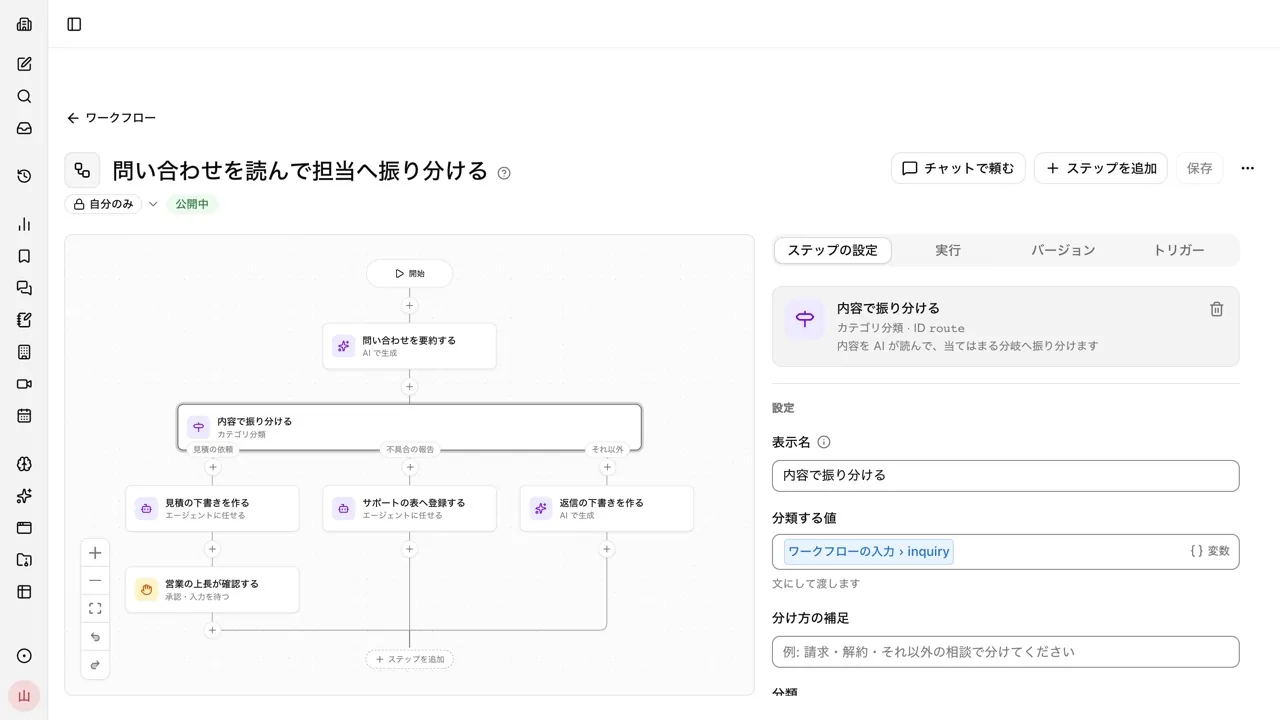
There are four kinds of triggers: scheduled runs, external triggers using a URL and secret, events from connected services such as Gmail and GitHub, and in-app events such as meeting minutes being finalized. In the "Wait for approval or input" step, you can choose up to 5 approvers. A version is kept each time you save, and unattended runs always use the published version. With "Pre-publish check," you can confirm that set inputs produce the expected results before publishing. Workflow definition files made in n8n and Dify can be imported as drafts.
On the other hand, the shortest scheduled run interval is once an hour, so it is not suited to checking every few minutes. Zapier and Make definitions cannot be imported, so moving over means rebuilding. You can have up to 200 workflows per workspace and up to 200 steps per workflow, and run records are kept for 30 days. Pricing is one base fee per company plus credits based on usage, and it does not increase with the number of people.
Frequently Asked Questions
How much can I use Zapier for free?
The free plan includes 100 tasks a month, Zaps of 2 steps (one trigger and one action), a 15-minute check interval, and one user. For flows of 3 or more steps, or shorter intervals, you need the paid Pro plan or higher.
Can I use them without programming knowledge?
All the products in this article let you build flows by arranging blocks on screen. However, depending on the API specifications of the services you connect, you may need to adjust date formats or data shapes. It is easier to start by adapting flows provided as templates to your company.
What is the difference between iPaaS and no-code automation tools?
iPaaS is a general term for integration platforms that connect cloud services and internal systems with each other. No-code automation tools often refers to those among them that let you build integrations on screen without programming. Enterprise products like Workato are called iPaaS and have stronger governance and audit features.
Which is best for starting free?
To try running one flow, you can start on the free plans of Zapier, Make, Yoom, or IFTTT. If you use Microsoft 365, Power Automate's standard connectors are also free. If you can provide your own servers, n8n's Community Edition is another option.
Sources
- Zapier pricing
- Zapier Human in the Loop
- Zapier supported languages (Help)
- Make vs. Zapier comparison (Make)
- Adjustments to Make plans and pricing (Help)
- Scheduling a Make scenario (Help)
- Power Automate pricing
- Power Automate license types (Microsoft Learn)
- Power Automate approvals (Microsoft Learn)
- Power Automate limits and configuration (Microsoft Learn)
- Yoom pricing plans
- IFTTT plans
- n8n pricing
- n8n Community Edition features
- Workato pricing
- Samurai App guide: Workflows
Prices and specifications were checked on each company's official site as of November 9, 2026. Please check each company's site for the latest information.