Customer inquiries no longer come only by email; the channels keep growing to include contact forms, LINE, and chat. When several people watch a shared mailbox, mistakes like "I thought someone else had replied" and "two of us replied to the same customer" happen easily. Even if you track status in a spreadsheet, updates cannot keep up once the volume grows.
This article is for people in customer support, sales administration, and IT who want to rethink how inquiries are handled. It compares 9 inquiry management systems (inquiry management tools), split into three types: shared inbox, help desk, and form, and covers how pricing is set, support for LINE and chat, and AI reply assistance.
Prices and specifications include only what each company's official site showed as of November 9, 2026. Values we could not confirm in official sources are marked "Not confirmed officially", and those that require a quote are marked "Contact sales".
Summary: which companies each type suits
- A few people share the work of answering email inquiries: the shared inbox type: Mailwise, yaritori, Re:lation, and Rakuraku Jido Otai. You can assign an owner and a status to each email
- High inquiry volume, and you want records and analysis too: the help desk type: Zendesk, Zoho Desk, and HubSpot Service Hub. Inquiries are managed as "tickets", with FAQ sites and analytics included
- The contact form on your website is the main channel: the form type: formrun and Tayori. You can start from a free plan
- You want to receive LINE and chat inquiries on the same screen: Re:lation, Zendesk's Suite plans, and Tayori Professional and above. Always check which plan supports it
The three types of inquiry management systems
Inquiry management systems can be split into three types by where they started. Even under the same label of "inquiry management", what they are good at differs.
| Type | Starting point | Best for | Products in this article |
|---|---|---|---|
| Shared inbox | Several people handle one email address | Mostly email, shared among a few to a few dozen people | Re:lation, Rakuraku Jido Otai, yaritori, Mailwise |
| Help desk | Each inquiry is managed as a ticket | High volume, including records, analysis, and FAQs | Zendesk, Zoho Desk, HubSpot Service Hub |
| Form | Building a contact form for your website | Mostly inquiries from forms, and you want to start small | formrun, Tayori |
The shared inbox type works on a screen close to an everyday email client, so it is easy to introduce. The help desk type builds up inquiry history per customer and can total response times and publish FAQs, but there are more things to configure. The form type centers on building forms and managing responses, and is not suited to gathering email and LINE inquiries in one place.
How to choose an inquiry management system
The number and kinds of channels
First, write down where your inquiries come from today. Whether it is only email, or also forms, LINE, chat, and phone, changes the candidates. Even when a product supports LINE or chat, it is often limited to higher plans. For example, in Zendesk, messaging including web forms, phone, and LINE is available on the Suite plans, while Support Team centers on email.
Mechanisms to prevent duplicate and missed replies
If several people handle inquiries, check whether you can assign an owner and a status (not started, in progress, done) to each email. Rakuraku Jido Otai lists duplicate-reply prevention and automatic switching of "New → Replying → Done" as features. To prevent missed replies, also check whether it alerts you about inquiries that have stayed unhandled for a certain time.
The pricing unit
Depending on the product, the price is set by the number of users (a monthly price per person) or as a monthly price per team or account. Mailwise and yaritori are per person, while formrun and Tayori are a monthly price per plan. Some products, like Zendesk and HubSpot, also charge separately by the number of cases AI resolves or by credits. Converting to your own headcount, such as the monthly cost for 5 people, makes the differences easier to see.
AI reply assistance, and what it costs
As of 2026, many products offer AI drafting and summarizing of replies. What to check is which plans include it, and whether extra charges apply based on usage. Rakuraku Jido Otai makes text generation a standard feature at no extra cost, with usage above a certain amount offered as an option. Zendesk's AI agents charge per case once you exceed the included number of resolutions.
Integration with existing systems
If you manage customer information in a CRM, check whether inquiry history can be linked to the customer records in the CRM. HubSpot Service Hub is a product built into its CRM, and Mailwise can integrate with kintone. If you want internal notifications to go to Slack or Teams, check for those integrations too.
Inquiry management system comparison table
| Tool | Type | Free plan / trial | Approximate paid price | Pricing unit | LINE support |
|---|---|---|---|---|---|
| Re:lation | Shared inbox | Free (1 user, email only) / 10-day free trial | From ¥15,000 per month | Varies by number of users and storage | LINE Official Account supported on Business and above |
| Rakuraku Jido Otai (formerly MailDealer) | Shared inbox | Free trial available | Contact sales | Varies by number of users and stored messages | Integrates with LINE Official Account |
| yaritori | Shared inbox | 7-day free trial | From ¥1,980 per user per month | Per person (from 2 users) | Not confirmed officially |
| Mailwise | Shared inbox | 30-day free trial | Standard ¥600 per user per month (excl. tax) | Per person (from 5 users) | Not confirmed officially |
| Zendesk | Help desk | 14-day free trial | Support Team $19 per agent per month (annual) | Per person + AI resolutions | Supported on Suite plans |
| Zoho Desk | Help desk | Free plan available / 15-day free trial | Standard ¥1,980 per user per month (annual, excl. tax) | Per person | Not confirmed officially (varies by plan) |
| HubSpot Service Hub | Help desk (built into CRM) | Free tools available | Starter from ¥1,200 per seat per month (excl. tax, limited-time price) | Per seat | Not confirmed officially |
| formrun | Form | FREE (1 form, up to 30 responses per month) | BEGINNER ¥2,980 per month (annual contract, excl. tax) | Per team | Not confirmed officially |
| Tayori | Form, FAQ, chat | Free (1 user) | Starter ¥3,800 per month (excl. tax) | Per plan | Professional and above |
Note: Zendesk prices are shown as listed on its official pricing page (US dollars). Zoho Desk's pricing page lists different amounts for the same plan in different places, so we show the amounts from the plan overview section.
Features of the main tools
Re:lation
A shared inbox tool from Ingage Inc. Besides email, it handles inquiries from phone, SMS, LINE Official Account, Facebook Messenger, Instagram, Rakuten Ichiba, Yahoo! Shopping, Chatwork, and more on one screen. Slack and Teams are notification integrations.
There are five plans: Free, Starter, Business, Pro, and Enterprise. Free is 1 user, 1 inbox, 100MB of storage, and email only; Business starts at 5 people, with 2 inboxes and 20GB of storage, and includes channel integrations such as LINE. The price is shown as "from ¥15,000 per month" and varies by number of users and storage. AI reply drafting, inquiry classification and prioritization, and FAQ generation are also listed as features. There is a 10-day free trial. It suits e-commerce and service businesses that receive a mix of email and LINE inquiries.
Rakuraku Jido Otai (formerly MailDealer)
A shared inbox tool from RAKUS, renamed from "MailDealer". Visiting the old site takes you to the page under the new name. It includes duplicate-reply prevention, routing to owners, and automatic status switching of "New → Replying → Done", and it can integrate with LINE Official Account.
AI features include writing replies based on past exchanges and FAQs, writing email from key points, and "AI risk detection", which detects negative content and alerts managers. Text generation is a standard feature at no extra cost, and usage above a certain amount requires an optional plan. The monthly price varies by number of users and stored messages, and the amount is not published on the official site. A free trial is available. It suits companies with many email inquiries that want to avoid overlooking complaints.
yaritori
A shared inbox tool for teams to split up replies to Gmail or Outlook email. You can assign a status and a reply owner to each inquiry, and chat internally about each email. In October 2026, it announced an integration with Microsoft Teams.
Pricing starts at ¥1,980 per user per month, with no initial fee and no minimum contract period, and it can be contracted from 2 users. Its AI features include reply drafts and template selection, as well as complaint detection, translation, and conversion to honorific Japanese. There is a 7-day free trial. It suits teams that want to start small and add people as they grow.
Mailwise
A shared inbox tool from Cybozu. You can set an owner and a processing status for each email, and also record phone and in-person visits as history. It integrates with kintone, also from Cybozu.
Prices are per user, excl. tax: Standard is ¥600 per month (¥7,200 per year), and Premium is ¥1,800 per month (¥21,600 per year). Standard handles up to 10 email addresses; 11 or more requires Premium. Contracts start at 5 users, with no initial fee and a 30-day free trial. AI features were not mentioned on the official pages we checked. It suits companies that want to keep costs down and start by splitting up email work.
Zendesk
A leading help desk product that manages each inquiry as a "ticket". Pricing is monthly per agent; billed annually, Support Team is $19, Suite Team is $55, and Suite Professional is $115. Billed monthly, they are $25, $69, and $149 respectively. Suite Enterprise requires contacting sales.
Email is available on all plans, but messaging including web forms, phone, and LINE is for the Suite plans. AI agents include a set number of "resolutions" per agent, and anything beyond that is charged per case ($1.50 as an add-on, $2.00 pay-as-you-go). On Suite Professional, the summarizing and writing tools can be used up to 5 times per person per month. There is a 14-day free trial. It suits companies with high inquiry volume that want an FAQ site and response analytics as well.
Zoho Desk
Zoho's help desk product, with a Japanese pricing page. In the plan overview section, the monthly price per user (billed annually) is ¥1,980 for Standard, ¥3,260 for Professional, and ¥5,660 for Enterprise. Express, for up to 5 users, is ¥990 billed annually or ¥1,270 billed monthly. Consumption tax is charged separately from these prices. The feature comparison section on the same page listed different amounts, so check with Zoho before signing a contract.
It supports email, web forms, social media, phone, and chat, as well as messaging such as LINE and WhatsApp. We could not confirm officially which channels are available on which plan. There is a free plan, and the 15-day free trial can be started without a credit card. It suits companies that want to use it together with other Zoho products such as its CRM.
HubSpot Service Hub
A customer service product built into HubSpot's CRM. Inquiry history is linked to the same customer records as sales and marketing. The Japanese product page shows the monthly price per seat (excl. tax) as: Starter from ¥1,200 / ¥2,400 (the lower one is a limited-time price for new customers), Professional from ¥12,000, and Enterprise from ¥18,000.
It supports shared addresses, ticket management, web chat (Starter and above), and phone (Enterprise). The "Breeze" AI customer agent is on Professional and above. You can start from the free tools. We could not confirm officially the onboarding fees in yen. It suits companies that already manage customers in HubSpot.
formrun
A form-type tool from Basic Inc. that combines building forms and managing inquiries. Responses are lined up as cards, and every plan lets you add statuses and labels. Pricing is monthly per team (excl. tax); on an annual contract, BEGINNER is ¥2,980, STARTER is ¥12,980, and PROFESSIONAL is ¥25,800. On a monthly contract they are ¥3,880, ¥14,980, and ¥29,800 respectively.
The free FREE plan covers 1 form, 1 member, 30 responses per form per month, and 100MB of storage. BEGINNER and above add notifications to Slack, Chatwork, Teams, and LINE WORKS. STARTER and above include the AI email assistant. Paid plans can be tried for 14 days. It suits companies that want to start by building a contact form for their website.
Tayori
A tool from PR TIMES that combines forms, FAQs, surveys, and chat. Pricing is monthly (excl. tax): Free is ¥0 (1 user, one each of form, FAQ, and survey), Starter is ¥3,800 (3 users), Professional is ¥11,980 (10 users), and Enterprise is ¥25,400 (11 to 30 users, with a ¥50,000 initial fee).
Live chat is available on Starter and above, and the AI chatbot and LINE integration on Professional and above. Paid plans can be tried for 14 days. It suits companies that want to place FAQs next to the contact form and reduce the number of inquiries themselves.
How this differs from managing with spreadsheets and email clients
While volume is low, spreadsheets work
If you get a few inquiries a day and 1 or 2 people handle them, a shared mailbox and a spreadsheet are manageable. But since how you replied to which email lives outside the sheet, forgetting to update the sheet leaves you unable to tell where things stand.
As people are added, ownership overlaps
Once more than 3 people handle inquiries, mistakes like two people opening the same email and replying separately, or an email getting buried with nobody replying, happen easily. With an inquiry management system, the owner and status are shown to everyone as soon as an email is opened, so there is less need to ask around.
Less time spent searching history
Finding out what a customer asked before by searching email takes effort. A product that groups history by customer makes it easier to reply with past exchanges in mind.
When to introduce one
Rather than drawing the line by volume, decide based on "Have missed or duplicate replies actually happened?" and "Has someone asked about a status that you could not answer?" That makes the purpose of introducing one clear. If you run real inquiries through a free plan or trial for about a month, you will see which type suits your company.
Samurai App as an option
Samurai App's unified inbox is not a dedicated inquiry tool; it is a feature that brings your exchanges with outside parties into the same list as your internal channels. Chats from Slack, Microsoft Teams, Chatwork, Google Chat, LINE Official Account, and Messenger, and mail from Gmail and Outlook, appear as rooms. If an admin allows it, each person can also connect their personal LINE (this uses an unofficial method that LINE does not provide).
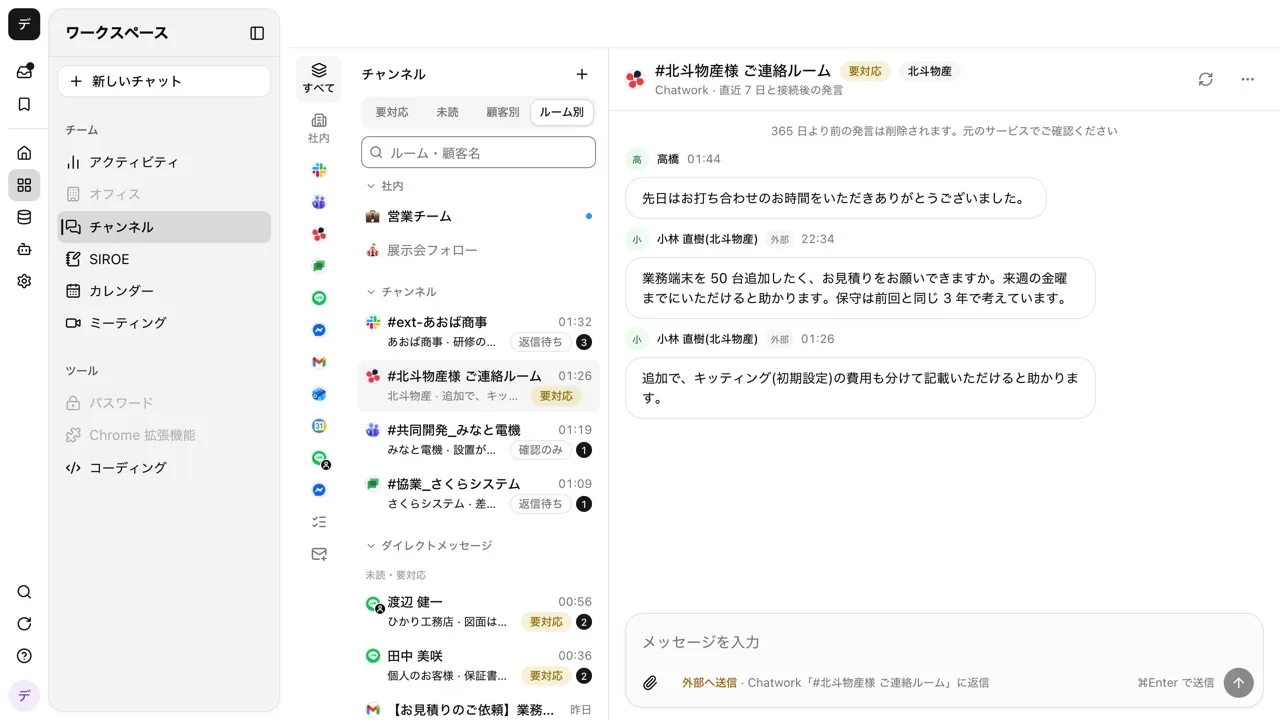
When a new message arrives, AI reads the room and labels it "Needs reply", "Awaiting reply", or "FYI", and you can filter with the "Needs reply", "Unread", and "By customer" tabs. Replies can be sent on the spot without opening the original service. For each room you can choose "Only judge whether a reply is needed", "Write drafts", or "Send automatically", and even with "Send automatically", content about prices, fixing dates or delivery dates, contracts, payments, complaints, or personal data is not sent and becomes a draft. Automatic replies are capped at 30 per room per hour. Messages in outside rooms are kept for 365 days after they are sent.
On the other hand, it has no feature to assign inquiries to owners, no feature to total response times, and no contact form to place on your website. For a support department with high volume that needs to assign owners and analyze responses, the help desk products introduced in this article are a better fit. Pricing is one base fee per company plus credits based on usage, and it does not increase with headcount.
How to reply to scattered messages from one list is shown on the scattered inquiries page. The steps to have AI draft email replies are in the article on having AI draft Gmail replies.
See the unified inbox features
FAQ
Are there inquiry management systems I can use for free?
Yes. There are Re:lation's Free plan (1 user, email only), formrun's FREE plan (1 form, up to 30 responses per month), Tayori's Free plan (1 user), HubSpot's free tools, and Zoho Desk's free plan. Most limit the number of people or inquiries, so if several people will use it in earnest, choose a paid plan or decide after trying a free trial.
When should I move away from managing inquiries in Excel?
It is time to move when more than 3 people handle inquiries, when missed or duplicate replies have actually happened, or when you cannot answer a question about status without looking at the sheet. With a spreadsheet, the email content and the tracking sheet are in separate places, so you cannot prevent missed updates.
Can I manage LINE and chat inquiries in the same place?
Re:lation (Business and above), Rakuraku Jido Otai, Zendesk's Suite plans, and Tayori Professional and above indicate integration with LINE Official Account. For many products it is limited to higher plans, so compare prices for the plan that includes the channels you want.
What is the difference between an inquiry management system and a CRM?
A CRM manages customer information and deals, while an inquiry management system manages how incoming inquiries are handled. Some products, like HubSpot Service Hub, are built into a CRM, which suits companies that want to see inquiry history alongside sales information.
Sources
- Re:lation pricing
- Re:lation supported channels
- Rakuraku Jido Otai
- Rakuraku Jido Otai AI features
- yaritori
- yaritori pricing
- Mailwise pricing
- Zendesk pricing
- Zoho Desk pricing
- HubSpot Service Hub
- formrun pricing
- Tayori pricing plans
- Samurai App guide: Unified inbox
- Samurai App guide: AI replies
Prices and specifications were checked on each company's official site as of November 9, 2026. Check each company's site for the latest information.