When you set up a sales meeting or interview, you list candidate dates in an email, wait for a reply, and send new ones if none work. Each round of scheduling is a short task, but as the number grows it can take up a whole morning. With a scheduling tool, the other person just picks an open time slot, and the meeting is set, with the calendar entry and meeting URL handled automatically.
This article is for people in sales, recruiting, customer success, and similar roles who schedule a lot with people outside the company, and for IT staff considering a tool. It compares 9 major scheduling tools by free plan limits, paid plan pricing, team scheduling, and the calendars and meeting tools they connect to. It also lays out the difference between "availability-poll" tools, like those used to collect attendance for a company dinner, and "booking-link" tools, where people outside the company choose a time slot.
Prices and specifications are only what each company's official site showed as of November 9, 2026. Values we couldn't confirm officially are marked "Not confirmed officially".
Summary: how to choose by use case
- You want to streamline your own sales meetings and interviews for free: the free plans of TimeRex or Jicoo. You can create booking pages without a limit on how many, and Zoom, Meet, and Teams URLs are created automatically
- You want to assign people on your team automatically: Jicoo Team or higher, or Calendly Teams or higher. You can use round robin (assigning in turn)
- You already subscribe to Google Workspace or Microsoft 365: Google Calendar appointment schedules or Microsoft Bookings. You may be able to start without an additional contract
- You schedule a lot with partners overseas: Calendly or YouCanBook.me. They have English interfaces and connect to Google and Outlook as well as calendars such as iCloud
- You want to collect attendance for internal gatherings: Chouseisan. You can create an attendance poll of candidate dates without signing in
The 2 types of scheduling tools
Scheduling tools fall into 2 types by how the time is decided.
| Type | How it's decided | Best for | Products in this article |
|---|---|---|---|
| Booking link | Your calendar's open times are shown on a booking page, and the other person picks one | Deciding with people outside the company one-on-one or in small groups: sales meetings, interviews, consultations | Calendly, TimeRex, Jicoo, eeasy, YouCanBook.me, Google Calendar, Microsoft Bookings, Zoho Bookings |
| Availability poll | Candidate dates are listed, participants answer yes / maybe / no, and the majority decides | Large gatherings such as internal meetings, dinners, and study sessions | Chouseisan (Jicoo also has a poll feature) |
Booking-link tools connect to your calendar and show open times automatically, so double bookings don't happen. Availability-poll tools don't connect to calendars, but they collect everyone's availability at once. If most of your scheduling is one-on-one with outside people, a booking-link tool fits; for large internal groups, an availability poll fits.
How to choose a scheduling tool
Free plan limits
Free plans mainly limit "the number of booking pages", "the number of calendars you can connect", and "display of the tool's logo". Calendly's free plan allows 1 event type and 1 connected calendar. The free plans of TimeRex and Jicoo let you create booking pages without a limit on how many, but you can't remove the tool's logo. YouCanBook.me allows 1 booking page and up to 30 bookings a month.
Team scheduling
If you work as a team in sales or recruiting, check whether the tool supports round robin, which shows slots where any one team member is free and assigns someone automatically, and multi-person scheduling, which shows slots where everyone is free. In many products, these are features of paid team plans.
Calendars and meeting tools it connects to
Most products in this article connect to Google Calendar and Outlook. If anyone uses iCloud Calendar, Jicoo and YouCanBook.me support it. Whether a Zoom, Google Meet, or Teams URL can be created at the time of booking also affects how much work it takes to send meeting details.
Integration with CRM and sales tools
If you want sales meeting bookings recorded directly in customer records in your CRM, check the integrations with HubSpot and Salesforce. Salesforce integration is often limited to higher plans: Teams and above for Calendly, Premium for TimeRex, and Team and above for Jicoo.
Pricing unit
Most products charge a monthly fee per person who has a booking page. eeasy charges by usage: it's free if you schedule fewer than 6 times a month. If only a few people take bookings, the per-person price doesn't matter much, but if your whole sales department will use it, compare the monthly total multiplied by headcount.
Scheduling tool comparison table
| Tool | Type | Free plan | Typical paid plan | Team assignment | Automatic meeting URLs |
|---|---|---|---|---|---|
| Calendly | Booking link | Yes (1 event type, 1 calendar) | Standard $10/seat/month (billed monthly) | Round robin on Teams and above | Zoom, Meet, Teams |
| TimeRex | Booking link | Yes (unlimited booking pages) | Basic ¥750/month (billed annually, excl. tax) | Automatic assignment by priority on Basic and above | Zoom, Meet, Teams |
| Jicoo | Booking link, poll | Yes (unlimited booking pages) | Team ¥1,200/user/month (excl. tax) | Round robin on Team and above | Zoom, Meet, Teams |
| eeasy | Booking link | Free if fewer than 6 schedulings a month | ¥850/user/month (excl. tax) | Automatic assignment with the reception page option | Zoom (others not confirmed officially) |
| YouCanBook.me | Booking link | Yes (1 booking page, 30 per month) | Not confirmed officially | Round robin on the Team plan | Zoom, Meet, Teams |
| Google Calendar (appointment schedules) | Booking link | 1 booking page | Included in eligible Workspace and other plans | Not confirmed officially | Meet can be set as the location |
| Microsoft Bookings | Booking link | None | Included in eligible Microsoft 365 plans | Booking pages per staff member | Teams |
| Zoho Bookings | Booking link | Free forever (1 user) | Not confirmed officially | Group bookings with multiple people | Meeting links created automatically |
| Chouseisan | Availability poll | Free (no sign-in needed) | Not confirmed officially | None | None |
Note: Calendly's price is shown as displayed (in US dollars) on the official pricing page we checked. For YouCanBook.me and Zoho Bookings, the pricing pages didn't display amounts, so we couldn't confirm them.
Features of the main tools
Calendly
A booking-link tool widely used outside Japan. The free plan is "Always free" and is limited to 1 event type, 1 connected calendar, and one-on-one bookings. The paid Standard plan is $10 per seat per month (billed monthly) and Teams is $16 per month (billed monthly); annual billing is shown as 17% and 20% cheaper respectively. Enterprise starts at $15,000 a year, for 50 or more seats.
Paid plans connect up to 6 calendars. Round robin, team bookings, and routing to the right person based on inquiries are features of Teams and above. HubSpot integration starts at Standard, and Salesforce at Teams. We couldn't tell from the pricing page we checked whether a Japanese interface or support is offered. It suits companies that schedule a lot with partners overseas.
TimeRex
A booking-link tool from Japan. Prices are per license, excluding tax: Basic is ¥750 a month billed annually (¥900 billed monthly), and Premium is ¥1,250 a month billed annually (¥1,500 billed monthly). Enterprise, for 40 or more people, is by inquiry.
The Free plan is "free forever", with unlimited scheduling calendars and unlimited scheduling. However, you can check the availability of up to 2 other participants, connect up to 2 calendars per account, and only Premium lets you remove the TimeRex logo. Zoom, Teams, and Meet URLs can be created automatically on every plan. Salesforce and HubSpot integration are Premium features. It suits people who want to start free with a booking link that works in Japanese.
Jicoo
A booking-link tool from Japan that also has a poll feature. Prices are monthly per user (excluding tax): Individual is ¥0, Team is ¥1,200, and Business is ¥1,600. Annual billing is shown as a 20% discount. Pricing for Enterprise, for 30 or more people, isn't published. New accounts can try Business for 14 days without registering a card.
Even the free plan has no limit on booking pages or bookings, and connects up to 3 Google, Outlook, or iCloud calendars per person. Automatic Zoom, Meet, and Teams URLs and HubSpot integration are available from the free plan. Round robin, booking pages for multiple hosts, and scheduling on someone's behalf are Team and above, as is Salesforce integration. It has a wide free tier and a path to expanding to a team.
eeasy
A booking-link tool from Japan whose distinguishing feature is pricing based on usage. Per user, it's free if you schedule fewer than 6 times a month; at 6 or more, it's ¥850 a month (excluding tax) with no limit on the number of schedulings. There's no setup fee. Personal use is "free forever".
Reception pages for taking bookings as a team are an option: Light is ¥9,800 a month (up to 3 pages), Basic is ¥22,800 a month (up to 10 pages), and Business is ¥48,800 a month (up to 30 pages). Reception pages support automatic assignment of the person in charge, scheduling with 3 or more people, and scheduling on someone's behalf. The one-month free trial doesn't switch to billing automatically. It suits people whose number of schedulings varies a lot from month to month.
YouCanBook.me
A booking-link tool from the UK. The free plan is limited to 1 calendar, 1 booking page, and 30 bookings a month, and shows "Powered for free" on the booking page. Individual allows unlimited bookings, Professional up to 10 booking pages, and Team adds round robin.
It connects to Google, Microsoft, and Apple iCloud calendars, as well as Fastmail and CalDAV calendars. This time, the official pricing page didn't display amounts, so we couldn't confirm prices. Annual billing is shown as 10% cheaper and two-year billing as 20% cheaper. It suits teams whose members use a variety of calendars.
Google Calendar (appointment schedules)
A booking feature built into Google Calendar. Personal Google accounts and Business Starter can create 1 booking page. Eligible plans, such as Workspace Business Standard and above or Google One Premium, add multiple booking pages, availability checks across multiple calendars, reminder emails such as the day before a booking, paid bookings with Stripe, and up to 20 co-hosts.
You can set Google Meet as the booking location. We couldn't confirm round robin or CRM integration officially this time. Appointment schedules can't be created from the mobile app. It suits companies that already subscribe to Google Workspace and want to start without extra cost.
Microsoft Bookings
A booking feature included in Microsoft 365. It's included in plans such as Microsoft 365 Business Basic, Business Standard, Business Premium, E3, and E5, and data is stored in Exchange Online. You can create personal booking pages and shared booking pages where you set staff, services, and business hours.
When you book as an online meeting, a Teams meeting link is created for each booking. Booking notifications can be sent by email and SMS. Because it works with Outlook calendars, it suits companies that manage schedules in Microsoft 365.
Zoho Bookings
Zoho's booking-link tool, which has a Japanese pricing page. There's a free-forever plan for 1 user; the paid plans are Basic, Premium, and FLEX for large organizations. Annual billing is shown as 25% or more cheaper, but we couldn't confirm the amounts officially this time. It syncs two-way with Zoho, Google, and Microsoft 365 calendars and creates meeting links automatically. Because it connects to Zoho CRM, it suits companies that use Zoho's products together.
Chouseisan
An availability-poll tool where you list candidate dates and participants answer yes / maybe / no. Just send the URL to members to check attendance and schedule, with no sign-in needed. Calendar integration wasn't mentioned on the official pages we checked. It suits situations like internal meetings and social events where you want to gather many people's availability at once.
Differences between free and paid plans
Features for teams
Free plans usually assume one person uses them. Round robin, booking pages that combine several people's availability, and bulk settings by an administrator are features of paid team plans.
Logo display and branding
On free plans, the tool's logo almost always appears on the booking page. Since it's a page shown to customers outside the company, choose a plan that lets you remove the logo if that bothers you. TimeRex lets you remove the logo on Premium.
Integration with external tools
CRM integration and webhooks are often limited to paid plans. If you want booking information recorded in your sales records, compare prices for the plans where integration is available.
When free is enough
If you're just one person taking bookings for sales meetings and interviews, the free plans of TimeRex or Jicoo are enough to get started. Once you reach the stage of assigning people on a team or recording in a CRM, consider a paid plan. If you want to send notifications from Calendly or Chouseisan to Slack, how to send Calendly bookings to Slack may also help.
Samurai App as an option
Samurai App's calendar isn't a tool for showing booking pages to people outside the company. It's a shared calendar for overlaying your teammates' schedules to find a time that works. The schedules of up to 16 people added under "People to overlay" line up on the same grid, and events you aren't invited to show only "Busy" and the time.
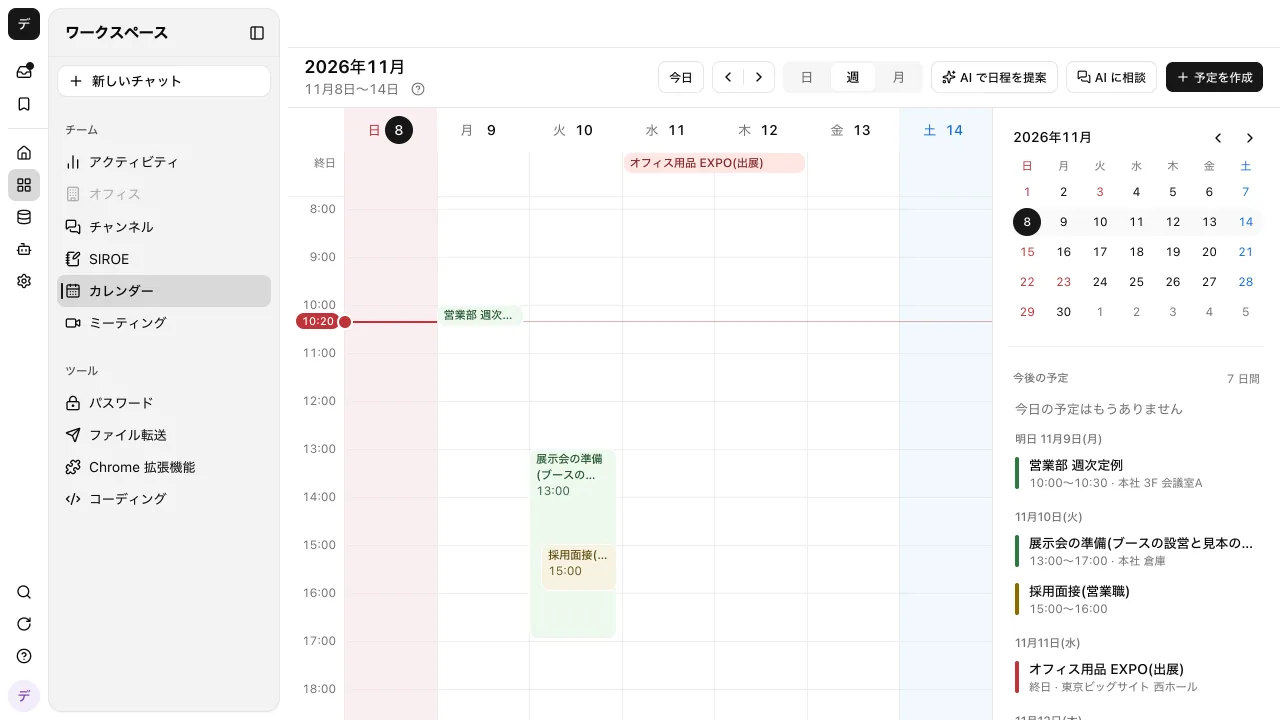
With "Suggest times with AI", choose the participants (up to 15 besides yourself), meeting length, format, search period, and time of day, and AI picks up to 5 times when everyone is free and lists them with reasons. Candidates are weekdays only, up to 2 per day. For in-person meetings, it includes travel time in the search and also adds your own travel to your calendar.
For scheduling with people outside the company, turn on "Auto-register dates" in an email room (Gmail or Outlook), and AI adds dates confirmed in emails from the other party to your calendar. The events it adds have no participants, so no one receives an invitation. A card appears that lets you choose who to invite from the recipients of the email thread, and the invitation goes out after you press "Invite". Changes and cancellations are also applied through a confirmation card. It's off by default, and one room auto-registers up to 10 events in 24 hours.
On the other hand, there are no booking pages where people outside the company pick an open time slot and book it. If most of your scheduling has outside people choosing a time slot, use it together with the booking-link tools introduced in this article. With Google Calendar and Outlook, you can keep events aligned by exporting the events you create and importing once a day. How to cut the work of scheduling is shown on the meeting scheduling page.
FAQ
How far can I go with a scheduling tool for free?
The free plans of TimeRex and Jicoo let you create booking pages without a limit on how many, and create Zoom, Meet, and Teams URLs automatically. Calendly's free plan allows 1 event type, and YouCanBook.me allows 1 booking page and up to 30 bookings a month. In many products, team assignment and hiding the logo are paid plan features.
Does the other person need an account?
With booking-link tools, the person booking usually doesn't create an account; they choose a time slot on the booking page and enter their name and email address. Chouseisan also lets people enter attendance without signing in.
Does it connect to both Google Calendar and Outlook?
Calendly, TimeRex, Jicoo, eeasy, and YouCanBook.me connect to both Google Calendar and Outlook. Jicoo and YouCanBook.me also support iCloud Calendar. Google Calendar appointment schedules work with Google calendars, and Microsoft Bookings with Outlook calendars.
Can it prevent double bookings?
Booking-link tools read the events in connected calendars and show only open times on the booking page, so they prevent double bookings. However, events in calendars that aren't connected are treated as open, so if you use several calendars, such as work and personal, choose a plan that lets you connect all of them.
Sources
- Calendly pricing
- TimeRex pricing plans
- TimeRex
- Jicoo pricing
- eeasy
- eeasy for individuals
- YouCanBook.me pricing
- Google Calendar appointment schedules (Help)
- Premium features of Google Calendar appointment schedules (Help)
- Microsoft Bookings overview (Microsoft Learn)
- Zoho Bookings pricing
- Chouseisan
- Samurai App how-to: Calendar
- Samurai App how-to: Auto-register dates
Prices and specifications were checked on each company's official site as of November 9, 2026. Please check each company's site for the latest information.