Even when you ask a senior colleague to play the customer in a role-play, often all that's left afterward is a single comment like "You should ask a few more questions." Since nothing records what was actually said, people stumble at the same spot in the next practice too.
This article splits sales role-plays into three parts, preparation, the session, and the review, and explains what to decide in each. It also covers the difference between two ways of using AI, the steps for recording in Samurai App's Meetings and reading the feedback, and what that feedback can't tell you.
Summary
- How much a role-play helps depends heavily on whether material for the review remains. If you transcribe the recording, you can point to the actual remark when discussing "which response didn't work."
- Before practicing, decide the scene (first visit, price negotiation, and so on), the customer's profile, and what to look at, and put them on one sheet. If you haven't decided what to look at, the review ends in impressions.
- There are two ways to use AI: having AI play the customer, or recording practice between people and having AI evaluate it. Samurai App does the latter; it has no feature for AI to play the customer by voice.
- AI feedback is a reference value estimated from the transcript. It can't measure speaking speed, tone of voice, or facial expressions, so combine it with review by people.
Why role-plays don't stick
If you make time for role-plays but people don't improve, the cause is usually after the practice.
- What was said isn't kept. Nobody can accurately recall a 10-minute exchange right after it ends. The review skews toward the scenes that left the strongest impression.
- What people look at differs by person. The senior colleague playing the customer looks at how the pitch is structured, while the manager looks at word choice, so the feedback depends on who you happen to practice with that day.
- There isn't enough time from people to play the customer. The better someone is, the busier they are, and it's hard to have them join practice again and again.
- Practicing with the same faces breeds familiarity. You can predict how the other side will respond, and the tension of the real thing fades.
All of these ease when you keep a record of what happened in practice and look at it with the same criteria every time.
How to run a role-play
1. Narrow it to one scene and one goal
Practice one scene per role-play. What to look at differs by scene, such as discovery on a first visit, price negotiation, or responding after being turned down. Write the goal in a form where you can judge afterward whether it was achieved, such as "find out the budget and the decision-maker."
2. Write the customer's profile on paper
Briefly write down the profile to give the person playing the customer.
- The company's industry and size, and the customer's role
- What they're struggling with now (including things they haven't put into words yet)
- 2 or 3 objections or questions to raise during the conversation
- Which parts of the budget and approval situation to answer if asked
Deciding the objections in advance keeps the difficulty from changing depending on who plays the customer.
3. Decide roles and time
The basic setup is three people: the salesperson, the customer, and an observer. When there's no observer, use a recording instead. As a guide, allow 10 to 15 minutes for the role-play and 10 to 15 minutes for the review, and don't cut the review time.
4. Share what to look at beforehand
Before starting, have everyone confirm the criteria to be used in the review. For example:
| Criterion | What to look at |
|---|---|
| Listening | The ratio of time the customer talks to time you talk |
| Questions | The number of questions, and whether you changed the next question based on the customer's answer |
| Conciseness | Whether each explanation runs too long |
| Handling objections | Whether you acknowledged an objection before answering it |
| Next step | Whether you ended by setting the next meeting date and the items to take back |
5. Record, and review by pointing to remarks
If you transcribe the recording, you can point to remarks, such as "Here you brought up price first." Narrow the good points and the points to fix to 1 to 3 each, and end with the person deciding what they'll change in the next practice.
Example scenarios by scene
When it's hard to come up with a profile from scratch, starting with these three scenes makes it clear what to practice.
Discovery on a first visit
- Customer: the general affairs manager at a food wholesaler with 80 employees. You're meeting through a referral, and they don't know your product well yet
- What to practice: whether you can draw out the customer's problems before explaining your product
- Reactions the customer raises: "We're not really having trouble with how we do it now," "I can't decide anything without running it by my boss"
Price negotiation
- Customer: the second sales meeting. The department head who saw the quote says "It's more expensive than other vendors"
- What to practice: whether you can confirm who they're comparing you with and on what terms before getting into discounts
- Reactions the customer raises: "The other vendor had no setup fee," "This fiscal year's budget is already set"
Responding after being turned down
- Customer: after your proposal, the contact person said "We'd like to pass this time"
- What to practice: whether you can ask the reason and end by agreeing on when it's OK to get in touch next
- Reactions the customer raises: "Our internal priorities changed," "We might look at it again in six months"
If you practice the same scene 2 or 3 times in a row, you can compare whether the points to fix from last time were fixed.
Two ways to use AI
If you search for "sales role-play AI," you'll find ways to practice using AI. Broadly, there are two.
| AI plays the customer | AI evaluates practice between people | |
|---|---|---|
| Who plays the customer | AI (responds by voice or text) | A senior colleague or coworker |
| Best for | When you want to practice alone many times | When you want to review an exchange close to the real thing |
| What remains | Practice records and feedback (depends on the product) | Transcript, minutes, and feedback |
| Caveat | The reactions may differ from real customers | You still need someone's time to play the customer |
Which is better depends on whether you're short on time from people to play the customer, or your reviews are shallow. If you're short on people to play the customer, the former suits you; if you're short on material for the review, the latter does.
Steps for recording in Samurai App and reading the feedback
Samurai App's Meetings creates a transcript and minutes from a recording and gives feedback for each participant. It isn't a feature dedicated to role-plays; you use the meeting recording and analysis features for role-plays. Here are the steps for an in-person session.
1. Start an in-person recording
On the "Meetings" screen, press "Record in person." Enter something like "First visit role-play 11/9" in "Title" and choose the "Visibility." The default is "Only me," and it can't be changed after the recording is uploaded. Also decide the "Minutes format" and "Meeting language" before recording.
Press "Start recording," and when the role-play is over, press "Stop recording." Only sound from that device's microphone is recorded. Each recording can be up to 4 hours.
2. Name the speakers
When transcription is finished, speakers are separated by voice as "Speaker 1," "Speaker 2," and so on. Use "Speaker names" above the transcript to name the salesperson and the customer. The names are also reflected in the minutes and the transcript file.
3. Read the feedback on the "Analysis" tab
About 5 minutes after the minutes are saved, the feedback appears on the "Analysis" tab. If you don't want to wait, the creator can press "Analyze now." For in-person recordings, "Meeting analysis" is ON from the start.
"Per-participant feedback" shows the following for each person.
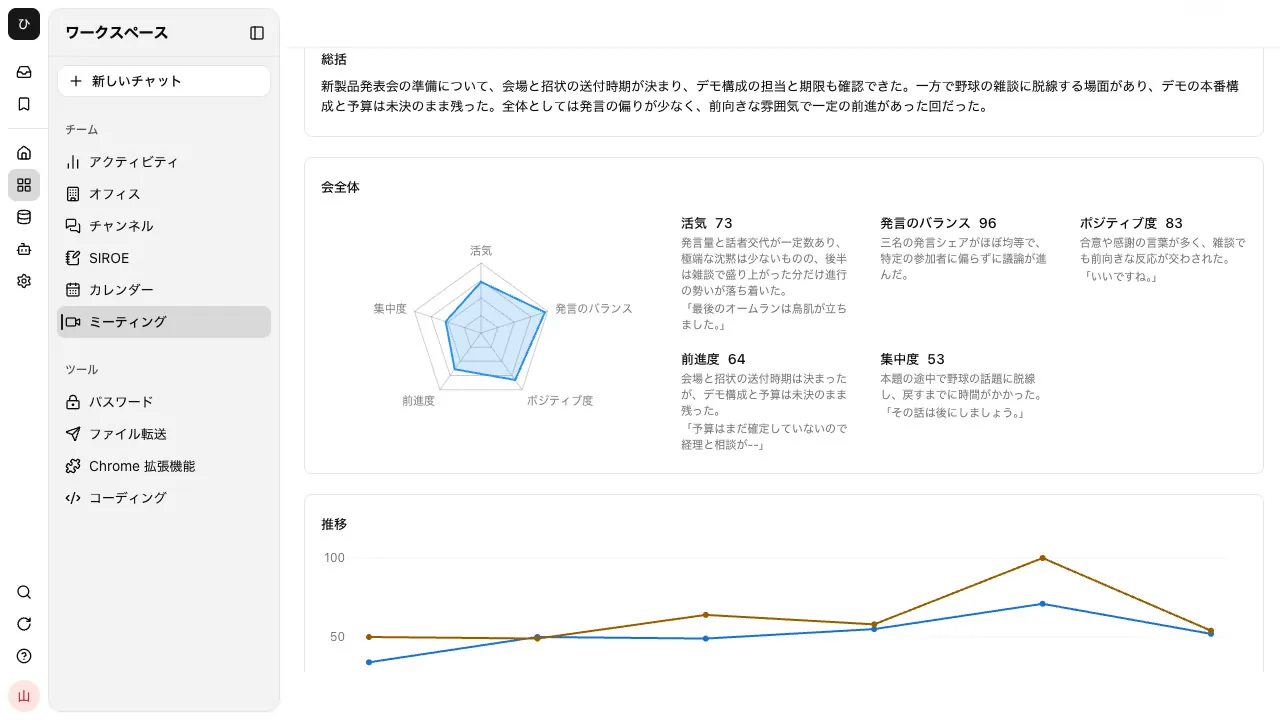
- A pentagon showing five criteria, clarity, energy, initiative, responsiveness and listening, and conciseness, each out of 100
- Share of speaking, number of turns, and number of questions
- "What went well" and "What to improve"
Only the meeting's creator can see this "Per-participant feedback." If a new hire records it themselves, only the new hire can see it; if a manager records it, only the manager can. Decide before recording who will look at the feedback together. The evaluation of the "Whole meeting," which everyone can see, doesn't show individual names.
4. Discuss how to rephrase with AI
In the meeting's "AI chat," you can discuss based on the transcript. For example, ask:
Rephrase my response in 3 different ways for the moment when the customer said "We haven't set a budget yet." Make each one draw out who the decision-maker is
When role-playing over a web meeting
When you role-play over a Samurai App video call, "Meeting analysis" is OFF for newly created calls. Turn it ON when creating the call or on the call's "Settings" tab. The call's host also gets "Advice on facilitation." For Google Meet, Zoom, or Microsoft Teams, you can record with the "Meeting Notes" browser extension; turn on "Meeting analysis" in the side panel before you start recording.
For details, see the role-play solutions page and the Meetings features.
What the feedback can't tell you
- It doesn't measure tone of voice or speaking speed. The feedback is a reference value estimated by AI from the transcript. Facial expressions and pauses aren't part of the feedback either.
- There's no overall score. There are only scores per criterion and written comments. Don't use it to rank people.
- People who speak very little aren't evaluated. People who say fewer than 40 characters, such as only "yes," don't get per-participant feedback.
- There's no feature for AI to play the customer. If you want to practice alone, you can ask AI in a regular chat to play the customer and exchange messages in text. It isn't suited to practicing by voice.
- Redoing the feedback uses credits. You're charged each time you press "Reanalyze."
- Meetings with "AI access" turned OFF are neither transcribed nor analyzed.
FAQ
How often should we do role-plays?
There's no set right answer. Practicing the same scene once a week in a row and checking whether last time's points to fix were fixed makes the change easy to see. Because the feedback is kept with the same criteria each time, it's easy to compare with last time.
Can I practice role-plays alone?
You can record your own explanation, transcribe it, and look at its length and hesitations. To practice responding to the customer's objections, you need someone to play the customer. You can also ask AI to play the customer in text, but its reactions may differ from those of real customers.
Can the feedback scores be used for performance reviews?
We don't recommend it. The scores are reference values estimated by AI from the transcript, not an evaluation of the person. Use them as material for the person to find what to fix next.
Who can see what was recorded?
People in the "Visibility" chosen before recording can see the minutes and transcript. "Per-participant feedback" is for the creator only. It isn't shown to guests.
Sources
- Meeting feedback (analysis) (Samurai App documentation)
- Recording in-person meetings (Samurai App documentation)
- Meetings AI chat (Samurai App documentation)
Checked against Samurai App's documentation as of November 9, 2026.