When a client or a colleague puts materials in Drive, you do not notice unless you go and look. Some teams make checking the inbox folder part of their daily routine.
This article explains how to send a notification to a Slack channel when a file is added to a specific folder.
Bottom line
Connect Google Drive to a Samurai App workflow with a "service integration," and start it on one of the following events.
| Event | When it fits |
|---|---|
"File Created" (GOOGLEDRIVE_FILE_CREATED_TRIGGER) |
Watching one folder in My Drive. It has a folder_id field |
"New File Matching Query" (GOOGLEDRIVE_NEW_FILE_MATCHING_QUERY_TRIGGER) |
Watching a shared drive. It has a search query and settings for shared drives |
Because it checks the connected service periodically, it can take up to 15 minutes to start. Sending is done by the "Send to destination" step, which does not call a model.
What you can and cannot do
- You can narrow with a search query. You can write a Google Drive search query in
query. You can narrow by name, type, and parent folder - Creating a folder itself also triggers it. To exclude folders, add
mimeType != 'application/vnd.google-apps.folder' - Files moved in from another location may not be notified. "New File Matching Query" returns only items whose creation time is newer than the previous check. Moving a file does not change its creation time. If you also want to catch moves, look into another event such as "Google Drive Changes" (
GOOGLEDRIVE_GOOGLE_DRIVE_CHANGES) - File updates are a separate event. To learn about updates, use "File Updated" (
GOOGLEDRIVE_FILE_UPDATED_TRIGGER). Turning oncontent_onlytriggers it only on content updates, but Google Docs and Google Sheets do not trigger it with this setting - Each event received costs about ¥0.5. If you drop 100 files at once, the cost may increase by that much. You can enable up to 20 service integrations
What you need
- A Google account that can read the folder to watch
- The URL of a Slack Incoming Webhook for the channel to post to
- Manager or higher permissions in Samurai App (needed to attach a service integration to a workflow)
Steps
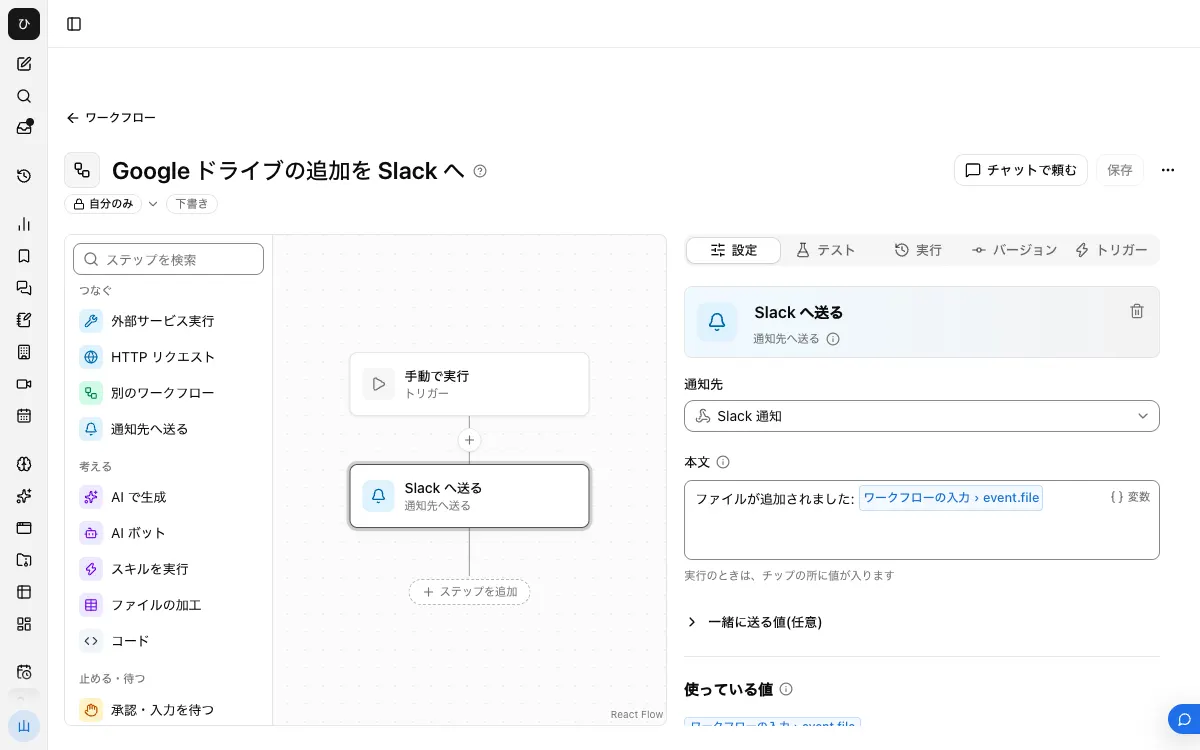
When finished, the workflow looks like this.
1. Register the destination
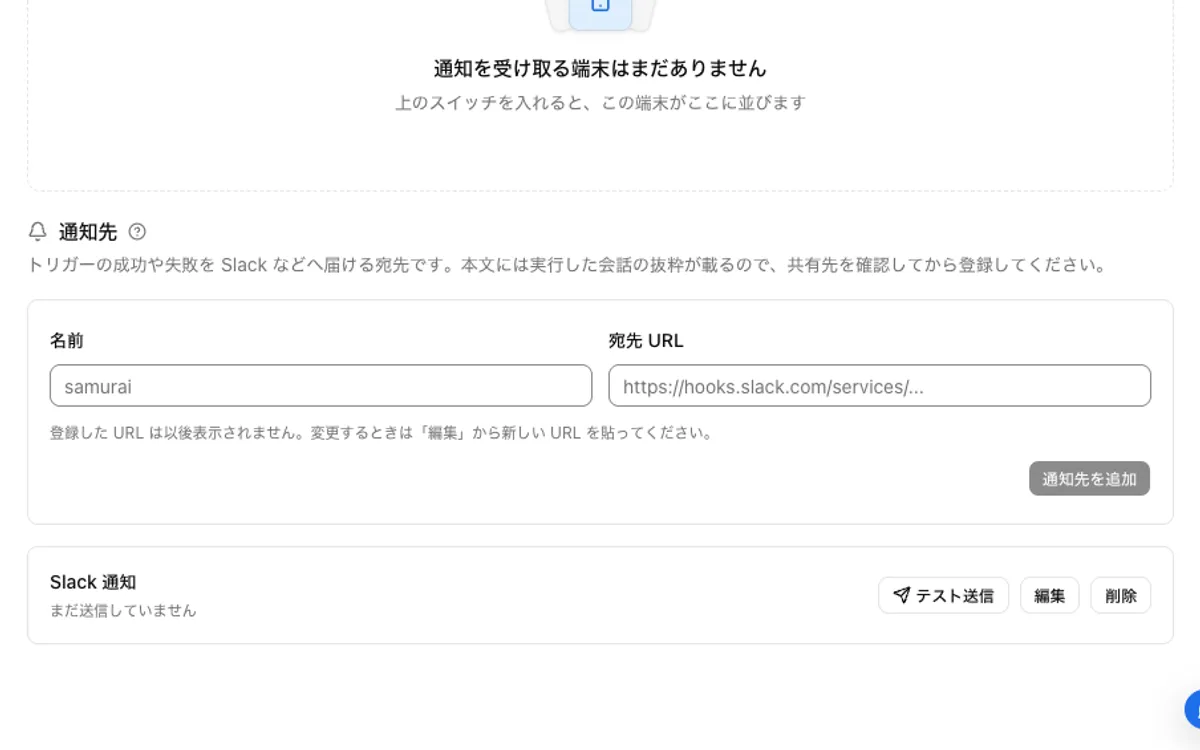
In your Slack app settings, enable "Incoming Webhooks," choose a channel from "Add New Webhook to Workspace," and create the URL. In Samurai App, register a name and the URL under "Destinations" in "Settings" > "Notifications," and check it with "Send test."
2. Connect Google Drive
On the "Connectors" tab of the "Connectors" screen, press "Add" for Google Drive, choose "Add with the standard app," and sign in.
3. Note the folder ID
When you open the folder in a browser, the ID appears after folders/ in the URL.
4. Create and publish the workflow
From "Create" in "Workflows," choose "New." With no step selected, in "Workflow input" under "Settings," press "Add input field," set the name to event, and set the type to "Group of fields."
Place a "Send to destination" step, choose the destination, and for "Body," write only the following line at first.
A file was added: {{input.event.file}}
The file's information goes into the body as a whole, in JSON form. After checking the actual fields in step 7, rewrite it to be easier to read.
After "Save," press "Publish version N" on the "Versions" tab.
5. Attach the service integration
Press "Add service integration" on the "Triggers" tab. Under "Which service to watch," choose the Google Drive connection, and under "When to run," choose "File Created."
Enter the following in "Filters" and register it.
folder_id: the ID from step 3query:mimeType != 'application/vnd.google-apps.folder'(to exclude folder creation)
6. Add a file and check
Upload a new file to the folder and wait about 15 minutes. If a "Started by event" row appears in "Recent runs" on the "Runs" tab and the message arrives in Slack, it is working.
7. Make the body easier to read
Open the row in "Recent runs" and check the field names of file in the input. For example, if name is present, rewrite it like this.
A file was added: {{input.event.file.name}}
For other fields, such as a link to the file, write only the fields that actually appear here. If you write a field that does not arrive, the step fails rather than leaving a blank in the body. After rewriting, "Save" and publish again.
Examples of narrowing
query is a Google Drive API search query. Join conditions with and.
| What to narrow to | Search query |
|---|---|
| Directly under a specific folder, excluding trash | 'folder ID' in parents and trashed = false |
| Name contains "invoice" | name contains 'invoice' |
| PDFs only | mimeType = 'application/pdf' |
| Everything except folders | mimeType != 'application/vnd.google-apps.folder' |
"New File Matching Query" has no folder_id field, so specify the folder with an in parents search query.
When it does not work
It does not trigger for files in a shared drive
Use "New File Matching Query," and set corpora to drive and driveId to the shared drive's ID. Also turn on includeItemsFromAllDrives and supportsAllDrives. Google's documentation also says these two settings are required when searching folders in a shared drive.
The search query cannot be registered, or it does not trigger
Enclose strings in single quotes. Check that you have not used full-width quotation marks or written the folder name instead of its ID. It also does not trigger if the connected Google account cannot read the folder.
Files in subfolders are not notified
'ID' in parents specifies files whose parent is that folder. To watch each level, add a registration per folder, or add the parent folders to the search query with or.
The run fails with "No value for $ref '...'"
A field written in the body is not in the content that arrived. As in step 7, check the actual field names in the input in "Recent runs."
Frequently asked questions
Can it notify instantly?
Service integrations work by checking periodically, so there is a delay of up to 15 minutes.
Can the file's contents also be posted to Slack?
You can set it up so a "Generate with AI" or "AI bot" step creates a summary and puts it in the body. In that case a model is called, so usage fees apply. Also check beforehand that everyone in the channel will see it.
Related guides
- Notify Slack of Google Sheets updates
- Notify Slack of incoming Gmail
- Notify Slack of Google Forms responses