A shared spreadsheet doesn't notify anyone when someone adds to it. With a deal ledger or a list of requests, you might not notice an update until the next day.
"Update", though, can mean a row being added, a specific row changing, or something changing within a range, and each calls for a different event. This article explains how to choose and how to send to Slack.
Summary
Connect Google Sheets to a Samurai App workflow with a "service integration", and start it with one of the events below. All of them work by checking the connected service periodically, so it can take up to 15 minutes before the workflow starts.
| What you want to know | Event | What you specify |
|---|---|---|
| A row was added | "New Rows in Google Sheet" (GOOGLESHEETS_NEW_ROWS_TRIGGER) |
Spreadsheet ID, sheet name, the row to start watching from |
| One specific row changed | "Spreadsheet Row Changed" (GOOGLESHEETS_SPREADSHEET_ROW_CHANGED_TRIGGER) |
Spreadsheet ID, the text that identifies the row, the range to search |
| Values in a set range changed | "Cell Range Values Changed" (GOOGLESHEETS_CELL_RANGE_VALUES_CHANGED_TRIGGER) |
Spreadsheet ID, range |
For most work, "New Rows" is the one you'll use. The sending step only needs "Send to notification target", and no model is called.
What it can and can't do
- "Notify about just that row whenever any row changes" can't be built from a single event. "Spreadsheet Row Changed" watches the one row that has a cell exactly matching
query. You'd use it to watch, say, the row for "Deal A-102" - Range watching doesn't tell you which cell changed. What arrives from "Cell Range Values Changed" is
previous_valuesfrom before the change andcurrent_valuesfrom after. A wide range also makes the message long, so narrow it to the columns you care about - "Spreadsheet Row Changed" also fires on additions and deletions. It arrives with
change_typeset to one ofcreated,updated, ordeleted - Column headers don't arrive.
row_datafrom "New Rows" is a list of the row's values - Each event received costs about ¥0.5. You can have up to 20 service integrations enabled
What you need
- A Google account that can read the spreadsheet you want notifications for
- A Slack Incoming Webhook URL for the channel to post to
- Manager or higher permission in Samurai App (needed to add a service integration to a workflow)
Steps
When you're done, the workflow looks like this.
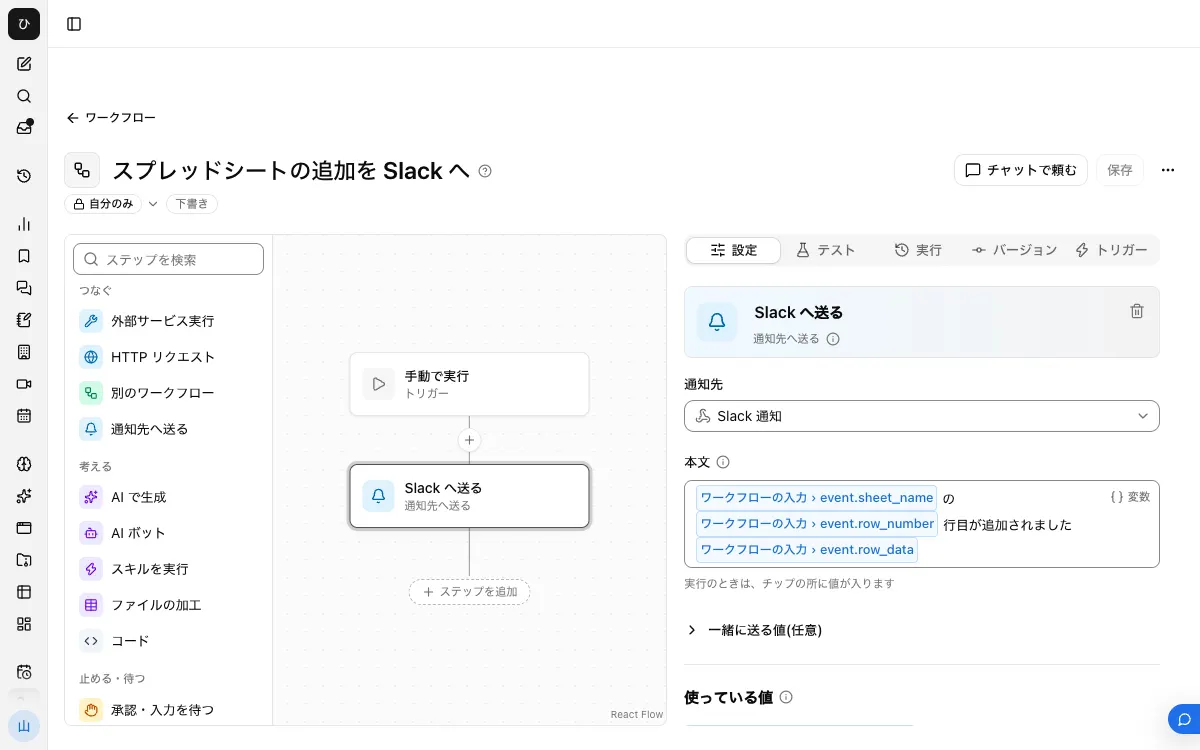
This example notifies on new rows.
1. Register the notification target
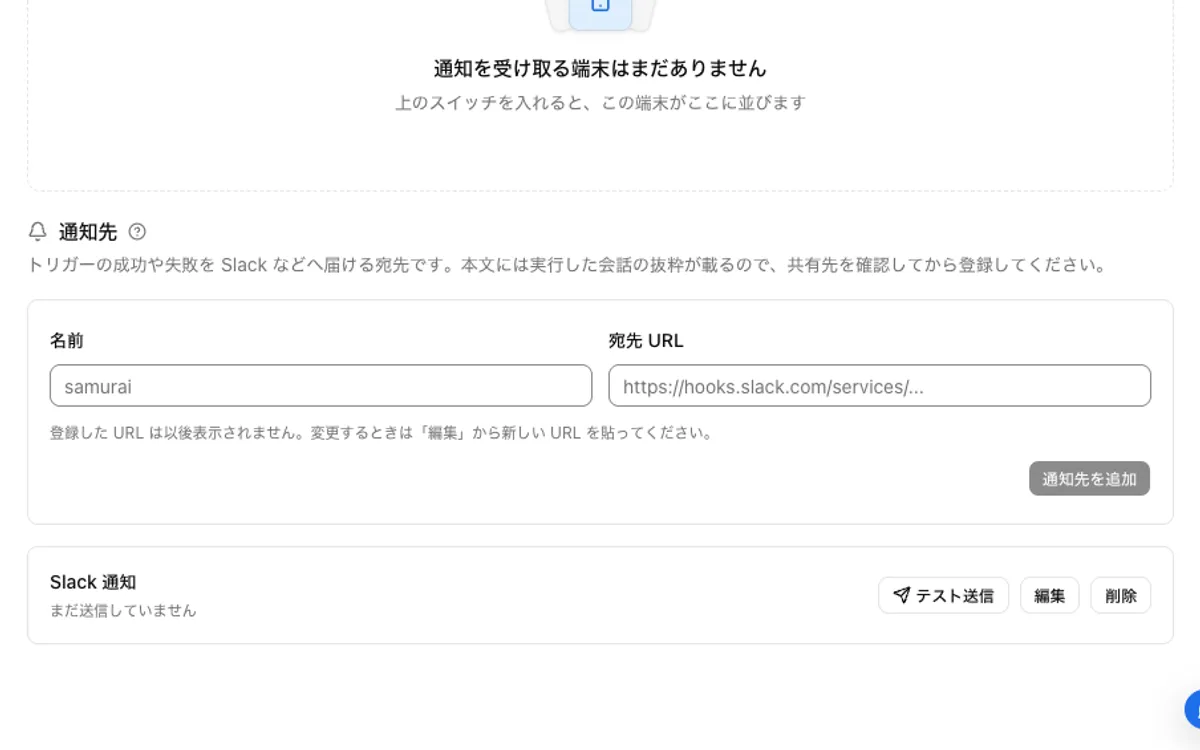
In your Slack app settings, enable "Incoming Webhooks", then use "Add New Webhook to Workspace" to pick a channel and create a URL. In Samurai App, register a name and the URL under "Notification targets" in "Settings" > "Notifications", and check it with "Send test".
2. Connect Google Sheets
On the "Connectors" tab of the "Connectors" screen, press "Add" for Google Sheets, choose "Add with standard integration app", and sign in.
3. Note the spreadsheet ID
The string between /d/ and /edit in the spreadsheet's URL is the ID.
4. Build and publish the workflow
From "Create" in "Workflows", choose "New". With no step selected, go to "Workflow inputs" under "Settings", press "Add input field", name it event, and set its type to "Group of fields".
Place a "Send to notification target" step, choose the notification target, and write the following in "Body".
Row {{input.event.row_number}} was added to {{input.event.sheet_name}}
{{input.event.row_data}}
row_data goes into the body in JSON form, like ["A-102","Yamada","Won"].
After "Save", press "Publish version N" on the "Versions" tab.
5. Add the service integration
On the "Triggers" tab, press "Add service integration". Under "Which service to watch", choose the Google Sheets connection, and under "When to run", choose "New Rows in Google Sheet".
Enter the following under "Filter" and register it.
spreadsheet_id: the ID from step 3sheet_name: the name of the sheet to watchstart_row: 2 if you have one header row
6. Add a row and check
Add one row and wait about 15 minutes. You're done when a "Started by event" row appears under "Recent runs" on the "Runs" tab and the message arrives in Slack. Open the row to see the input that actually arrived.
Send only certain columns in a readable form
You can refer to columns by position. {{input.event.row_data.0}} is the first column and {{input.event.row_data.1}} is the second.
However, Google's Sheets API leaves empty cells at the end of a row out of the read result. For a row that arrives that way, a body that refers by number to a trailing column that was empty fails with "No value for $ref '…'". Refer by number only to columns that are always filled, and when you include columns that can be empty, add a "Code" step in between.
Pass input.event.row_data as row under "Values to pass", and write the following.
const [id, owner, status, memo] = inputs.row;
return `Deal: ${id ?? ""}\nOwner: ${owner ?? ""}\nStatus: ${status ?? ""}\nNote: ${memo ?? ""}`;
When it doesn't work
Adding a row doesn't start it
First, wait 15 minutes. If it still doesn't start, check that you didn't put the whole URL in spreadsheet_id, and that sheet_name is spelled the same as the sheet's tab. An unpublished version doesn't start.
"Spreadsheet Row Changed" doesn't run
query is a value that must exactly match a cell's entire contents. Partial matches aren't found. Write range in the form Sheet1!A:Z. A sheet name alone can't be used, and if the name contains spaces, wrap it in single quotes like 'My Sheet'!A:Z.
The range for "Cell Range Values Changed" fails
range uses the same format. If the sheet name has spaces or symbols, wrap it in single quotes.
Pasting many rows at once increased notifications and costs
Events arrive one row at a time. If your team sometimes pastes a large number of rows at once, try it first with a few rows and check how many events arrive.
FAQ
Can I notify only for certain values?
Yes. Put a "Branch on condition" step before "Send to notification target". Note that the cost is incurred when the event arrives, so stopping it with a condition doesn't reduce it.
Can I get notified right after editing a cell?
Service integrations work by checking periodically, so there's a delay of up to 15 minutes.
Does this work for Google Forms response sheets?
Yes. Responses are added as rows, so "New Rows" can receive them. Ways to avoid the delay are compared in the Google Forms article.
Related guides
- Send Google Forms responses to Slack
- Send Slack notifications for new files in Google Drive
- Send Typeform responses to Slack